





Wonka88
Members
-
Joined
-
Last visited
Everything posted by Wonka88
-
I have a weekly scheduled script to delete dangling images. I have also pruned unused volumes, and 20 other things suggested by Reddit and ChatGPT.
-
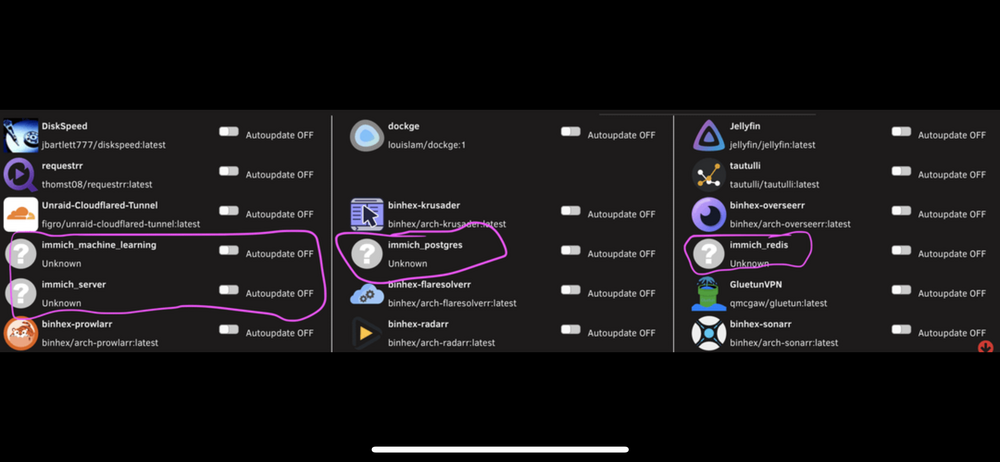
I have a bit of an issue going on. I’m not sure if it’s this plugin, or just that the plugin is seeing a different problem. I had immich installed via compose. It was a stack. I deleted the stack. I also cleared out the app data folders associated with it. But every day when I get the discord notification from the auto update plugin, it has these immich containers needing to be updated. These containers have been deleted. Any idea how to fix?
-
Are we supposed to reinstall the drivers plugin after we get the gui back? should I replace the onboard nic with something over PCIe?
-
Same for me too.
-
Whenever the container restarts, updates, or the system restarts, the app won’t open afterwards. the webui wont lost at all. I typically have to fiddle with the setting a few time and randomly the container starts working again. This is with PIA. The same issue happens with the qbit-vpn container.
-
Just updated Plex on Unraid, now Plex is borked I'm running binhex-plexpass. Unraid did an update and now whenever I launch the webUI, I get a "failed to open page" error. The client apps can't see the server either. What can I do? I'm a relative novice with docker and Unraid. Any assistance would be awesome checked the logs: the following is in red. Error: Unable to set up server: sqlite3\_statement\_backend::loadOne: database or disk is full (N4soci10soci\_errorE)
-
Earlier today I loaded the Unraid webgui and updated some plugins and containers. Then I started a transfer from an external hard drive using the unassigned devices plugin. The drive was USB 2 so it took a couple hours. I did the transfer using binhex-krusader. During the transfer (and now as well) the web gui for Unraid stopped working. I get a login screen, and then just a white screen. However all container web interfaces work fine (Plex, sonarr, etc) How can I get my webgui back? I have truly tried googling for the last hour but nothing seems to match what I am going through. thanks
-
I can get everything to work. I can access all my docker apps, my shares from the files app on my iPhone or iPad, but I cannot for the life of me connect to the unraid UI what am I missing?
