





CatchaFlight
Members
-
Joined
-
Last visited
-
Sorry I meant the rough ballpark for the restart was at 13:30 if skimming through the logs quickly. I will run the memtest tonight and post results.
-
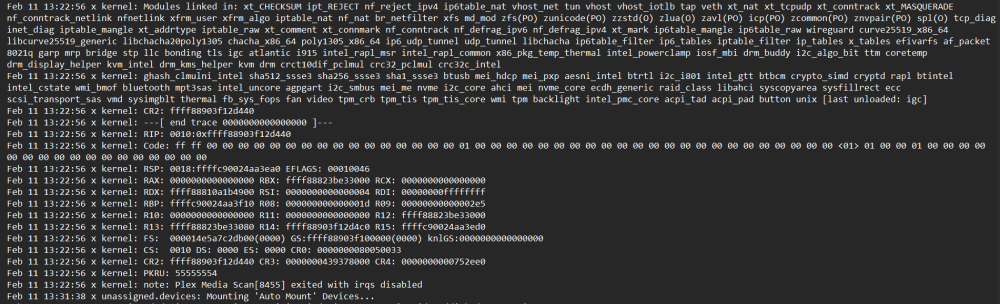
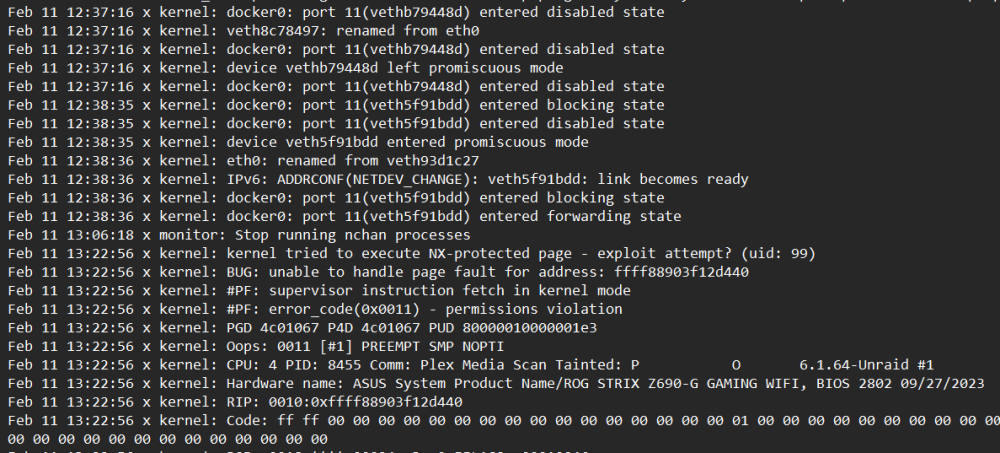
I'm still having random and crashes and cannot understand the logs. Could someone please help me? I had the latest restart at 13:30 02/11. I attached pics of what my logs show happening right before my reboot in the spoilers for a quick view. I don't understand why docker0 ports enter disabled states and what the "exploit attempts?" mean. Ipv6 is disabled in the system and shouldn't even be showing. I also attached the latest diagnostics file.
-
I'm having an issue where everything on unraid becomes inaccessible. I cannot log into the dashboard, shares, or any docker apps. I have to manually shut down the power and restart in order to do anything on it. Its starting to happen a couple times a week and I cannot figure out what is going on. Could someone help me go over the logs and diagnostics? In the logs: On Jan. 30, I restarted it at 00:27 On Feb. 2, I restarted it again at 10:58

