





Kypaon
Members
-
Joined
-
Last visited
-
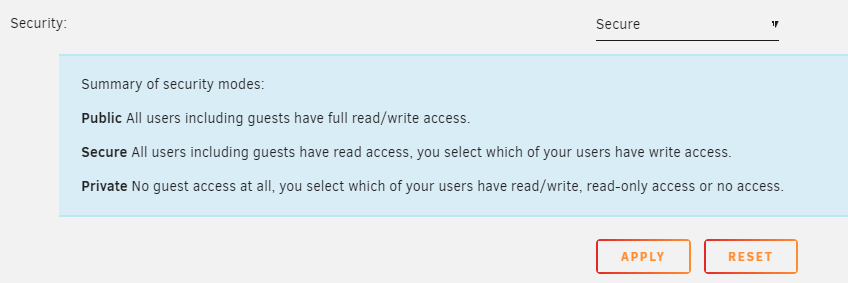
Resolved my own question. Putting the answer here in case someone else encounters the same issue. Security for the share was set to "Secure" which despite the name actually enables read-only access to anyone on the network... Updating to Private resolved the issue. I would argue that "Secure" is a poor word choice and an even poorer default option for a share. I'd also argue having the option names be "Public R/W", "Public RO", and "Private" would have been more intuitive. Also the reason the Mac was able to auto detect the drive was because Export was set to Yes. I'm still a bit confused why Android and Windows didn't mount the folder as read-only the same way the Macbook.

-
I live in a shared apartment and the other night one of my housemates told me that my network drive "just popped up" on their Macbook and they were able to access all of my files. Immediately concerned by this I went to Unraid 's user page, reset the admin and user password, and rebooted the server. This resulted in my Windows and Android devices needing to be remounted w/ the new password. I poked my housemate this morning to see if they still had access and they texted a picture of one of the photos stored on the NAS. I went to the syslogs and see an access denied log for the exact file they just showed me! ``` Feb 4 13:08:44 Keep smbd[23202]: smbd_calculate_access_mask_fsp: Access denied on file photos/*.jpg: rejected by share access mask[0x001F00A9] orig[0x00100180] mapped[0x00100180] reject[0x00000100] ``` Is this a configuration issue on my end? Or some bizarre vulnerability with how Macbooks can access SMB network drives? Currently running UNRAID v.6.12.2
-
Kypaon joined the community
-
I live in a shared apartment and the other night one of my housemates told me that my network drive "just popped up" on their Macbook and they were able to access all of my files. Immediately concerned by this I went to Unraid 's user page, reset the admin and user password, and rebooted the server. This resulted in my Windows and Android devices needing to be remounted w/ the new password. I poked my housemate this morning to see if they still had access and they texted a picture of one of the photos stored on the NAS. I went to the syslogs and see an access denied log for the exact file they just showed me! ``` Feb 4 13:08:44 Keep smbd[23202]: smbd_calculate_access_mask_fsp: Access denied on file photos/*.jpg: rejected by share access mask[0x001F00A9] orig[0x00100180] mapped[0x00100180] reject[0x00000100] ``` Is this a configuration issue on my end? Or some bizarre vulnerability with how Macbooks can access SMB network drives? Currently running UNRAID v.6.12.2
