




Skip to content
View in the app

A better way to browse. Learn more.

Unraid

A full-screen app on your home screen with push notifications, badges and more.

To install this app on iOS and iPadOS
  1. Tap the Share icon in Safari
  2. Scroll the menu and tap Add to Home Screen.
  3. Tap Add in the top-right corner.
To install this app on Android
  1. Tap the 3-dot menu (⋮) in the top-right corner of the browser.
  2. Tap Add to Home screen or Install app.
  3. Confirm by tapping Install.

Suspect

Members
  • Joined

  • Last visited

  1. @alturismo Well suddenly it started tonight and on github i found a topic related to this problem. Only problem now it gives me the error with: No Internet!!! What can this be? My unraid got internet so this is really weird. Btw still dont got a cron. I started the command '/bin/bash /app/update.sh' to force webgrabplus to update... but webgrabplus isnt making a cron...
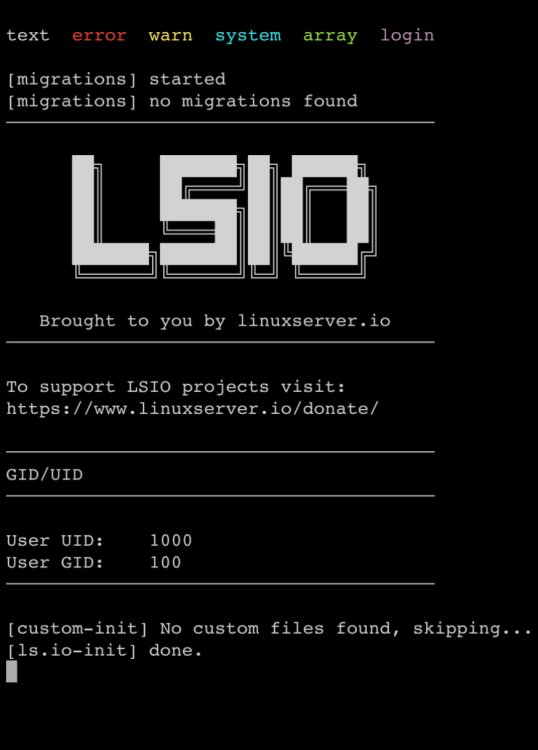
  2. Hello all, I got an odd problem. My webgrabplus doenst start. what I have done. - Is changing the MAC adress to the adress where unraid is running on. - removing the mac adress parameter everything starts up but nothing is happing not even a log file. This is my log screen. hope you guys can help. Thanks in advance!
Account

Navigation

Search

Search

Configure browser push notifications

Chrome (Android)
  1. Tap the lock icon next to the address bar.
  2. Tap Permissions → Notifications.
  3. Adjust your preference.
Chrome (Desktop)
  1. Click the padlock icon in the address bar.
  2. Select Site settings.
  3. Find Notifications and adjust your preference.