AirBud
Members
-
Joined
-
Last visited
-
I've finally fixed this problem. I'm not exactly sure of the details but my cache pool had a corrupted btrfs. I found the issue after disabling the cache pool and trying to run the things that were breaking. To fix it all I had to do was reformat the SSD I use for the cache pool, format it as something else, then reformat back to btrfs.
-
Awesome. Managed to get diagnostics out of it. hamraid-diagnostics-20240216-1939.zip
-
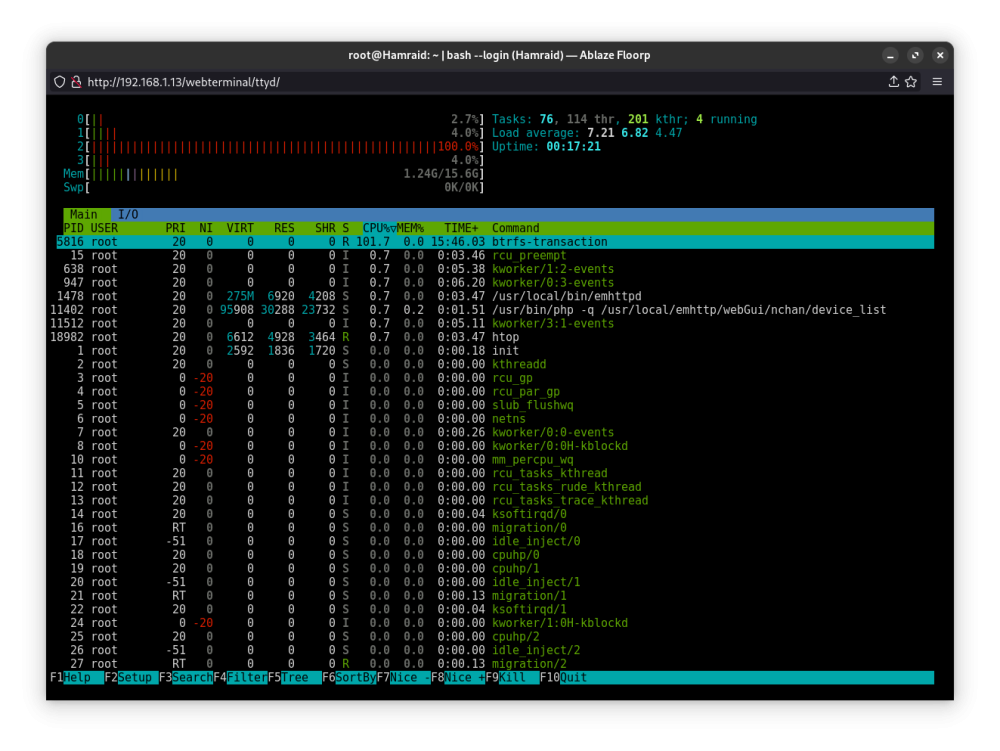
Hi Unraid community. I've been using unraid for my home server for a few months now. I was using Linux Mint with docker installed before, didn't know what I was missing, absolutely love Unraid! BUT. I've run into a very weird problem. I'm not majorly literate in Linux, or command lines so I've gotten very stuck. The problem: My Unraid server will run for a few hours just fine, but after that the GUI and docker will stop responding. Or after performing any routine action, like spinning stopping the array, or updating a docker container, or exporting the diagnostics logs, the gui crashes and docker stops working. My array is still working, samba is working, and I can still use the remote terminal and run commands like htop (see screenshot). Some things I've tried to fix the problem: Check HTOP, found the CPU was constantly being pinned at 100% on at least one core. (this would be for hours and always the btfrs-transaction process) Delete all docker containers, reinstalling them one-by-one to see if there's an error in a docker container. But even with docker disabled the problem persists. Booting in GUI mode and running diagnostics. The command hangs at "Starting diagnostics collection..." for hours. Restarting the array (the GUI crushes before stopping the array) To replicate the issue: I boot my unraid, which has docker disabled and it'll automatically spin up my 2 HDD and 1 SSD array. Do one of any of the following through the browser GUI: stop array, start docker, restart or shut down server. Wait 30 seconds and the GUI will be no longer responsive and trying to reach it will result in a timed out page. (If I'm connected to the terminal I can see that HTOP still shows CPU usage and commands can be inputted and used.) I'm at the point now that I believe the btrfs-transaction command is causing all this strange behaviour. But after doing research online I've not found any solution or even hints as to what this is and how to fix it. Does anyone have any idea of how to tackle this issue? On the other hand, I'm more than happy to create a fresh install of unraid on my flash, but can I be sure that the data on my arrays are going to stay with fresh unraid install? After trying again for the diagnostics and letting it run from boot, I would find nothing in the flash drive.