





FastAd
Members
-
Joined
-
Last visited
Everything posted by FastAd
-
I'm still having issues with this. Oct 17 12:29:02 Chaos kernel: I/O error, dev loop2, sector 6615312 op 0x0:(READ) flags 0x0 phys_seg 1 prio class 2 Oct 17 12:29:02 Chaos kernel: BTRFS error (device loop2: state EA): bdev /dev/loop2 errs: wr 72, rd 208, flush 0, corrupt 0, gen 0 I've tried replacing cables and also swapped the cables and power with another working drive but still have the errors occur. The only thing running on this drive is my docker. It works fine at startup and seems to start getting errors after a day or two. Starting to think it's maybe a bad drive. Is there any other tests I can do? chaos-diagnostics-20251017-1310.zip
-
Rebooted and its back to normal. Thank you.
-
Noticed my docker was down and have a lot of drive errors in system log. Getting the following in system logs:- Sep 29 15:28:03 Chaos kernel: I/O error, dev loop3, sector 77856 op 0x0:(READ) flags 0x1000 phys_seg 4 prio class 2 Sep 29 15:28:03 Chaos kernel: BTRFS error (device loop3): bdev /dev/loop3 errs: wr 0, rd 1001, flush 0, corrupt 0, gen 0 What can I do to recover this? chaos-diagnostics-20250929-1528.zip
-
Everything is looking back to normal after folders renamed and moved. Thank you for your help!
-
So if I manually rename the folders and move them into the base directory of the drive will unraid fix the links automatically to the folders or do I need to run a command? I guess I won't need to run a parity check after renaming the folders manually?
-
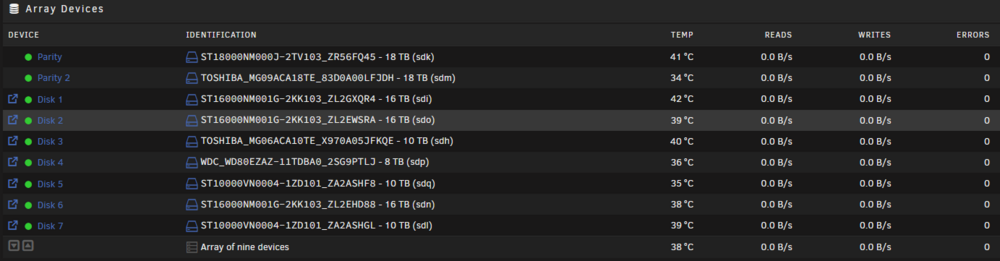
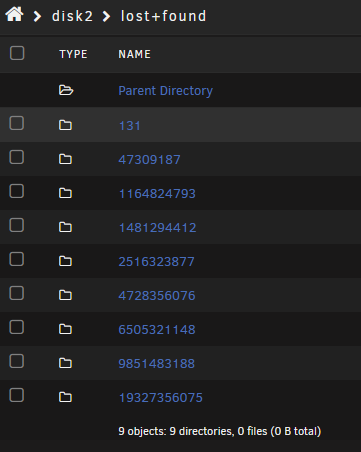
The rebuild completed before I ran the filesystem check. The filesystem check on disk 2 and 6 found errors and fixed them. All files on disk 2 and 6 are in a lost + found folder, the folder names in the drive have been changed to numbers as below but the correct data is in the folders. Do I need to run a parity check to restore the folder names on the disks to the correct folder names (the data inside the folders looks correct) or has my parity been ruined because of the rebuild done with the filesystem errors?
-
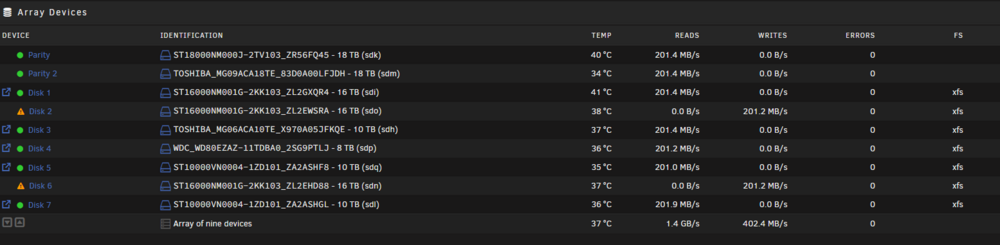
Checked and moved some cables around, sys log looks clear at the moment. Array started and currently re-building. New diag attached. chaos-diagnostics-20250610-1934.zip
-
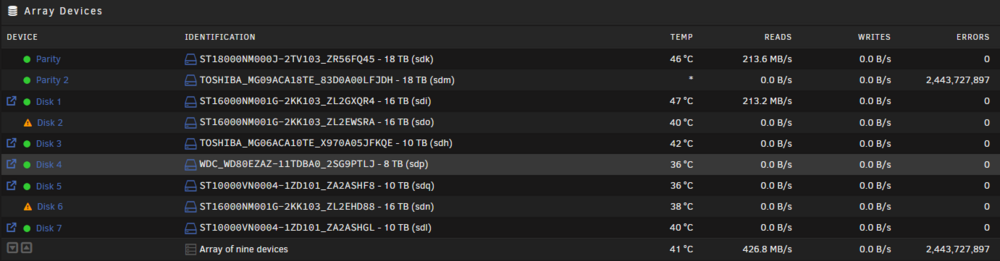
I've had a few errors with drives recently and trying to solve the problem. I've swapped out one drive with a new one and tested it in another system and its reported Ok on a long test so I believe its not a drive problem. After the server booted up fine, array seemed to take a while to start, Disk 2 was a new disk and Disk 6 was removed and re added. After I started the rebuild it looked like it was going ok and writing to the 2 disks, I've checked now and I have lots of errors on the parity2 drive and it just seems to be reading the disks. I have switched sata cables and the problems seems to stay with disk 2 and disk 6 so I want to try different power connectors next. Whats the best way to handle the rebuild with all the errors going on? Is there a way to rule out a bad controller? I guess that would effect all drives on the same controller if it was a controller issue though. Thanks chaos-diagnostics-20250610-1439.zip
-
What is the best way to add these drives back as one is parity and one is data? Is it best to rebuild the parity drive first or do both at the same time?
-
Diagnostics attached chaos-diagnostics-20250320-1856.zip
-
A few days ago a drive had some errors and got disabled. I have done a SMART test and the drive looks to report okay. Now today I have had another drive get disabled with errors. These are both on the same controller card (LSI SAS 9207-8i) so I think it is a problem with the card rather than the drives. Looking things up I've read they can overheat and cause issues so I have now added a 40mm fan to the heat sink of the card. One of the drives is a data drive and the other is a parity drive (running 2 Parity, 7 data drives). Whats the safest way to try and recover these drives? System log of the drives and smart results attached. Mar 17 17:19:28 Chaos kernel: mpt2sas_cm0: log_info(0x31110d00): originator(PL), code(0x11), sub_code(0x0d00) Mar 17 17:19:28 Chaos kernel: sd 4:0:5:0: [sdq] tag#3181 UNKNOWN(0x2003) Result: hostbyte=0x00 driverbyte=DRIVER_OK cmd_age=4s Mar 17 17:19:28 Chaos kernel: sd 4:0:5:0: [sdq] tag#3181 Sense Key : 0x2 [current] Mar 17 17:19:28 Chaos kernel: sd 4:0:5:0: [sdq] tag#3181 ASC=0x4 ASCQ=0x0 Mar 17 17:19:28 Chaos kernel: sd 4:0:5:0: [sdq] tag#3181 CDB: opcode=0x88 88 00 00 00 00 01 a5 a1 52 a0 00 00 00 18 00 00 Mar 17 17:19:28 Chaos kernel: I/O error, dev sdq, sector 7073780384 op 0x0:(READ) flags 0x0 phys_seg 3 prio class 0 Mar 17 17:19:28 Chaos kernel: md: disk6 read error, sector=7073780320 Mar 17 17:19:28 Chaos kernel: md: disk6 read error, sector=7073780328 Mar 17 17:19:28 Chaos kernel: md: disk6 read error, sector=7073780336 Mar 17 17:19:30 Chaos kernel: sd 4:0:5:0: [sdq] tag#3186 UNKNOWN(0x2003) Result: hostbyte=0x00 driverbyte=DRIVER_OK cmd_age=0s Mar 17 17:19:30 Chaos kernel: sd 4:0:5:0: [sdq] tag#3186 Sense Key : 0x2 [current] Mar 17 17:19:30 Chaos kernel: sd 4:0:5:0: [sdq] tag#3186 ASC=0x4 ASCQ=0x0 Mar 17 17:19:30 Chaos kernel: sd 4:0:5:0: [sdq] tag#3186 CDB: opcode=0x8a 8a 00 00 00 00 01 a5 a1 52 a0 00 00 00 18 00 00 Mar 17 17:19:30 Chaos kernel: I/O error, dev sdq, sector 7073780384 op 0x1:(WRITE) flags 0x0 phys_seg 3 prio class 0 Mar 17 17:19:30 Chaos kernel: md: disk6 write error, sector=7073780320 Mar 17 17:19:30 Chaos kernel: md: disk6 write error, sector=7073780328 Mar 17 17:19:30 Chaos kernel: md: disk6 write error, sector=7073780336 Mar 17 22:01:27 Chaos kernel: DMAR: DRHD: handling fault status reg 2 Mar 17 22:01:28 Chaos kernel: DMAR: [DMA Write NO_PASID] Request device [00:02.0] fault addr 0xffffb80223fc4000 [fault reason 0x07] Next page table ptr is invalid Mar 17 22:01:28 Chaos kernel: DMAR: DRHD: handling fault status reg 3 Mar 17 22:01:28 Chaos kernel: DMAR: [DMA Read NO_PASID] Request device [00:02.0] fault addr 0xffffb80223e24000 [fault reason 0x07] Next page table ptr is invalid Mar 17 22:01:28 Chaos kernel: DMAR: DRHD: handling fault status reg 3 Mar 17 22:01:28 Chaos kernel: DMAR: [DMA Read NO_PASID] Request device [00:02.0] fault addr 0xffffb80223e2f000 [fault reason 0x07] Next page table ptr is invalid Mar 17 22:01:28 Chaos kernel: DMAR: DRHD: handling fault status reg 2 Mar 20 11:18:01 Chaos kernel: sd 4:0:7:0: device_block, handle(0x0010) Mar 20 11:18:02 Chaos kernel: mpt2sas_cm0: log_info(0x31110d00): originator(PL), code(0x11), sub_code(0x0d00) Mar 20 11:18:03 Chaos kernel: sd 4:0:7:0: device_unblock and setting to running, handle(0x0010) Mar 20 11:18:03 Chaos kernel: md: disk29 read error, sector=6994635184 Mar 20 11:18:03 Chaos kernel: md: disk29 read error, sector=6994635192 Mar 20 11:18:03 Chaos kernel: md: disk29 read error, sector=6994635200 Mar 20 11:18:03 Chaos kernel: md: disk29 read error, sector=6994635208 Mar 20 11:18:03 Chaos kernel: md: disk29 read error, sector=6994635216 Mar 20 11:18:03 Chaos kernel: md: disk29 read error, sector=6994635224 Mar 20 11:18:03 Chaos kernel: md: disk29 read error, sector=6994635232 Mar 20 11:18:03 Chaos kernel: md: disk29 read error, sector=6994635240 Mar 20 11:18:03 Chaos kernel: unraidd6: attempt to access beyond end of device Mar 20 11:18:03 Chaos kernel: sds: rw=1, sector=6994635248, nr_sectors = 8 limit=0 Mar 20 11:18:03 Chaos kernel: md: disk29 write error, sector=6994635184 Mar 20 11:18:03 Chaos kernel: unraidd6: attempt to access beyond end of device Mar 20 11:18:03 Chaos kernel: sds: rw=1, sector=6994635256, nr_sectors = 8 limit=0 Mar 20 11:18:03 Chaos kernel: md: disk29 write error, sector=6994635192 Mar 20 11:18:03 Chaos kernel: unraidd6: attempt to access beyond end of device Mar 20 11:18:03 Chaos kernel: sds: rw=1, sector=6994635264, nr_sectors = 8 limit=0 Mar 20 11:18:03 Chaos kernel: md: disk29 write error, sector=6994635200 Mar 20 11:18:03 Chaos kernel: unraidd6: attempt to access beyond end of device Mar 20 11:18:03 Chaos kernel: sds: rw=1, sector=6994635272, nr_sectors = 8 limit=0 Mar 20 11:18:03 Chaos kernel: md: disk29 write error, sector=6994635208 Mar 20 11:18:03 Chaos kernel: unraidd6: attempt to access beyond end of device Mar 20 11:18:03 Chaos kernel: sds: rw=1, sector=6994635280, nr_sectors = 8 limit=0 Mar 20 11:18:03 Chaos kernel: md: disk29 write error, sector=6994635216 Mar 20 11:18:03 Chaos kernel: unraidd6: attempt to access beyond end of device Mar 20 11:18:03 Chaos kernel: sds: rw=1, sector=6994635288, nr_sectors = 8 limit=0 Mar 20 11:18:03 Chaos kernel: md: disk29 write error, sector=6994635224 Mar 20 11:18:03 Chaos kernel: unraidd6: attempt to access beyond end of device Mar 20 11:18:03 Chaos kernel: sds: rw=1, sector=6994635296, nr_sectors = 8 limit=0 Mar 20 11:18:03 Chaos kernel: md: disk29 write error, sector=6994635232 Mar 20 11:18:03 Chaos kernel: unraidd6: attempt to access beyond end of device Mar 20 11:18:03 Chaos kernel: sds: rw=1, sector=6994635304, nr_sectors = 8 limit=0 Mar 20 11:18:03 Chaos kernel: md: disk29 write error, sector=6994635240 Mar 20 11:18:03 Chaos kernel: sd 4:0:7:0: [sds] Synchronizing SCSI cache Mar 20 11:18:03 Chaos kernel: sd 4:0:7:0: [sds] Synchronize Cache(10) failed: Result: hostbyte=0x01 driverbyte=DRIVER_OK Mar 20 11:18:03 Chaos kernel: mpt2sas_cm0: mpt3sas_transport_port_remove: removed: sas_addr(0x4433221107000000) Mar 20 11:18:03 Chaos kernel: mpt2sas_cm0: removing handle(0x0010), sas_addr(0x4433221107000000) Mar 20 11:18:03 Chaos kernel: mpt2sas_cm0: enclosure logical id(0x500605b006a8c290), slot(4) Mar 20 11:18:05 Chaos emhttpd: offline: TOSHIBA_MG09ACA18TE_83D0A00LFJDH (sds) 512 35156656128 Mar 20 11:18:14 Chaos kernel: mpt2sas_cm0: handle(0x10) sas_address(0x4433221107000000) port_type(0x1) Mar 20 11:18:14 Chaos kernel: scsi 4:0:8:0: Direct-Access ATA TOSHIBA MG09ACA1 0105 PQ: 0 ANSI: 6 Mar 20 11:18:14 Chaos kernel: scsi 4:0:8:0: SATA: handle(0x0010), sas_addr(0x4433221107000000), phy(7), device_name(0x0000000000000000) Mar 20 11:18:14 Chaos kernel: scsi 4:0:8:0: enclosure logical id (0x500605b006a8c290), slot(4) Mar 20 11:18:14 Chaos kernel: scsi 4:0:8:0: atapi(n), ncq(y), asyn_notify(n), smart(y), fua(y), sw_preserve(y) Mar 20 11:18:14 Chaos kernel: scsi 4:0:8:0: qdepth(32), tagged(1), scsi_level(7), cmd_que(1) Mar 20 11:18:14 Chaos kernel: sd 4:0:8:0: Attached scsi generic sg18 type 0 Mar 20 11:18:14 Chaos kernel: end_device-4:8: add: handle(0x0010), sas_addr(0x4433221107000000) Mar 20 11:18:14 Chaos kernel: sd 4:0:8:0: Power-on or device reset occurred Mar 20 11:18:14 Chaos kernel: sd 4:0:8:0: [sdt] 35156656128 512-byte logical blocks: (18.0 TB/16.4 TiB) Mar 20 11:18:14 Chaos kernel: sd 4:0:8:0: [sdt] 4096-byte physical blocks Mar 20 11:18:14 Chaos kernel: sd 4:0:8:0: [sdt] Write Protect is off Mar 20 11:18:14 Chaos kernel: sd 4:0:8:0: [sdt] Mode Sense: 7f 00 10 08 Mar 20 11:18:14 Chaos kernel: sd 4:0:8:0: [sdt] Write cache: enabled, read cache: enabled, supports DPO and FUA Mar 20 11:18:14 Chaos kernel: sdt: sdt1 Mar 20 11:18:14 Chaos kernel: sd 4:0:8:0: [sdt] Attached SCSI disk Mar 20 11:18:16 Chaos unassigned.devices: Partition '/dev/sdt1' does not have a file system and cannot be mounted. Mar 20 11:18:17 Chaos emhttpd: online: TOSHIBA_MG09ACA18TE_83D0A00LFJDH (sdt) 512 35156656128 Mar 20 11:18:17 Chaos emhttpd: read SMART /dev/sdt chaos-smart-20250320-1604.zip chaos-smart-20250320-1602.zip
-
Ok, new drives are in, new config done. Parity is currently syncing. Looking good so far. Thanks again for your patience and help
-
Oh I see, I thought as it said the contents was emulated it was there. If I'm going to do a new config and write new parity, is it better to add my new 18TB parity drives first then do the new config? On new config do I leave "Preserve current assignments:" to none?
-
If I did new config, it would write new parity data. If the same data drive fails again while writing new parity data won't the data on that drive be lost? Would it be safer to wipe the data disk that failed and is now working and rebuild from the current parity to that disk? Sorry for all the questions but want to make sure I'm doing it right.
-
Can I not use that drive in the array again?
-
How do I add the drive back and rebuild it from parity. Do I need to format it first?
-
Done some things, quite a few of the following:- imap claims a free inode 3524047782 is in use, correcting imap and clearing inode cleared inode 3524047782 and:- clearing inode number in entry at offset 784... XFS_REPAIR Summary Wed Feb 21 16:15:50 2024 Phase Start End Duration Phase 1: 02/21 16:07:45 02/21 16:07:46 1 second Phase 2: 02/21 16:07:46 02/21 16:07:48 2 seconds Phase 3: 02/21 16:07:48 02/21 16:12:04 4 minutes, 16 seconds Phase 4: 02/21 16:12:04 02/21 16:12:04 Phase 5: 02/21 16:12:04 02/21 16:12:04 Phase 6: 02/21 16:12:04 02/21 16:15:22 3 minutes, 18 seconds Phase 7: 02/21 16:15:22 02/21 16:15:22 Total run time: 7 minutes, 37 seconds done I tried to mount the drive in UD and it did mount. Should I try and add the drive back into the array?
-
Tried to mount in UD. Get the error "Device '/dev/sdo' failed to mount. Check the syslog for details." The end of my system log has the follwing :- Feb 21 15:15:00 Chaos unassigned.devices: Mounting partition 'sdo1' at mountpoint '/mnt/disks/2SG9P86N'... Feb 21 15:15:00 Chaos unassigned.devices: Mount cmd: /sbin/mount -t 'xfs' -o rw,relatime '/dev/sdo1' '/mnt/disks/2SG9P86N' Feb 21 15:15:00 Chaos kernel: XFS (sdo1): Mounting V5 Filesystem Feb 21 15:15:00 Chaos kernel: XFS (sdo1): Corruption warning: Metadata has LSN (2:2970628) ahead of current LSN (2:2967213). Please unmount and run xfs_repair (>= v4.3) to resolve. Feb 21 15:15:00 Chaos kernel: XFS (sdo1): Metadata corruption detected at xfs_agf_verify+0x64/0x1e2 [xfs], xfs_agf block 0xfffffff1 Feb 21 15:15:00 Chaos kernel: XFS (sdo1): Unmount and run xfs_repair Feb 21 15:15:00 Chaos kernel: XFS (sdo1): First 128 bytes of corrupted metadata buffer: Feb 21 15:15:00 Chaos kernel: 00000000: 58 41 47 46 00 00 00 01 00 00 00 02 0f ff ff ff XAGF............ Feb 21 15:15:00 Chaos kernel: 00000010: 00 00 00 01 00 00 00 02 00 00 00 00 00 00 00 01 ................ Feb 21 15:15:00 Chaos kernel: 00000020: 00 00 00 01 00 00 00 00 00 00 00 00 00 00 00 03 ................ Feb 21 15:15:00 Chaos kernel: 00000030: 00 00 00 04 04 6c 14 8e 02 d3 73 5f 00 00 00 00 .....l....s_.... Feb 21 15:15:00 Chaos kernel: 00000040: 43 33 50 50 19 85 4e 40 b4 d9 d3 a4 1a 0e 71 82 [email protected]. Feb 21 15:15:00 Chaos kernel: 00000050: 00 00 00 00 00 00 00 00 00 00 00 00 00 00 00 00 ................ Feb 21 15:15:00 Chaos kernel: 00000060: 00 00 00 00 00 00 00 00 00 00 00 00 00 00 00 00 ................ Feb 21 15:15:00 Chaos kernel: 00000070: 00 00 00 00 00 00 00 00 00 00 00 00 00 00 00 00 ................ Feb 21 15:15:00 Chaos kernel: XFS (sdo1): metadata I/O error in "xfs_read_agf+0xd7/0x116 [xfs]" at daddr 0xfffffff1 len 1 error 117 Feb 21 15:15:00 Chaos kernel: XFS (sdo1): Error -117 reserving per-AG metadata reserve pool. Feb 21 15:15:00 Chaos kernel: XFS (sdo1): Corruption of in-memory data (0x8) detected at xfs_fs_reserve_ag_blocks+0xa7/0xb8 [xfs] (fs/xfs/xfs_fsops.c:575). Shutting down filesystem. Feb 21 15:15:00 Chaos kernel: XFS (sdo1): Please unmount the filesystem and rectify the problem(s) Feb 21 15:15:00 Chaos kernel: XFS (sdo1): Ending clean mount Feb 21 15:15:00 Chaos kernel: XFS (sdo1): Error -5 reserving per-AG metadata reserve pool. Feb 21 15:15:01 Chaos unassigned.devices: Mount of 'sdo1' failed: 'mount: /mnt/disks/2SG9P86N: can't read superblock on /dev/sdo1. dmesg(1) may have more information after failed mount system call. ' Feb 21 15:15:01 Chaos unassigned.devices: Partition '2SG9P86N' cannot be mounted.
-
Reading of the disks has stopped. Under disk5 it has the following :- Phase 1 - find and verify superblock... couldn't verify primary superblock - not enough secondary superblocks with matching geometry !!! attempting to find secondary superblock... ....<Lots of dots here>...........Sorry, could not find valid secondary superblock Exiting now. I'm guessing its dead dead. If SMART looked ok do I reformat the drive and rebuild it or is it best to replace it? I've just had 2 new 18TB drives arrive for my parity drive upgrade.
-
File system check is running :- Phase 1 - find and verify superblock... couldn't verify primary superblock - not enough secondary superblocks with matching geometry !!! attempting to find secondary superblock... I guess it runs through the whole disk like a parity check?
-
Yes it is disk5. I've checked all cables and even tried swapping the cables with another drive and the drive is still disabled. I noticed on boot up it was pausing on the bios screen with "Please backup your data and replace your hard disk drive. A failure may be imminent and cause unpredictable fail.". The drive is showing up in the bios also. After starting the array, on disk5 it now says "Unmountable: Unsupported or no file system" chaos-diagnostics-20240220-1046.zip
-
Thanks for your reply trurl. I've attached the diagnostics to this post. chaos-diagnostics-20240219-1523.zip
-
I've just had my first failed drive in Unraid. I have 2 10TB parity drives and 7 data drives. I've been looking to upgrade my parity drives for a larger size recently as I'm nearly at max capacity and now one of my data drives has just failed. I was planning to just replace the 2 parity drives with larger drives and then move the current 10TB parity drives to data drives. Whats the best way to upgrade my parity drives and replace the failed data drive with one of the old parity drives? If I was to get 3 new larger drives to replace the 2 parity drives and 1 data drive, can it rebuild the data drive as it will be larger than the current parity drives? What's the best way to fix this safely?


