





parenek4
Members
-
Joined
-
Last visited
-
Well... it seems like removing plugin helped and first reset was good. But after second reset server is not coming up online and not recieving any IP. I can't tell that i'm very happy with my unraid experiance starting to look at the truenas because it's just random if my server comming up or no.
-
can you point me out to a solution?
-
That's exactly what i did. And that's how it started to get ip address. But still a lot of mess of a server... And i don't really know what is up. I will try to run a BIOS update on the mobo and se if it maybe helps. Can you see something in the dignostics?
-
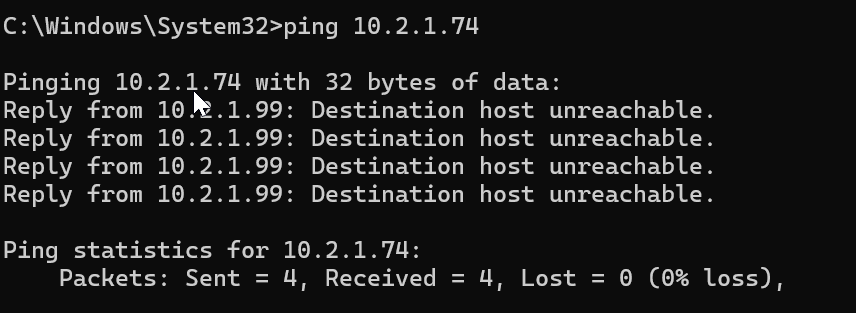
This is so anoing . Now my server is "down" can't reach GUI again. Ping showing 0% loss but host is unreachable.
-
Here is diagnostic. I bought a new USB and made new install. Server is getting IP now but is really unstable, slow, unable to reach. I tried and bought new nic and installed it and it making now differences. I set static ip now and sometimes can reach the server but it's really not a nice experiance. tower-diagnostics-20250223-2209.zip
-
seems like the problem was that my driver for eth0 not loading. Tried to fix it but seems like my usb was curropt. So now i copy everything in the folder, then format usb and copy all of the files back on it and not can't boot.
-
network .cfg # Generated settings: IFNAME[0]="br0" DHCP_KEEPRESOLV="no" DHCP6_KEEPRESOLV="yes" BONDNAME[0]="bond0" BONDNICS[0]="eth0" BONDING_MODE[0]="1" BONDING_MIIMON[0]="100" BRNAME[0]="br0" BRNICS[0]="bond0" BRSTP[0]="no" BRFD[0]="0" PROTOCOL[0]="ipv4" USE_DHCP[0]="yes" USE_DHCP6[0]="" SYSNICS="1"
-
all checked. Every port. Different switch, Dream machine, new cables, Different VLAN and without vlan. It's like it's not requesting ip adress. And even when i tried static ip no response. I'm totaly lost after new lan adapter is not improve my situation.
-
Hi everyone, I’m facing a frustrating issue with my Unraid server after reconfiguring my setup. Initially, I had errors on one drive, and while trying to work around it, I ended up moving data manually. During this process, my Mover stopped working, which led me to decide on a New Config. I did the following steps: Created a New Config and reassigned all disks. Moved my HBA adapter to another PCIe x16 slot. Reconnected all cables and ensured everything was seated properly. Started a parity check, but it crashed at 80%, and I haven’t been able to bring the array back up since. At this point, I suspected a failing drive, so I disconnected it and started with a fresh setup. This allowed my server to boot again, and I was ready to continue troubleshooting. Current Issue - No IP Address Assigned Now, my biggest problem is that my server isn’t getting an IP address anymore. It boots fine without an internet connection, but as soon as I connect it to my network, it doesn’t request an IP. I’m using a Unifi setup and connecting through a switch (same port and cables as before, and the port LED is green). I’ve tried both DHCP and a static IP, but neither works. I’ve manually edited and reset the network.cfg file without success. Thinking my onboard LAN might have failed, I installed a TP-Link PCI 1Gb network card, but I’m still facing the same issue. Troubleshooting Attempts So Far: ✅ Tried rebooting multiple times. ✅ Switched between static IP and DHCP. ✅ Manually reconfigured network.cfg. ✅ Changed network ports and cables. ✅ Installed a new PCI network card to rule out hardware failure. Request for Help: Has anyone encountered a similar issue where Unraid won’t request an IP after a fresh config? Could this be a BIOS setting, Unraid network config issue, or something else? Any suggestions on logs I should check or additional troubleshooting steps? Thanks in advance! Any help is greatly appreciated.
