huminsk
Members
-
Joined
-
Last visited
-
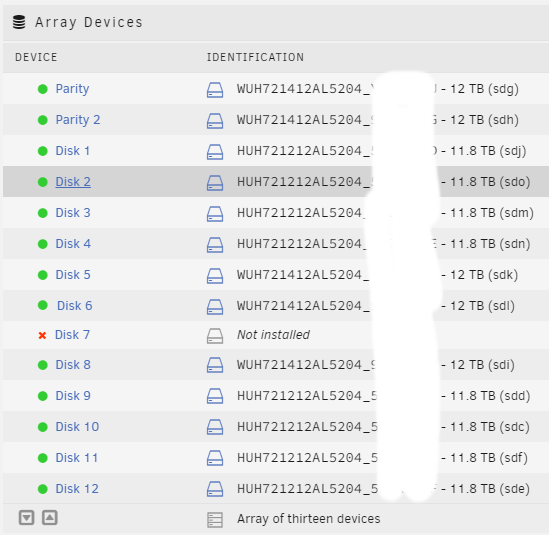
Hello everyone, I recently plan to migrate my UNRAID server to a new motherboard platform, and I want to retain all Docker, VM, and system settings (I believe they are in the config on the USB drive, right?). Currently, my UNRAID is still on a version before UNRAID 7, and I plan to upgrade UNRAID on the new server. Remove the following components from the old motherboard and plug them into the new motherboard. Two cache NVMe drives (which contain my Dockers and VMs) HBA card NIC Move the HDD array consisting of 14 mechanical hard drives from the old server to the new server. Remove UNRAID boot USB drive from the old motherboard, Insert the into the new server and set it as the primary boot device in the BIOS. Power on the new server. Is this approach feasible? Are there any risks involved? Thank you!
-
Two more hard drives reported Read Error when rebuilding data. All these 3 drives were connected to a same Molex MiniSAS-SAS cable. I have changed the cable and rebuilt the data of the "failed" disk, so far so good. So it was a cable issue as you guys suspected. Thank you for your help. @trurl @itimpi
-
trurl, thanks for replying. S.M.A.R.T report and syslog uploaded. The symptom is UNRAID reported thousands of Read Errors on disk 7 and then disabled it. It makes funny noise during unmount phase of stopping array(Maybe it still could be a cable issue related to power connector?). I will try the failed drive when I get the new cable. 35000cca2594f2e2c-2024-02-15 disk7 (sdm) - DISK_DSBL.txt syslog.txt
-
huminsk changed their profile photo
-
Hi all, One of my 12TB drive(disk 7) failed , I am trying to replace it with a smaller one(11.8 TB, diskX). I have done the following: 1. Set disk 7 to "no device" 2. Mount disk 7 and the new diskX via ssh 3. Copied all folders from disk 7 to DiskX using "cp -vR" Not sure if it is a better way to do this, like copy files from "emulated array drive" instead of the failed physical hard drive My plan is to performe a "new config" procedure as blow: 1. Run array new config, keep everything else except disk 7 assginment. 2. Set the new DiskX as disk 7. 3. Rebuild the parity. Is it ok to do so? Thank you!