catt0
Members
-
Joined
-
Last visited
-
Thank you for your response! The parity check is currently running and looking good.
-
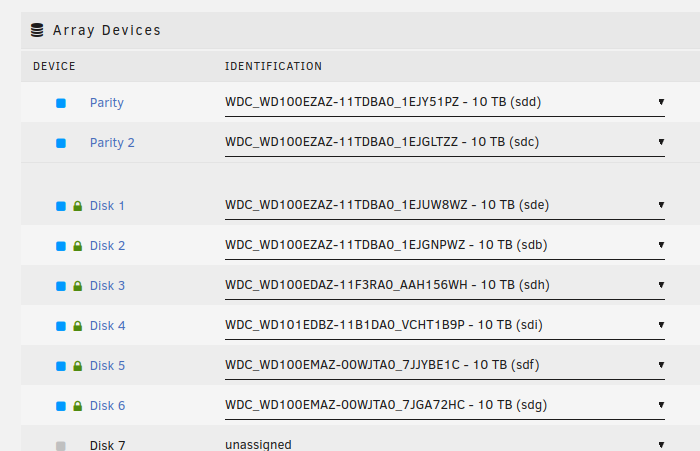
Hello everyone, I had to recover from a USB stick corruption without a recent enough backup. I managed to read 99% of the data from the USB stick, sadly not the disk assignment. However I have diagnostic data from just before I installed the latest disk and can check it for the disk assignments. Before I go ahead and start the array, I would appreciate a double-check on my logic. I attached the diagnostics.zip/system/vars.txt from the diagnostic data, it contains the disk assignments. Under "disks" it contains the disk assignments to the slots. All data disks are assigned as listed there, the only non-listed disk is added in the next free slot. The disk listed under "parity" is assigned as Parity 1, the disk listed under "parity2" is assigned as Parity 2. Assignments are also attached as a screenshot. My questions: 1. Is my assumption correct that "parity" -> "Parity 1" and "parity2" -> "Parity 2" (vars.txt -> web interface assignments)? 2. If I get the order of the data disks or parity disks wrong, but check "Parity is valid", no data loss will occur, "only" the parity check will show errors? I am sure of the data disk assignments, no data disk is assigned as parity disk. 3. Can I copy over configs from the recovered USB stick, e.g. Share configs, to the new stick without risking data loss? I will not copy the disk.cfg as it is not correct. 4. Any additional steps I can take after assigning the devices to double-check my assignments? Just in case, I also attached the full diagnostics report. Additional info on stick and recovery, in case this is of interest to someone: USB Stick is a SanDisk Ultra Flair 16GB (USB 3.0), bought Jan 2020 and running ever since, got a little hot. Stick was not readable after powering off the server for a move. Keeping it plugged into a PC for 2 days made it "readable" again, I think it got back to its standard temperature. I pulled off readable sectors with ddrescue, I have at least one bad sector. The disk.cfg in the recovered data is missing the HDD IDs, likely they were stored in the bad sector... vars.txt tower-diagnostics-20231125-1655.zip