





CivBase
Members
-
Joined
-
Last visited
Everything posted by CivBase
-
That worked. Thanks!
-
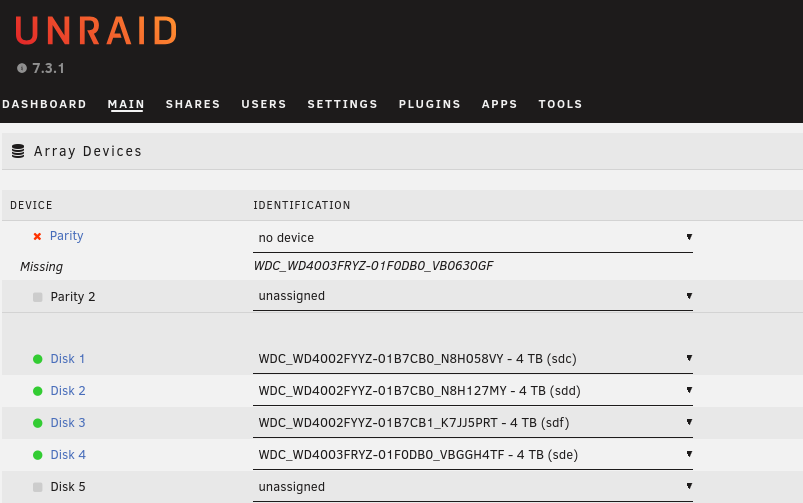
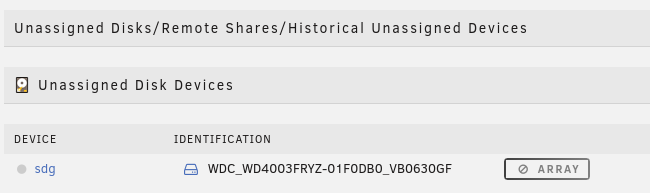
After resolving a recent issue (https://forums.unraid.net/topic/199400-corrupt-usb-stick/) I updated to the latest version of UNRAID (6.12.10 -> 7.3.1). Immediately before the update I ran a successful parity check. And after updating and rebooting, the parity disk is now marked as missing. All other disks are recognized and assigned correctly. I have the Unassigned Devices plugin and the parity disk appears there. The only option that appears is the parity disk dropdown is "no device". I also can't select that disk in the dropdowns for the array data disks or my cache pool. And since I'm missing a disk, I cannot start the array. Diagnostics and syslog are attached. natasha-diagnostics-20260614-2208.zip natasha-syslog-20260614-2208.txt
-
I took out each of my disks and manually made an extra backup of all the files I cared about. It doesn't look like there was any missing data. Then I installed the exact version I had previously to a new USB stick and copied the configs I backed up onto that. This time it picked up all the disks correctly. There were no issues with the parity disk. I transferred the license key to the new stick, double-checked my configs, and then started the array. Looks like it picked up all the shares. It's still doing a parity check, but I don't see any indication of data loss so I expect that to be alright. Once that's done, I really need to update. And it looks like version 7 lets me migrate my boot device to an internal drive, so I'll probably take advantage of that while I'm at it. Thanks for the help!
-
I've attached my diagnostics and syslog. natasha-diagnostics-20260613-1627.zip natasha-syslog-20260613-1627.txt
-
AFAICT the share configs seem to all be fine. I have /config/share.cfg, /config/shares/system.cfg, and another /config/shares/*.cfg for each share (attached). So I find it strange that it's not showing the shares. Based on the changes.txt file from my backup, I was on version 6.12.10. I don't suppose there was a change to how those configs are stored in version 7? Or are there other relevant config files besides those? config.zip
-
I grabbed the latest version of UNRAID, but maybe that's my problem. My old server was on an older version. Would the server version be logged anywhere in the old USB files?
-
I re-imaged the USB stick and copied over all the config files. Upon boot I see many things carried over. My users are there, my configs are there, and all my disks were picked up. However... My shares are gone. My parity disk is no longer assigned. It is marked as "missing". I have the "Unassigned Devices" plugin and it appears there, but is not available as an option for the parity disk. I no longer see an interface to manually browse files on the disks. Is there a way to recover my shares without having to set everything back up manually? I still have the config files for all of them. I have not started the array.
-
The server has stopped working. I was able to pull all the files off the USB's file system, including the config dir. Is that sufficient for a backup before I try the USB tool?
-
When I click the "Flash Backup" button I get a 404 response. If I click it again within the minute, I get a 403. I'm accessing the NAS directly on my local network, not through a reverse proxy.
-
Lost power briefly this morning and noticed a little while later that my NAS was off. I turned it back on and check to make sure everything was okay. It booted fine and let me login. The disks, arrays, and configs seemed to all be fine, except it said the license key file was corrupted. I was able to successfully recover the key, but it failed to write the recovered key to the disk. This showed up in the system logs when I got the error: Jun 11 12:23:01 NAS kernel: FAT-fs (sda1): Directory bread(block 3422240) failed Jun 11 12:23:01 NAS kernel: FAT-fs (sda1): Directory bread(block 3422241) failed Jun 11 12:23:01 NAS kernel: FAT-fs (sda1): Directory bread(block 3422242) failed Jun 11 12:23:01 NAS kernel: FAT-fs (sda1): Directory bread(block 3422243) failed Jun 11 12:23:01 NAS kernel: FAT-fs (sda1): Directory bread(block 3422244) failed Jun 11 12:23:01 NAS kernel: FAT-fs (sda1): Directory bread(block 3422245) failed Jun 11 12:23:01 NAS kernel: FAT-fs (sda1): Directory bread(block 3422246) failed Jun 11 12:23:01 NAS kernel: FAT-fs (sda1): Directory bread(block 3422247) failed Jun 11 12:23:01 NAS kernel: FAT-fs (sda1): Directory bread(block 3422248) failed Jun 11 12:23:01 NAS kernel: FAT-fs (sda1): Directory bread(block 3422249) failed Jun 11 12:23:27 NAS kernel: FAT-fs (sda1): unable to read inode block for updating (i_pos 54756145)Looks like there's some level of file system corruption on the stick. Not enough to prevent booting or lose the configs, but at least enough to prevent me from restoring the license key file. I'm not entirely sure what to do from here. Is there any way to backup the configs and re-image the USB Stick? Or maybe I could migrate things over to a new USB Stick?
-
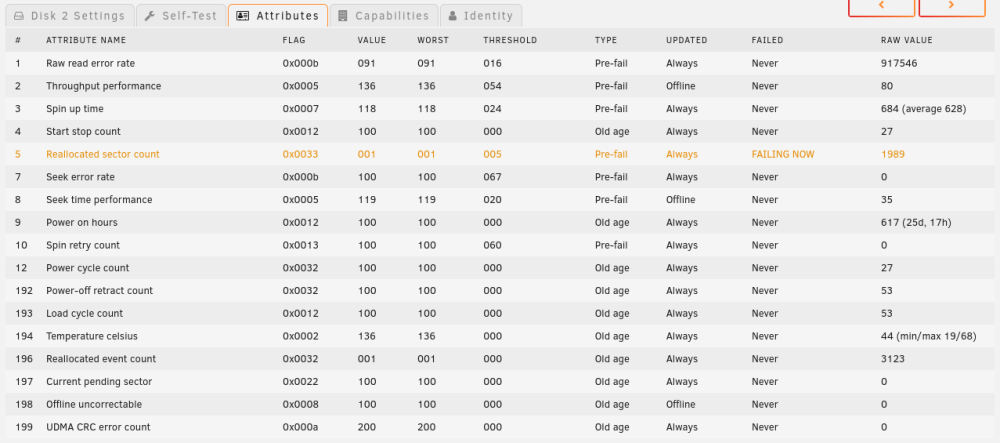
I formatted disk2 and disk3 and got the data copied back into the array. Then I ran SMART tests and got errors on disk2 (screenshot attached). I guess that explains how the file system got corrupted. It's one of the new disks I got a few weeks ago, so that's a bummer. I ordered a replacement and I'm currently using the unbalanced plugin to move all the data from disk2 onto disk4. I still have all the data I recovered from disk2, so if something goes wrong with the transfer I should still be able to restore it.
-
The Data-Rebuild is complete and disk2 shows the same error as before, "Unmountable: Unsupported or no file system". So what should I do now? My instinct is to try to format disk2 and disk3 again. Then, if that works, copy the recovered data back into the array. Is that all there is to it at this point? I'm also uncertain about my original choice to go with btrfs. I don't know if that had anything to do with the issues I've had with disk2 or disk3, but my research into data recovery for disk2 seems to suggest the tooling and support for btrfs is still lacking compared with xfs. Would you recommend I switch to xfs? If so, is there a simple way I can switch disk1 and disk4 over to xfs as well?
-
I got all the data from disk2 copied onto an external device. I put disk2 back in the NAS, started it up, re-assigned disk2 to the array, and started the array. It immediately started a Data-Rebuild. I'm letting it finish since it already started, but I don't expect it to fix anything since the emulated disk2 appeared to have the same problem. Hopefully that wasn't a mistake. disk2 is still /dev/sdd. Here's the output from that command: root@NAtaSha:~# fdisk -l /dev/sdd Disk /dev/sdd: 3.64 TiB, 4000787030016 bytes, 7814037168 sectors Disk model: WDC WD4002FYYZ-0 Units: sectors of 1 * 512 = 512 bytes Sector size (logical/physical): 512 bytes / 4096 bytes I/O size (minimum/optimal): 4096 bytes / 4096 bytes Disklabel type: gpt Disk identifier: 1F571DE2-9EC9-409F-BEA0-B1CB5F8D39E5 Device Start End Sectors Size Type /dev/sdd1 64 7814037134 7814037071 3.6T Linux filesystem
-
I scanned disk2 with UFS Explorer and thankfully all the data is still there. I'm currently saving it off to another device as a backup. I'll be out of town for the next three days, but after that I'll add disk2 back to the NAS and try your command.
-
disk2 was definitely formatted when I first setup the NAS and was being used to store data in the array. That data stopped being accessible in the shares when the problem with disk2 began. I have not initiated any wipes or formats since disk2 first appeared as unmountable. Prior to that, I had not formatted disk2 since I first setup the array. I have never wiped any of the drives.
-
root@NAtaSha:~# sfdisk /dev/sdf Welcome to sfdisk (util-linux 2.38.1). Changes will remain in memory only, until you decide to write them. Be careful before using the write command. Checking that no-one is using this disk right now ... OK Disk /dev/sdf: 3.64 TiB, 4000787030016 bytes, 7814037168 sectors Disk model: WDC WD4002FYYZ-0 Units: sectors of 1 * 512 = 512 bytes Sector size (logical/physical): 512 bytes / 512 bytes I/O size (minimum/optimal): 512 bytes / 512 bytes sfdisk is going to create a new 'dos' disk label. Use 'label: <name>' before you define a first partition to override the default. Type 'help' to get more information. >>> 2048 The size of this disk is 3.6 TiB (4000787030016 bytes). DOS partition table format cannot be used on drives for volumes larger than 2199023255040 bytes for 512-byte sectors. Use GUID partition table format (GPT). Created a new DOS disklabel with disk identifier 0xa320b548. Created a new partition 1 of type 'Linux' and of size 2 TiB. /dev/sdf1 : 2048 4294967295 (2T) Linux /dev/sdf2: ^C
-
If the file system ends up not being recoverable, do you have any recommendations for software to recover data from btrfs? root@NAtaSha:~# sfdisk /dev/sdf Welcome to sfdisk (util-linux 2.38.1). Changes will remain in memory only, until you decide to write them. Be careful before using the write command. Checking that no-one is using this disk right now ... OK Disk /dev/sdf: 3.64 TiB, 4000787030016 bytes, 7814037168 sectors Disk model: WDC WD4002FYYZ-0 Units: sectors of 1 * 512 = 512 bytes Sector size (logical/physical): 512 bytes / 512 bytes I/O size (minimum/optimal): 512 bytes / 512 bytes sfdisk is going to create a new 'dos' disk label. Use 'label: <name>' before you define a first partition to override the default. Type 'help' to get more information. >>> 64 The size of this disk is 3.6 TiB (4000787030016 bytes). DOS partition table format cannot be used on drives for volumes larger than 2199023255040 bytes for 512-byte sectors. Use GUID partition table format (GPT). Created a new DOS disklabel with disk identifier 0x4a979c96. Created a new partition 1 of type 'Linux' and of size 2 TiB. /dev/sdf1 : 64 4294967295 (2T) Linux /dev/sdf2: ^C
-
Started the array with disk2 still unassigned, contents emulated. disk2 shows "Unmountable: Unsupported or no file system". disk3 is still assigned and shows "Unmountable: Unsupported partition layout". root@NAtaSha:~# blkid /dev/sda1: LABEL_FATBOOT="UNRAID" LABEL="UNRAID" UUID="5B78-7F6A" BLOCK_SIZE="512" TYPE="vfat" /dev/loop1: TYPE="squashfs" /dev/sdb1: UUID="5d82a858-c631-49c0-b038-75c5784f1c09" UUID_SUB="07d9f78c-d288-4641-a480-5533e5f8fac5" BLOCK_SIZE="4096" TYPE="btrfs" /dev/loop0: TYPE="squashfs" /dev/sde1: UUID="b3bdaa5e-3196-40da-a3b0-4c05f70f9c64" UUID_SUB="8bae425a-2517-4164-9e01-2dee44d51215" BLOCK_SIZE="4096" TYPE="btrfs" PARTUUID="d16f52fe-52bb-4ecd-ab36-0ab8dffced60" /dev/sdc1: UUID="3fa64220-8898-416c-aefd-dce48cf77463" UUID_SUB="7d5cf850-2512-4d45-b3a8-5cd16e0a4310" BLOCK_SIZE="4096" TYPE="btrfs" PARTUUID="70ef2bed-0fd0-4891-806b-e07dde350a5d" /dev/md1p1: UUID="3fa64220-8898-416c-aefd-dce48cf77463" UUID_SUB="7d5cf850-2512-4d45-b3a8-5cd16e0a4310" BLOCK_SIZE="4096" TYPE="btrfs" /dev/md4p1: UUID="b3bdaa5e-3196-40da-a3b0-4c05f70f9c64" UUID_SUB="8bae425a-2517-4164-9e01-2dee44d51215" BLOCK_SIZE="4096" TYPE="btrfs" /dev/sdd: PTUUID="65a6b1a2-b94d-4eb8-8c2b-942a5de3ab7d" PTTYPE="gpt" root@NAtaSha:~# fdisk -l /dev/sdf Disk /dev/sdf: 3.64 TiB, 4000787030016 bytes, 7814037168 sectors Disk model: WDC WD4002FYYZ-0 Units: sectors of 1 * 512 = 512 bytes Sector size (logical/physical): 512 bytes / 512 bytes I/O size (minimum/optimal): 512 bytes / 512 bytes natasha-diagnostics-20240310-1043.zip
-
So it's emulating an unmountable disk? That's odd. The last parity check was March 5th and it still shows as valid, but disk2 didn't start showing as unmountable until after I rebooted on March 6th. I get this in the logs now. Mar 9 09:50:22 NAtaSha emhttpd: mounting /mnt/disk2 Mar 9 09:50:22 NAtaSha emhttpd: shcmd (73215): mkdir -p /mnt/disk2 Mar 9 09:50:22 NAtaSha emhttpd: /mnt/disk2: no btrfs or device /dev/md2p1 is not single Mar 9 09:50:22 NAtaSha emhttpd: /mnt/disk2 mount error: Unsupported or no file system Mar 9 09:50:22 NAtaSha emhttpd: shcmd (73216): rmdir /mnt/disk2
-
I unassigned disk2 and started the array. When I hover over the device status icon, the popup says "device is missing (disabled), contents emulated". Is that all I need to confirm the emulated disk mounts?

-
In that case, its the same for disk2 as well. Seems I am not able to mount either with UD. I did not format either disk.
-
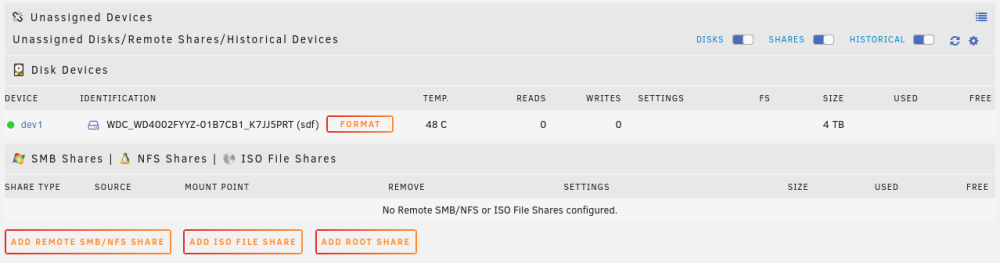
I've installed the Unassigned Devices plugin, but I'm having trouble with the instructions. If I set disk3 to "no device" in the array, it shows up in the "Unassigned Disks" section. But from there I'm not sure how to "see if the disks mount with UD". The only option presented by the UI is "format". Is this necessary to mount it with UD? Will formatting disk3 at this point impact my ability to re-build disk2 if that ends up being necessary? No data has been stored on disk3, but it was part of the array (as "unmountable") during the last parity check and I did not zero it out before adding it to the array.
-
Does "UD" refer to the "Unassigned Devices" plugin?
-
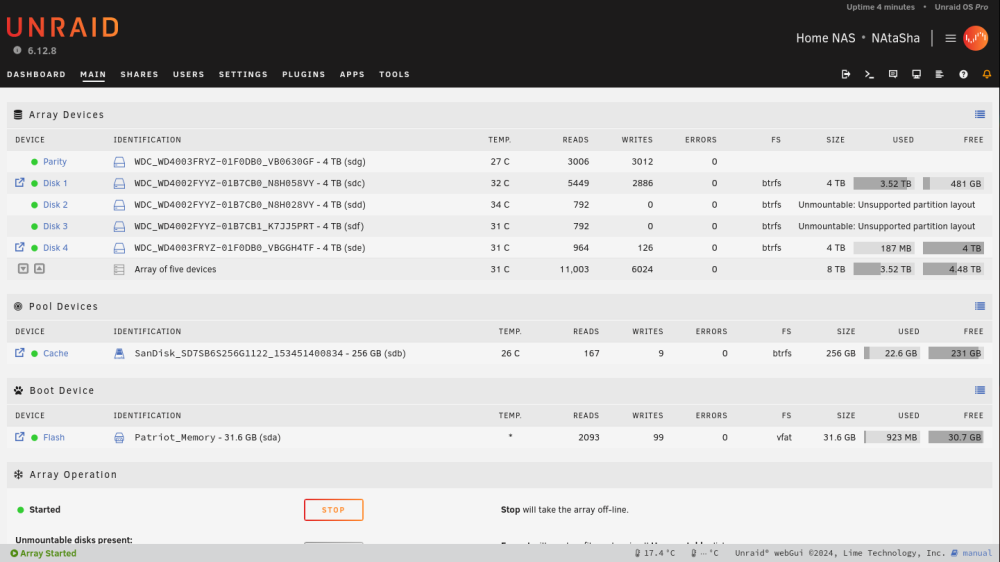
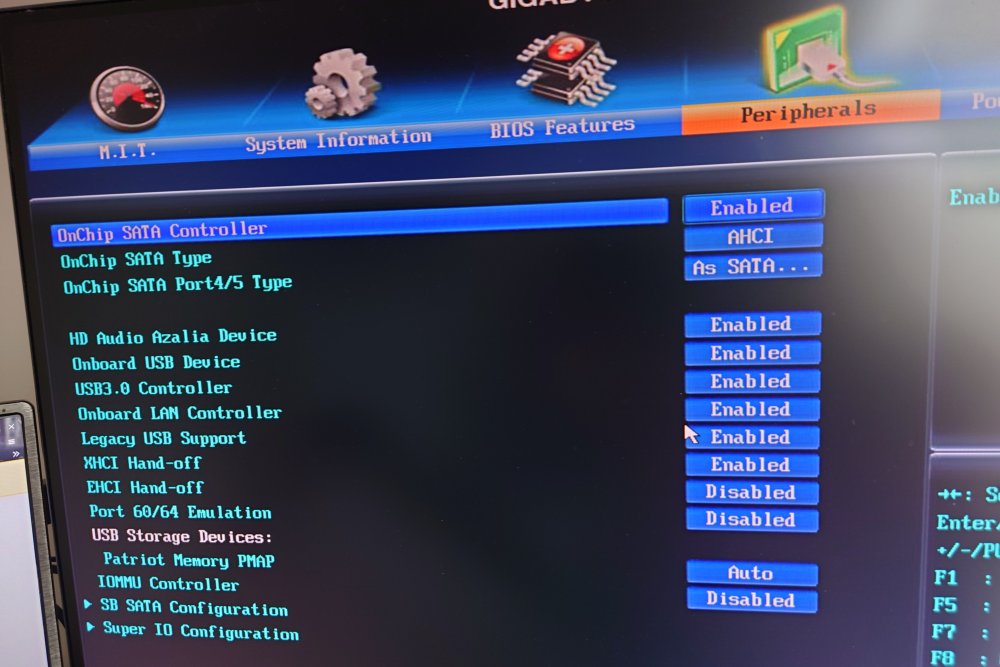
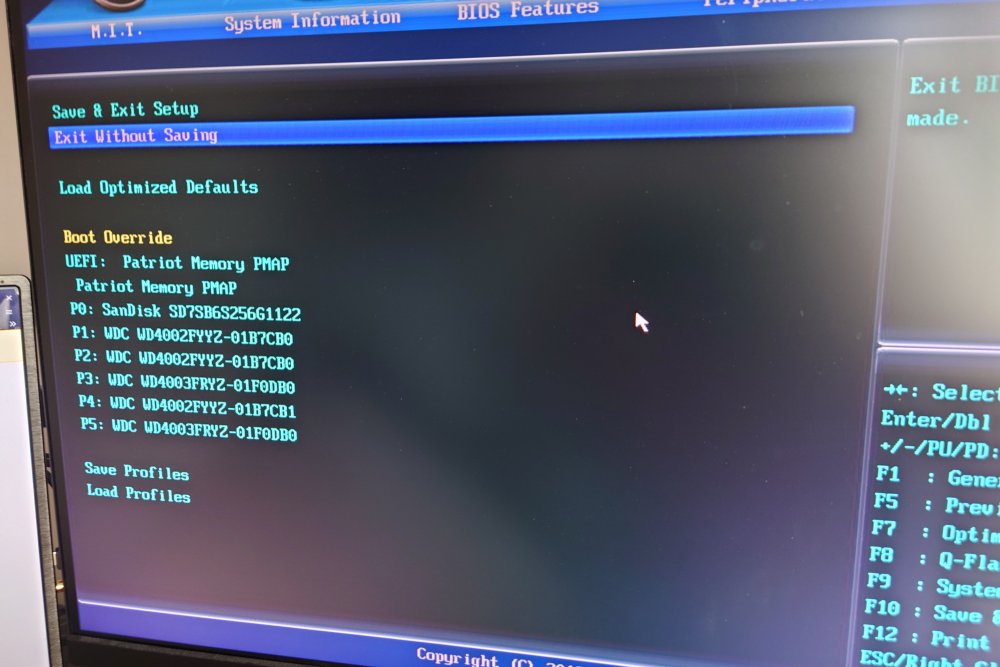
You were spot on with the IDE thing. I've updated the BIOS (see attached pics for confirmation) and attached new diagnostics. Still getting "umountable" for both disk2 and disk3. Is it possible/advisable for me to just rebuild disk2 at this point? Will disk3's issue be a problem for a rebuild of disk2? natasha-diagnostics-20240308-1156.zip
-
disk2 is now listed as "unmountable" upon reboot. Consequently, many files are now missing from the shares which use that array. I tried a full shutdown after that, but disk2 is still listed as "umountable" after starting it back up. 😬 I have not initiated a format since disk2 is now impacted and that disk has data on it. disk2 was one of the new disks I purchased for the NAS. It was never used prior to installation. New diagnostics are attached. This appears in the system logs: Mar 6 16:55:44 NAtaSha emhttpd: mounting /mnt/disk2 Mar 6 16:55:44 NAtaSha emhttpd: shcmd (38): mkdir -p /mnt/disk2 Mar 6 16:55:44 NAtaSha emhttpd: /mnt/disk2 mount error: Unsupported partition layout Mar 6 16:55:44 NAtaSha emhttpd: shcmd (39): rmdir /mnt/disk2 disk2 is now missing from lsblk. NAME MAJ:MIN RM SIZE RO TYPE MOUNTPOINTS loop0 7:0 0 63.4M 1 loop /lib loop1 7:1 0 339M 1 loop /usr sda 8:0 1 29.5G 0 disk └─sda1 8:1 1 29.5G 0 part /boot sdb 8:16 0 238.5G 0 disk └─sdb1 8:17 0 238.5G 0 part /mnt/cache sdc 8:32 0 3.6T 0 disk └─sdc1 8:33 0 3.6T 0 part sdd 8:48 0 3.6T 0 disk sde 8:64 0 3.6T 0 disk └─sde1 8:65 0 3.6T 0 part sdf 8:80 0 3.6T 0 disk sdg 8:96 0 3.6T 0 disk md1p1 9:1 0 3.6T 0 md /mnt/disk1 md2p1 9:2 0 3.6T 0 md md3p1 9:3 0 3.6T 0 md md4p1 9:4 0 3.6T 0 md /mnt/disk4 But /dev/md2p1 still shows up in btrfs fi show. That's the device that was being used by the /mnt/disk2 mount. Label: none uuid: 3fa64220-8898-416c-aefd-dce48cf77463 Total devices 1 FS bytes used 3.20TiB devid 1 size 3.64TiB used 3.20TiB path /dev/md1p1 Label: none uuid: b3bdaa5e-3196-40da-a3b0-4c05f70f9c64 Total devices 1 FS bytes used 174.07MiB devid 1 size 3.64TiB used 3.07GiB path /dev/md4p1 Label: none uuid: 5d82a858-c631-49c0-b038-75c5784f1c09 Total devices 1 FS bytes used 21.00GiB devid 1 size 238.47GiB used 24.06GiB path /dev/sdb1 Label: none uuid: 6da1f5e7-6324-4e3c-8daf-6c2cc7ebec52 Total devices 1 FS bytes used 2.84TiB devid 1 size 3.64TiB used 2.87TiB path /dev/md2p1 natasha-diagnostics-20240306-1657.zip



