snowburn08
Members
-
Joined
-
Last visited
-
Hmm, after some more checking, I'm guessing it's for Unraid Connect? Can someone confirm? I guess, I'll just need to change Unifi to something else, I don't want to break Unraid.
-
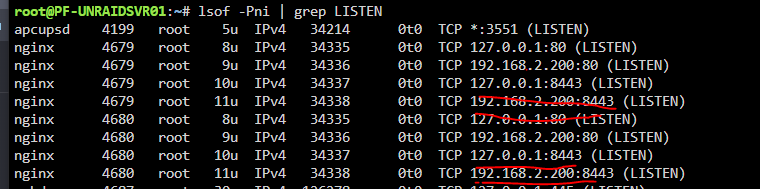
I was trying to set-up the Unifi docker when I noticed port 8443 is already in use. I checked all my dockers and they do not use 8443. I'm trying to find out what process/program is using it. I know it's a nginx but that's it. I did some googling to trace the problem and I'm trying to verify, if for some reason, UNRAID is using 8443? I can access UNRAID webui with just regular http and https. Screenshots below to show what I've ran to confirm something is using it, but to me, it's still pretty vague what is. I also did a "ps aux | grep 8443" and it brings up nothing whereas if I go something like ps aux | grep 8686, it brings up the docker run stuff and I can see that's being used by lidarr in my dockers tab. Pleas help.