





WildWayz
Members
-
Joined
-
Last visited
-
Thanks root@Unraid:~# smbstatus Unknown parameter encountered: "write cache size" Ignoring unknown parameter "write cache size" Samba version 4.22.8 PID Username Group Machine Protocol Version Encryption Signing ---------------------------------------------------------------------------------------------------------------------------------------- 19802 james users 192.168.8.248 (ipv4:192.168.8.248:54355) SMB3_11 - partial(AES-128-GMAC) 13275 james users 192.168.8.73 (ipv4:192.168.8.73:55660) SMB3_11 - partial(AES-128-CMAC) Service pid Machine Connected at Encryption Signing --------------------------------------------------------------------------------------------- storage 13275 192.168.8.73 Thu Mar 12 01:43:41 PM 2026 GMT - - downloads 19802 192.168.8.248 Thu Mar 12 01:58:09 PM 2026 GMT - - storage 19802 192.168.8.248 Thu Mar 12 01:58:09 PM 2026 GMT - - IPC$ 13275 192.168.8.73 Thu Mar 12 01:43:41 PM 2026 GMT - - CloudData 19802 192.168.8.248 Thu Mar 12 01:44:17 PM 2026 GMT - - ext_backup 19802 192.168.8.248 Thu Mar 12 01:58:09 PM 2026 GMT - - appdata 19802 192.168.8.248 Thu Mar 12 01:58:09 PM 2026 GMT - - Locked files: Pid User(ID) DenyMode Access R/W Oplock SharePath Name Time -------------------------------------------------------------------------------------------------- 19802 1000 DENY_NONE 0x100081 RDONLY NONE /mnt/user/CloudData . Thu Mar 12 13:51:36 2026 19802 1000 DENY_NONE 0x100081 RDONLY NONE /mnt/user/CloudData . Thu Mar 12 13:51:35 2026 19802 1000 DENY_NONE 0x80 RDONLY NONE /mnt/user/ext_backup . Thu Mar 12 13:58:10 2026 19802 1000 DENY_NONE 0x80 RDONLY NONE /mnt/user/appdata . Thu Mar 12 13:58:10 2026 19802 1000 DENY_NONE 0x80 RDONLY NONE /mnt/user/storage . Thu Mar 12 13:58:10 2026 19802 1000 DENY_NONE 0x80 RDONLY NONE /mnt/user/downloads . Thu Mar 12 13:58:10 2026
-
Yep - deffo using james account on the Unraid server. My other non-rclone shares work fine - it's just anything which is an rclone mount share which has the issue.
-
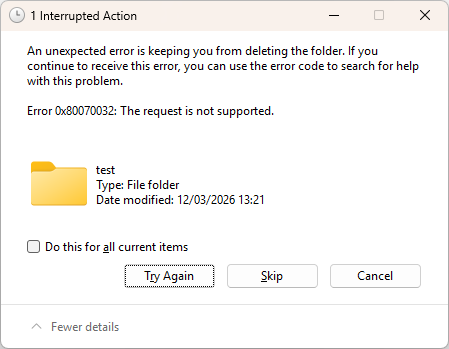
Thanks for coming back to me. if I run chown -R james:users /mnt/user/CloudData (I have moved it now) - they all show as james:users but still I cannot write to that folder in Windows - I get this error:
-
WildWayz changed their profile photo
-
Hey all Apologies if this sounds muddled - I am probably doing something wrong so any help is appreciated. My setup is as follows: - Unraid installed on a Ugreen NAS - Installed Rclone and User Scripts Plugins - New user called James I have created the rclone config file and can do and it lists the files and folders - so I know the Rclone config works. The FileJump is set up as WebDAV. In my User Scripts has a script set up as follows: rclone mount filejump: /mnt/user/storage/mounts/filejump \ --allow-other \ --dir-cache-time 72h \ --vfs-cache-mode full \ --vfs-cache-max-size 50G \ --vfs-cache-max-age 12h \ --poll-interval 15s \ --umask 000 \ --uid 1000 \ --gid 100 \ --daemon \ --log-file /var/log/rclone_mount.log \ --log-level INFO &So that should mount it into a folder using the UID and GID of my user James. I can confirm that by root@Unraid:~# ls -al /mnt/user/storage/mounts/filejump/ total 71981 drwxrwxrwx 1 james users 0 Mar 11 06:19 ./ drwxrwxrwx 1 james root 82 Mar 10 14:41 ../ -rw-rw-rw- 1 james users 73708416 Mar 11 05:21 Cyberduck-Installer-9.4.1.44384.exe drwxrwxrwx 1 james users 0 Mar 11 06:19 New\ folder/On Windows, I have mounted the share as user James, however, I am unable to create or delete anything in that filejump folder. On SMB Extras on Unraid, I don't have anything in there. It's driving me nuts :)

