HeikoS
Members
-
Joined
-
Last visited
-
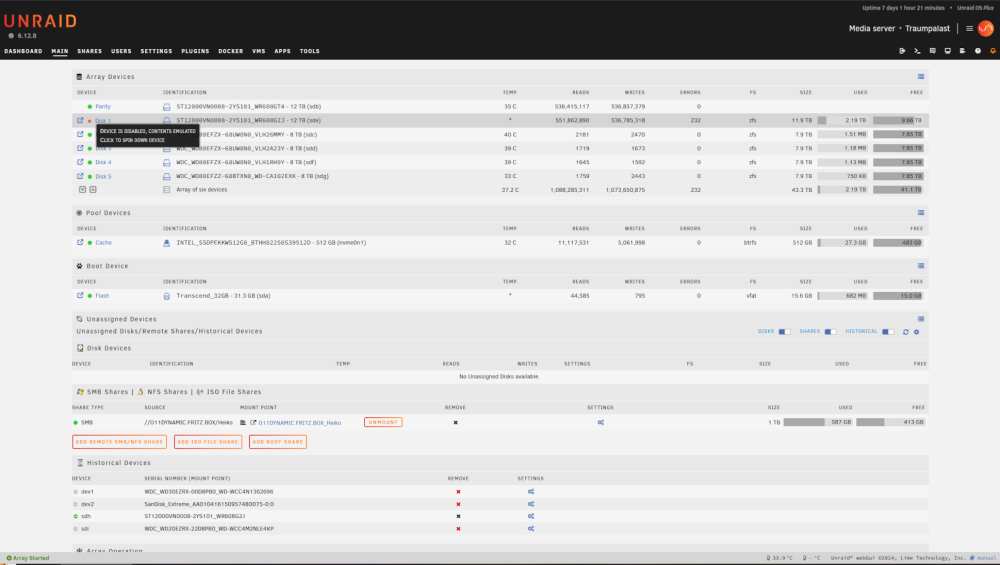
Also EasyUs Partition Manager hat keine Fehler auf der WD Red gefunden, daraufhin habe ich das Sata Kabel an der Ironwolf ausgetauscht und Unraid gestartet, jetzt zeigt Unraid Disc 1,2 und 3 als Device Missing. Sind meine Parity daten weg wenn ich jetzt New Config ausführe?
-
Hab jetzt die Disc Log information gefunden. Gleichzeitig teste ich die angeblich kaputte WD Red am Pc ob sie wirklich defekte aufweist, hoffe immernoch das es etwas einfaches wie das SATA Kabel ist.
-
Hallo zusammen, habe mein Nas jetzt seit einer guten Woche in Betrieb und gleich den zweiten Festplatten fail, eine WD hatte sich mit deutlichem klackern verabschiedet. Als Ersatz kam eine Ironwolf rein bzw. zwei, eine als parity. Jetzt hat die sich auch mit oben genannten Fehler verabschiedet. Wie gehe ich jetzt weiter vor um festzustellen ob das nur ein Schluckauf war oder ein handfester defekt vorliegt?