





Pola
Members
-
Joined
-
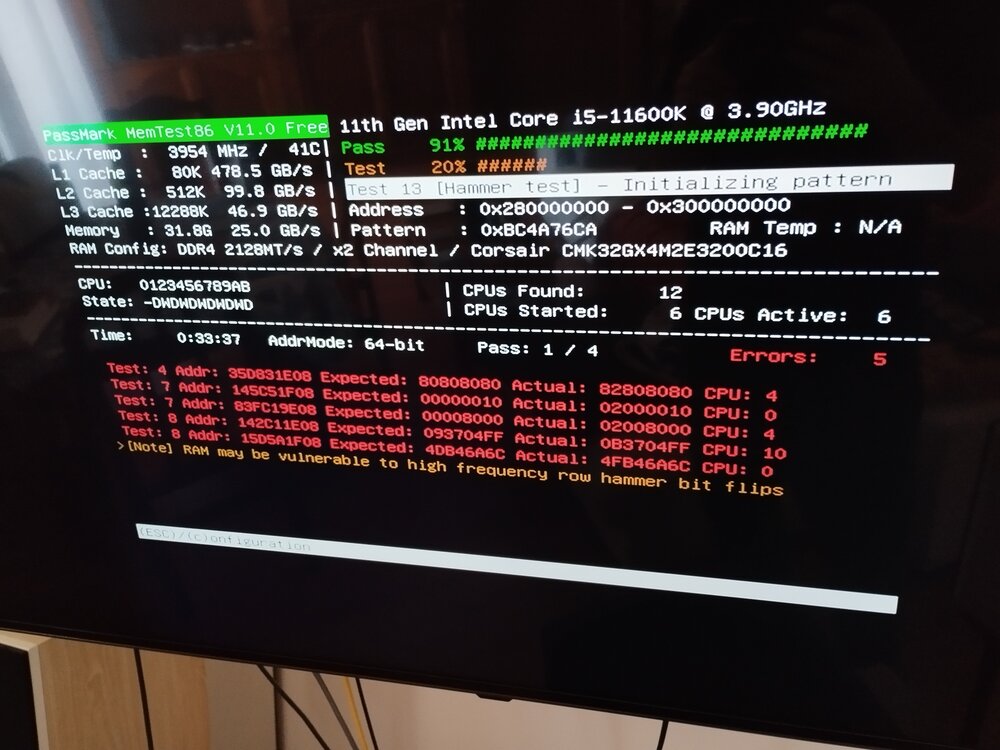
Hi Jorge, ran memtest from a fresh USB to double check.... did not finish the test as more and more errors were popping up and the server fans were starting to go crazy. I'm surprised how this can happen as the RAM was bought brand new, do you think it's worth trying to check if it's one ram stick or both? (run memtest individually) or simply change them both? RAM installed (can see from pic) corsair vengeance LPX DDR4 3200MHz (cmk32gx4m2e3200c16) which should be compatible with the MOBO: https://www.gigabyte.com/es/Motherboard/B560M-AORUS-PRO-AX-rev-1x/sp#sp Any specific recommendations on which ram to buy¿? MOBO allows max of 64GB, 2*16GB sticks is more than enough for my usage at the moment, thought it was best to have dual channel ram rather than one 32gb stick as I was thinking of expading to 64GB in the distant future. Thank you for your time, P
-
Cheers Jorge! thank you, will try that this week, much appreciated
-
Hi Jorge, thank you for your prompt reply as always, much appreciated I have not tried booting in safe mode; server will power on fine it's just power-off seemingly randomly... I have noticed it seems to happen if left ON overnight without use; if I power off after "use" it generally powers off fine. I have been thinking it could be some sort of HW related issue? Possibly BIOS setting that makes something "go to sleep" of sorts? No idea tbh. Only docker container in use is Plex, server has a static IP, not sure if this could share some light? How can i provide further info? Thanks again for your time Jorge edit: Could it be a RAM issue? tempted to run memtest on an external USB as it crashes when running from unraid, further info from Plex docker settings (I do not have a GPU on my server as I don't really need it):


-
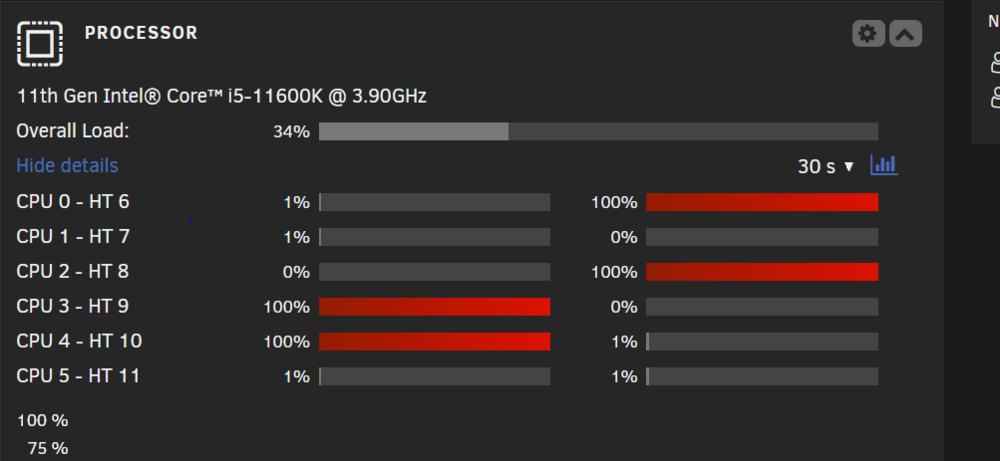
Hi all, Recurring issue pre 7.0.0 upgrade, now happening more often, I really don't know the cause except that the system does not shutdown properly if left powered on at night.... some CPU cores seem to go to 100% which i find bizzare: Any ideas? thanks! polaflix-syslog-20250129-1037.zippolaflix-syslog-20250129-1037.zip polaflix-syslog-20250129-1037.zip
-
Hi!! I do not... I don't have a cache or cache pool (might re-add it in the future as it was giving me issues in the past), does this look okay? Upgraded to 7.0.0 and had to remove the cache pool before it let me start the array again (unraid thought i had one) Thank you for your help

-
Cheers! Added -v to make it verbose Folders now remain deleted! Have a great weekend
-
Hi, here goes: Phase 1 - find and verify superblock... Phase 2 - using internal log - zero log... - scan filesystem freespace and inode maps... - found root inode chunk Phase 3 - for each AG... - scan (but don't clear) agi unlinked lists... - process known inodes and perform inode discovery... - agno = 0 bad CRC for inode 151 bad CRC for inode 151, would rewrite would have cleared inode 151 - agno = 1 bad CRC for inode 536871063 bad CRC for inode 536871063, would rewrite would have cleared inode 536871063 - agno = 2 - agno = 3 - process newly discovered inodes... Phase 4 - check for duplicate blocks... - setting up duplicate extent list... - check for inodes claiming duplicate blocks... - agno = 0 - agno = 1 - agno = 2 - agno = 3 bad CRC for inode 151, would rewrite would have cleared inode 151 bad CRC for inode 536871063, would rewrite would have cleared inode 536871063 setting reflink flag on inode 536871063 setting reflink flag on inode 536871064 Missing reference count record for (1/36474296) len 4096 count 2 No modify flag set, skipping phase 5 Phase 6 - check inode connectivity... - traversing filesystem ... - traversal finished ... - moving disconnected inodes to lost+found ... Phase 7 - verify link counts... No modify flag set, skipping filesystem flush and exiting. Im assuming i need to repair now without the readonly flag? thank you and happy Friday! polaflix-syslog-20250124-0819.zip
-
Hi! Sorry for the delay, yes! By connecting to the shares via windows file explorer but I have also tried by deleting the folders from unraid dashboard directly via the "Shares" menu. Share is stored in the array using high-water allocation method. Thank you for your replies! Any ideas? Try deleting via console after stopping docker maybe? Might try that. edit: tried deleting and checking the logs: Jan 23 20:57:12 PolaFlix kernel: XFS (md1p1): Metadata corruption detected at xfs_dinode_verify+0xa0/0x732 [xfs], inode 0x97 dinode Jan 23 20:57:12 PolaFlix kernel: XFS (md1p1): Unmount and run xfs_repair Could this be the issue? pretty self explanatory i know, will run xfs_repair!
-
Hi! I have two folders that contained files within a share, i have tried deleting the folders various ways but they don't delete. The contents within those folders have been deleted but not the folders themselves. I can rename said folders, attempt to delete them again but they just keep coming back.... ANy way i could provide more useful information? Sorry!!
-
Hi all!! I have several folders that had very long path names that when i delete from windows, it seems to work, i refresh the share and they come back. They are located in an unraid share which is used by plex. I have tried deleting using unraid dashboard to no avail either; i have stopped all docker apps previous to deleting to no avail either. Funny thing is that the files within the folders have indeed been deleted.... Any suggestions? Could be a permissions issue but I'm not sure how permissions work exactly and I don't want to eff everything up; i normally run "docker safe permissions" but I understand this is probably not what i should do in this case. Thanks!
-
Hi, since i removed (unassigned) the cache drive I have had no issues with the server. I suspect it could be the cache drive causing all the issues... Any suggestions on brand? it's an m.2 Don't really need a cache pool or a cache, I just use plex at the moment. however I without a cache the HDDs will be worn out faster? thank you for your help
-
I'm having an issue where screen turns black during memtest; not sure why, if I blindly press escape and enter it returns to boot menu... weird? thanks Jorge!
-
Questions: would you suggest swapping both sticks or trying to figure which one is the culprit and remove just that one? how about using ECC RAM? i think it's compatible with my mobo. Lastly, can i go on without the cache drive? Just need to reinstall my docker images? Thanks,
-
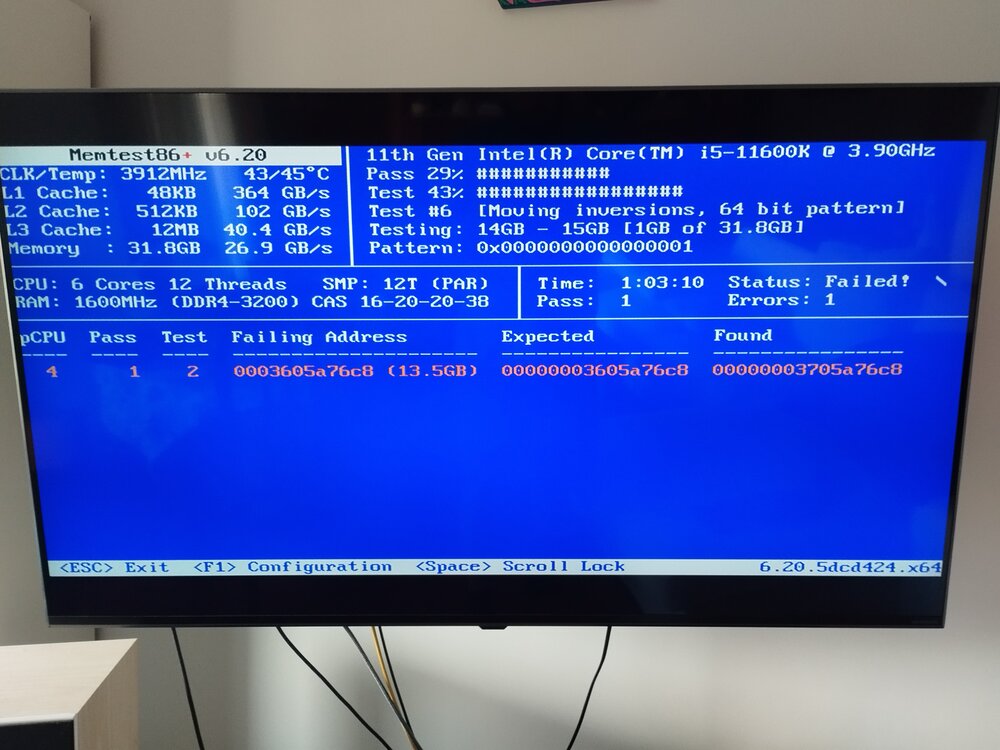
Hi, seems like 1 error popped up; however, screen has gone black (memtest didn't seem to have finished....) and I can't get the monitor to receive input from the server any longer; should I leave it for a while just in case?¿ Else i will have to power off manually... Not sure why I would have a RAM error, sticks were new with the build Thanks for your help, edit: have powered off manually, launching metest again, tweaked a couple of things in the BIOS settings to see if it makes a difference or not... anyhow!
-
Oh dear... i'm not really sure how to run a Memtest? Is it one of the boot options when i power on the server? I usually run headless... Gracias


