ufish235
Members
-
Joined
-
Last visited
Everything posted by ufish235
-
Thanks all, had no idea the Docker image would be 21GB - that's pretty big for a Docker image, no?
-
Really - what is the best way to investigate this on disk? I am comfortable with Linux command line but I actually don't know where my disk1 gets mounted. Or maybe there is a web GUI to explore the data?
-
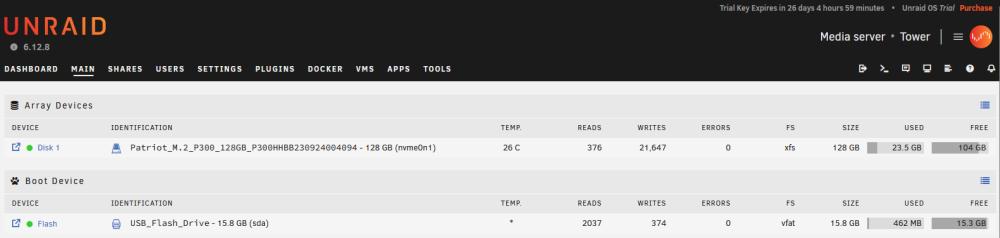
Hi guys! New user here, just starting to learn UNRAID functionality with a trial key. I have not yet set up my 2x8TB array, but I am tinkering with a 128GB NVMe I have installed as Disk 1, which will be used as cache once I figure out my whole setup. The issue I ran into is this: with just VPN configured, and the Community Applications app installed (no actual apps otherwise), I finally got around to activating my first array device. After assigning that disk, I naturally had to format it. However, after formatting it, it instantly read as having used up 20GB of space. What is going on here? Did UNRAID somehow write 20GB of data required for the installation to that disk? Why is my USB showing 500Mb used but somehow UNRAID had 20GB of data waiting to be saved to the first disk I initialized? I've included a screenshot below.