bansuri
Members
-
Joined
-
Last visited
-
Hi all, I'm new to this! I've set everything up. I was so happy and things were working. After copying TB's of data to my server I was happy. Sadly, some of the oldest folders/files in the server just don't want to copy FROM the server to my Mac. It gets stuck on "Preparing To Copy" and eventually times out. For some of the newer stuff that I've copied to Unraid, this doesn't seem to be an issue when I need the files again on my Mac. When I say older files, I mean old as in originally made old, not when I first copied them to Unraid. I did it maybe a month ago. The folders and files within still exist, and I can open them using Finder. It's just when I want to copy them to my mac, it hangs and doesn't work. Any ideas? tower-diagnostics-20240322-0005 (1).zip
-
Well shows what I know! Thanks so much for this. No idea why I would have put spaces there in the first place but hey... old archive drives for you! Thanks for your help!
-
Been deleting the space after the name in Krusader... then re-connecting to the drive in mac and it shows correctly. It also gives it a drive location in the Unraid IU now. Thank you so much. I'm so confused why this would happen
-
THIS FIXED IT. Why on earth would this be the problem???
-
Maybe it's because when I used Krusader... I went into my share via the MEDIA folder... and then transfered. Instead of directly to the drive and then the share?
-
I transferred these all of these files using Krusader... shows up correctly in Krusader. Could this be part of the issue?
-
Sadly it came up with no errors
-
It doesn't come up with anything
-
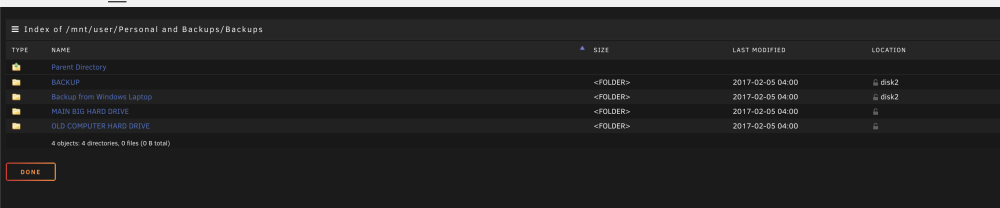
All the folders that the name are scrambled all seem to not have a "location" in that tab... but can still use and access them. That's the pattern. How can I add a location to them?
-
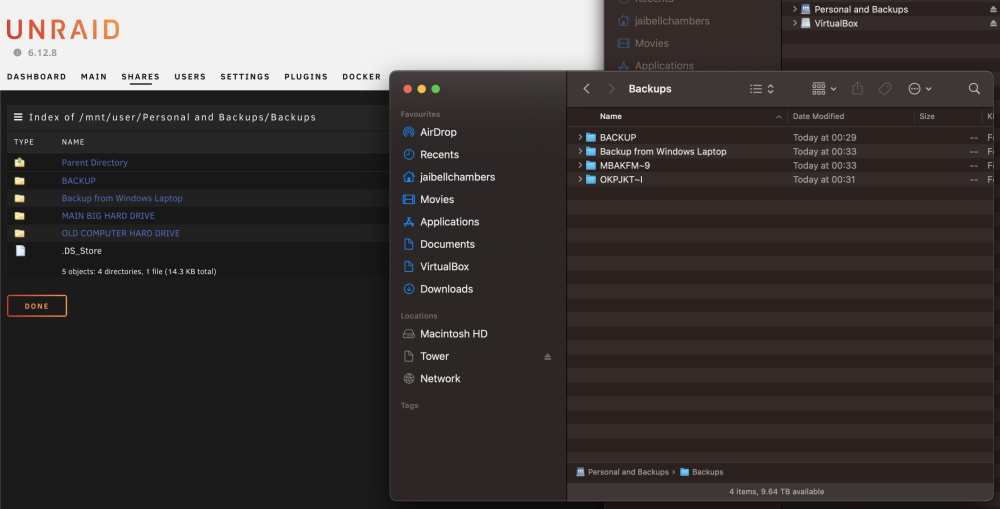
I've just realised that on the Unraid UI it doesn't have a location for the folder names that are scrambled... yet I can still open it and the files within. Has this got something to do with it?
-
Hi All! I've tried deleting the DS Store file and it didn't work. Here is my diagnostic file.. I'd really appreciate a hand here. Thanks all x tower-diagnostics-20240322-0005.zip
-
Hi! Just started transferring lots of old drives to my array via Krusader. All going well - but then when i delved in via my mac I can see that some folders the names aren't transfering peroply. So I checked via the Unraid UI and it's correct but when accessing on my mac they are incorrect. Why could this be? On the screenshot, the left is the Unraid UI which is correct, and on the right is mac which isn't. It seemed to have show as random letters and numbers on my mac. Any help?