




Skip to content
View in the app

A better way to browse. Learn more.

Unraid

A full-screen app on your home screen with push notifications, badges and more.

To install this app on iOS and iPadOS
  1. Tap the Share icon in Safari
  2. Scroll the menu and tap Add to Home Screen.
  3. Tap Add in the top-right corner.
To install this app on Android
  1. Tap the 3-dot menu (⋮) in the top-right corner of the browser.
  2. Tap Add to Home screen or Install app.
  3. Confirm by tapping Install.

Frankxue

Members
  • Joined

  • Last visited

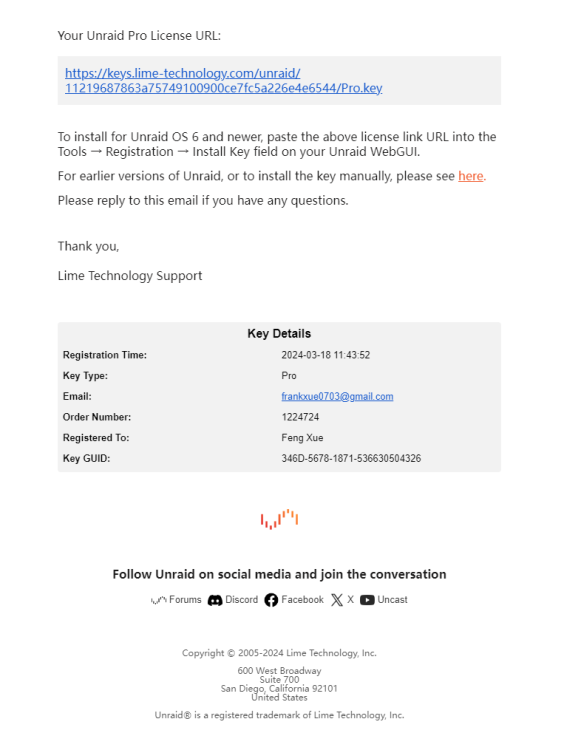
  1. When registering, the USB flash drive is a GUID 346D-5678-9011-372068633766 The USB disk used after purchasing the license is GUID 346D-5678-1871-536630504326 Now how to do
  2. So i'm trying to reinstall UNRAID. When I enter my original basic key and try to request a new one I get the following error: The license key file does not correspond to the USB Flash boot device. Please copy the correct key file to the /config directory on your USB Flash boot device. You may also attempt to Purchase or Replace your key. License key type Trial - invalid key Registered to Trial User Registered on Fri, 15 March 2024 Registered GUID 346D-5678-9011-372068633766 Flash GUID 346D-5678-1871-536630504326 Flash Vendor VendorCo Flash Product ProductCode Any help would be much appreciated Thanks
Account

Navigation

Search

Search

Configure browser push notifications

Chrome (Android)
  1. Tap the lock icon next to the address bar.
  2. Tap Permissions → Notifications.
  3. Adjust your preference.
Chrome (Desktop)
  1. Click the padlock icon in the address bar.
  2. Select Site settings.
  3. Find Notifications and adjust your preference.