DreamKiller
Members
-
Joined
-
Last visited
Everything posted by DreamKiller
-
As set up as I described above, this does auto-convert to MP3 and then deletes the FLAC files since my goal is to save space. But reading the docs for lidarr-flac2mp3, you should be able to do what you want by adding the -k option to the FLAC2MP3_ARGS variable. Not sure how you would handle the noted operation though ("Note: This also disables importing the new files into Lidarr after conversion.") There is also a BATCH mode as described in the FLAC2MP3 dos you could use manually from a console terminal, but I haven't explored this yet. To really do what I think you want to do, you may need to have 2 instances of Lidarr, one for lossy MP3 and one for lossless. And 2 different libraries setup in Plex if that is what you use. Maybe look at RiffSphere Home Assistant YouTube channel. He shows how to do this. I have found that it is easier to find FLAC versions than MP3 so you would need to add the FLAC2MP3 mod to the lossy Lidarr instance and setup the qualities and profiles to get the FLAC files if that is all there is. However this seems to me that you are now downloading the same music twice if you have data limits on you internet. See these videos: Unraid - Lidarr: Install Unraid - Lidarr: Configuration Unraid - Lidarr-lossless: Install Unraid - Lidarr-lossless: Configuration Good luck!

-
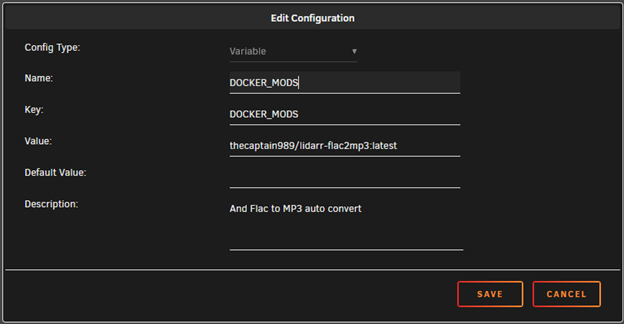
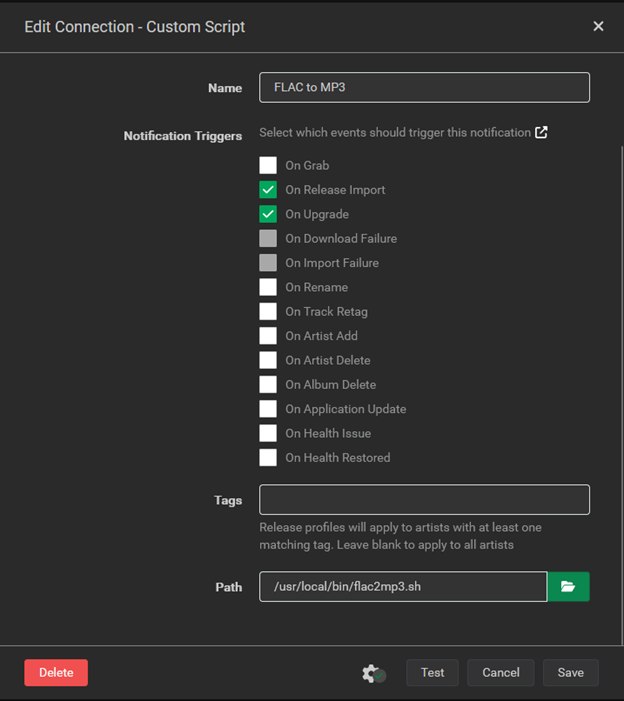
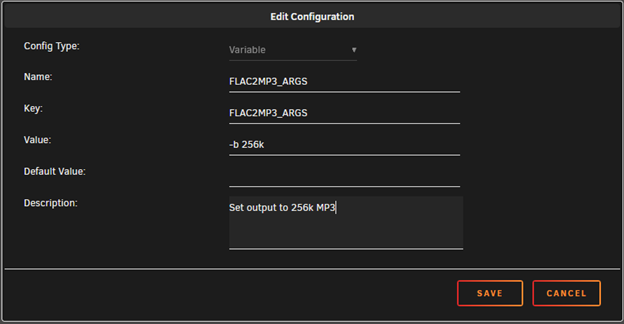
Adding an update to this guide in case someone else finds it like I did. Thanks to the OP for posting this guide, I wanted to do the same thing to auto convert FLAC files to smaller MP3 files and this put me on the right track. It seems that TheCaptain989 has continued his work on this and if you use the linuxserver/lidarr docker container, there is a easier way to add this and do it so that whenever the container is updated, this mod will also persist and be added to the update automatically. In the linuxserver/lidarr Unraid template, you just add the variable DOCKER_MODS with this value "thecaptain989/lidarr-flac2mp3:latest" and then apply the changes. This will pull in the scripts. Then in Lidarr add the Connection custom script as described above: And just like that it worked for me. And the mod should persist when linuxserver updates their lidarr container. Note that as is, this will convert to MP3 @ 320Kbps. Looks like you change this, but I haven't tried that yet (see readme at TheCaptain989). Update: Adding this environment variable to the Lidarr Unraid docker template, you can set the MP3 output bit rate to whatever you want. The below sets it to 256kbits/sec. And again, thanks to OP thejasonparker and TheCaptain989! Love this and works perfectly for me.