




Skip to content
View in the app

A better way to browse. Learn more.

Unraid

A full-screen app on your home screen with push notifications, badges and more.

To install this app on iOS and iPadOS
  1. Tap the Share icon in Safari
  2. Scroll the menu and tap Add to Home Screen.
  3. Tap Add in the top-right corner.
To install this app on Android
  1. Tap the 3-dot menu (⋮) in the top-right corner of the browser.
  2. Tap Add to Home screen or Install app.
  3. Confirm by tapping Install.

tylxr

Members
  • Joined

  • Last visited

  1. Awesome. I just did the new config. Things seem... alright so far lol I think I've learned my lesson about not running a parity drive and not preclearing drives. Thank you for the help!
  2. Is there any specific option on should choose?
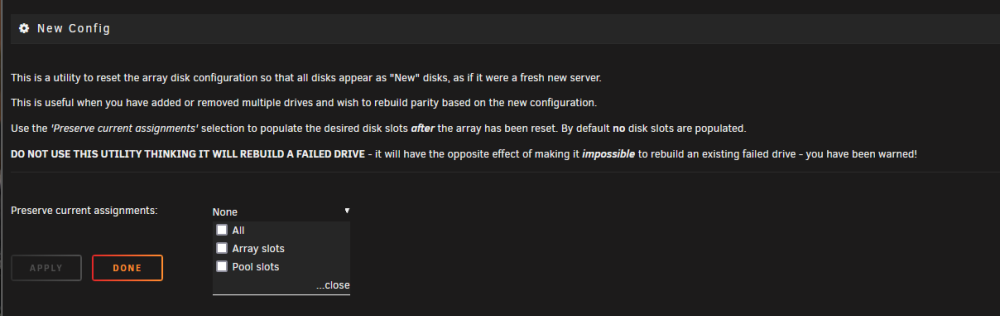
  3. I'm fairly confident I can live without whatever little data was on there but I'm not sure what to do at this point. How would I go about removing the device from the array? This is all I'm seeing in UNRAID
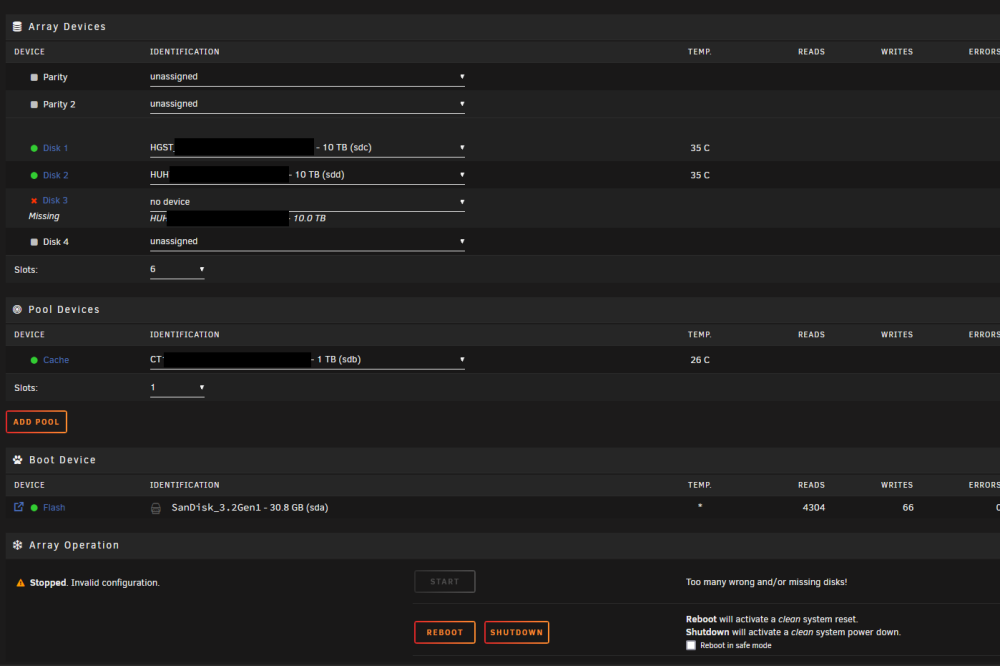
  4. Hi there, I had a new drive die after a couple days in my UNRAID server (it just clicks, doesn't show up in UNRAID anymore). I think it was only using ~1% space so I don't think anything was actually on it. Unfortunately, I did not have a parity drive setup. Am I screwed?

Account

Navigation

Search

Search

Configure browser push notifications

Chrome (Android)
  1. Tap the lock icon next to the address bar.
  2. Tap Permissions → Notifications.
  3. Adjust your preference.
Chrome (Desktop)
  1. Click the padlock icon in the address bar.
  2. Select Site settings.
  3. Find Notifications and adjust your preference.