





Keida
Members
-
Joined
-
Last visited
-
root@HomeLab:~# docker network ls NETWORK ID NAME DRIVER SCOPE d1ba060688da br0 ipvlan local 3d6ee64db36c bridge bridge local eb41f178a2cd host host local 423d76e065ec immich_default bridge local bfb5318a9fa1 none null local 0835ca250c75 palworldstack_default bridge local c834ca53a346 pelican_net bridge local Adding that config.yml with the changes needed and now the container stays open. Awesome!
-
you are refering to the screen shot right? thats the config.yml the webui gives to my understanding. i took that and saved it into /mnt/user/appdata/pelican-wing/etc/pelican/ from there i try to run the wing container and get met with the pool overlapping errror. Checking on the config.yml after that still shows only what the webgui says to save there. no changes sorry if im coming off poorly, im new to this stuff and could be missing something simple. I really appreciate your help. I suppose i should include the full log from the wing container. INFO: [Dec 26 13:37:28.503] writing log files to disk path=/var/log/pelican/wings.log INFO: [Dec 26 13:37:28.503] loading configuration from file config_file=/etc/pelican/config.yml INFO: [Dec 26 13:37:28.509] configured wings with system timezone timezone=America/Chicago INFO: [Dec 26 13:37:28.509] configured system user successfully gid=100 uid=99 username=nobody INFO: [Dec 26 13:37:28.510] fetching list of servers from API INFO: [Dec 26 13:37:28.798] processing servers returned by the API total_configs=0 INFO: [Dec 26 13:37:28.798] finished processing server configurations duration=92.159µs INFO: [Dec 26 13:37:28.799] creating missing pelican0 interface, this could take a few seconds... FATAL: [Dec 26 13:37:28.800] failed to configure docker environment error=Error response from daemon: Pool overlaps with other one on this address space Stacktrace: Error response from daemon: Pool overlaps with other one on this address space ____ __ Pelican _____/___/_______ _______ ______ \_____\ \/\/ / / / __ / ___/ \___\ / / / / /_/ /___ / \___/\___/___/___/___/___ /______/ /_______/ Copyright © 2018 - 2024 Dane Everitt & Contributors Website: https://pelican.dev Source: https://github.com/pelican-dev/wings License: https://github.com/pelican-dev/wings/blob/main/LICENSE This software is made available under the terms of the MIT license. The above copyright notice and this permission notice shall be included in all copies or substantial portions of the Software. I also see you asked for the docker network ls root@HomeLab:~# docker network ls NETWORK ID NAME DRIVER SCOPE d1ba060688da br0 ipvlan local 3d6ee64db36c bridge bridge local eb41f178a2cd host host local 423d76e065ec immich_default bridge local bfb5318a9fa1 none null local 0835ca250c75 palworldstack_default bridge local
-
Thank you for your response, looking at the config.yml there doesnt seem to be a spot called netowrk mode or pelcan_nw or pelcan_net.
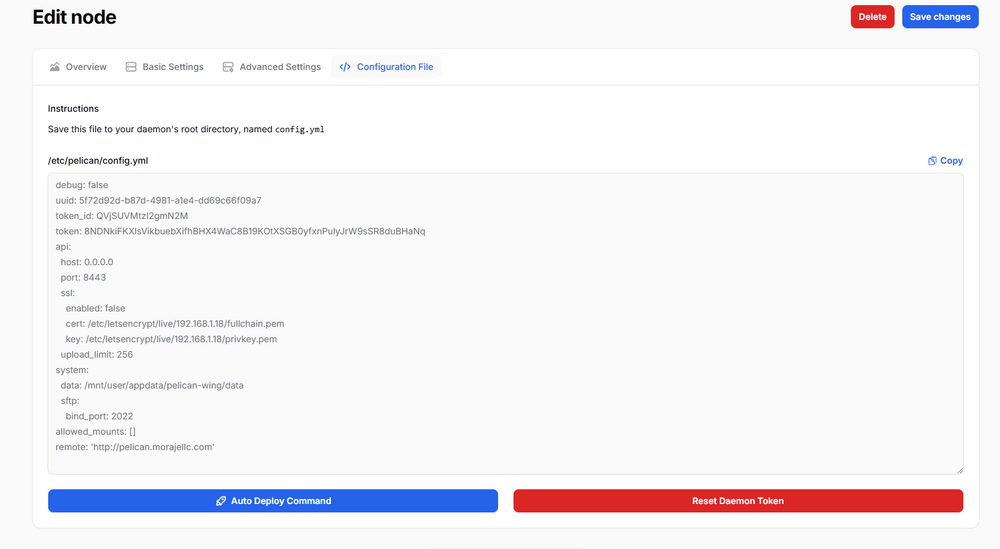
-
Good evening, I really want to get pelican up an running. I cant seem to set it up for the life of me. i cant get pelcan panel and wing to run at the same time. Wing will close right away. Even with the config.yml looking at the log for wing the only thing to note is FATAL: [Dec 25 23:54:14.859] failed to configure docker environment error=Error response from daemon: Pool overlaps with other one on this address space Stacktrace: Error response from daemon: Pool overlaps with other one on this address space i would gladly make a donation for help getting it running if thats aloud.
-
my server seems to become unresponive after a short while. I thought it was my flash drive failing but even after using a new one of a differnt brand it still has the same issues. The server itself runs around 29c. I also tried updated the mother board bios and turrning off nearly all the docker apps. syslog im desperate, im fairly new to server stuff and its crushing to finally get some stuff wokring but for it to keep crashing on its own.

