





j15big
Members
-
Joined
-
Last visited
-
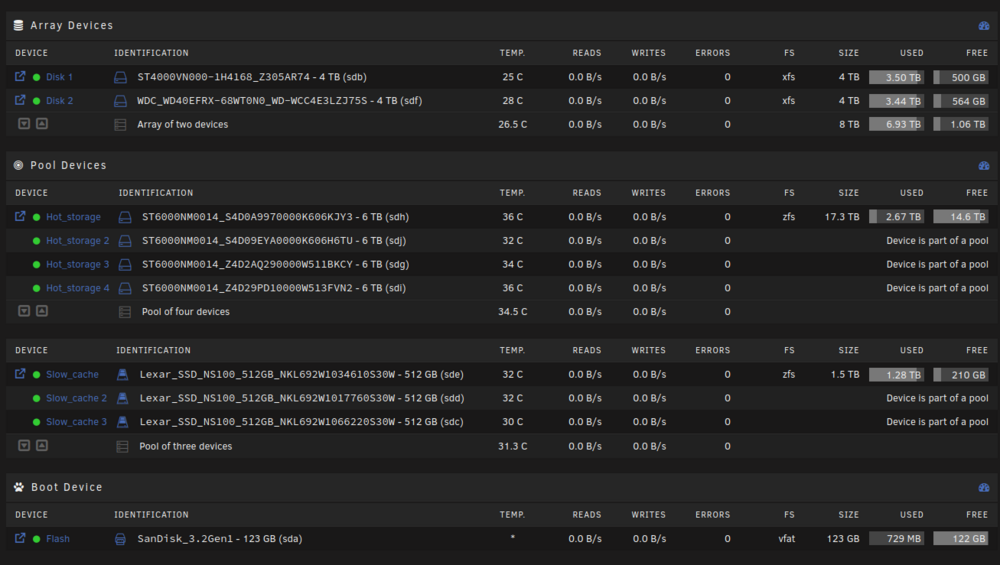
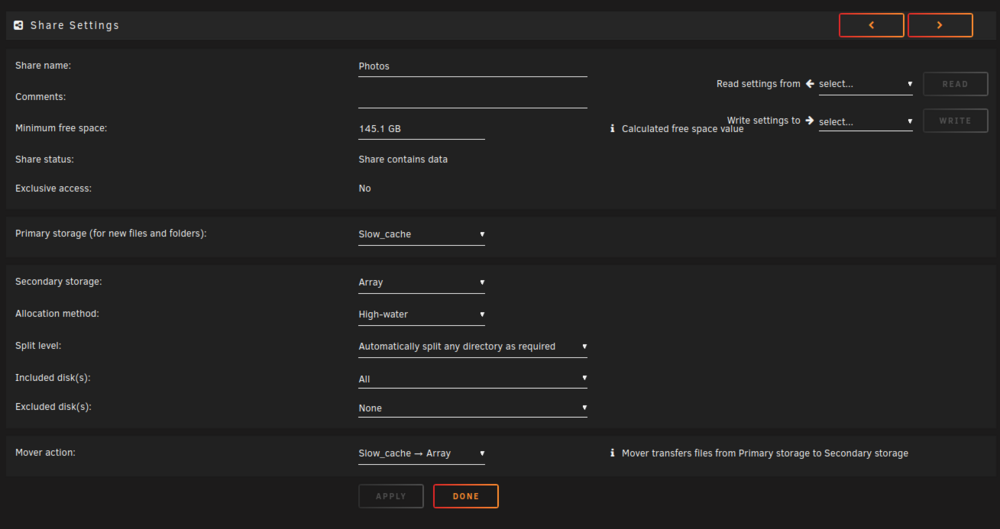
I have 2 ZFS pools and an Array. I'm still waiting for some disks to come in, so my server isn't fully populated yet, but I'm starting to transfer files. I've read that unraid doesn't support moving files between two pools natively (yet). I'm wondering if it's ok if I move data (using unbalanced) from a share's primary storage pool to another pool that isn't listed in the shares settings. Example: - slow_cache = zfs raid0 pool - hot_storage = zfs raidz1 pool - Array = normal unraid array - Share "Photos" - Primary storage: slow_cache - Secondary storage: array If I use unblanaced (or some other method) of moving data from the Photos share from "slow_cache" to "hot_storage" (which isn't listed in it's share's settings), will that cause problems? I tested it with a small amount of data and it seemed to be ok, but wanted to confirm before moving a bunch more data. Thanks! powerhouse-diagnostics-20240520-1209.zip
-
Hello! I'm trying to add in disk temperature monitoring to my telegraf container. The existing plugin options didn't seem to work for me. I decided to try and write a pretty simple bash script and add it in as an [[inputs.exec]] section to my telegraf config. To make a long story short, the script works as expected when I exec into the container and run it (as root). But when run by telegraf, I get permission denied. How do I know it's a permissions issue and not something else? I added some temporary logging to the bash script. As I mentioned before, the script outputs disk temps when run as root. But when it's run via the app/telegraf user, it clearly states: What have I tried to fix it? I've been at this for a while. Some things I've tried: - Adding --cap-add to the extra options. I tired: --cap-add=CAP_SYS_ADMIN \ --cap-add=CAP_DAC_OVERRIDE \ --cap-add=CAP_SYS_ADMIN \ --cap-add=CAP_DAC_OVERRIDE --cap-add=CAP_SYS_RAWIO - Adding --user='root' to the extra options - Adding in /dev/<device> both as a mount point and as a device Config docker run -d --name='telegraf' --net='host' --privileged=true -e TZ="America/Los_Angeles" -e HOST_OS="Unraid" -e HOST_HOSTNAME="Tower" -e HOST_CONTAINERNAME="telegraf" -e 'HOST_PROC'='/rootfs/proc' -e 'HOST_SYS'='/rootfs/sys' -e 'HOST_ETC'='/rootfs/etc' -e 'HOST_MOUNT_PREFIX'='/rootfs' -l net.unraid.docker.managed=dockerman -l net.unraid.docker.icon='https://github.com/atribe/unRAID-docker/raw/master/icons/telegraf.png' -v '/var/run/utmp':'/var/run/utmp':'ro' -v '/var/run/docker.sock':'/var/run/docker.sock':'rw' -v '/':'/rootfs':'ro' -v '/sys':'/rootfs/sys':'ro' -v '/etc':'/rootfs/etc':'ro' -v '/proc':'/rootfs/proc':'ro' -v '/mnt/user/appdata/telegraf/telegraf.conf':'/etc/telegraf/telegraf.conf':'rw' -v '/run/udev':'/run/udev':'ro' -v '/dev':'/dev':'rw' --cap-add=CAP_SYS_ADMIN --cap-add=CAP_DAC_OVERRIDE --cap-add=CAP_SYS_RAWIO --cap-add=CAP_DAC_OVERRIDE 'joeysantana/telegraf-custom:latest' I'm using a custom image because I needed to install a few tools for other plugins. FROM telegraf:latest RUN apt-get update && apt-get install -y --no-install-recommends \ smartmontools lm-sensors nvme-cli ipmitool && \ rm -rf /var/lib/apt/lists/* RUN groupadd -g281 docker RUN usermod -aG docker telegraf Any tips on how I can get this permissions issue figured out? Thanks in advance!

