





kounelii
Members
-
Joined
-
Last visited
-
Hi, 2 servers, about a month apart created. 2 identical usb flash drives (sandisk) bought new for this setup. both flash drives failed this summer (about same time) to read only! chatgpt (of course) led me to check if operating system marked the drives as read only or the flash themseves were reporting read only to the saystem, and it's the latter. need to change the boot flash to new usb. are these the steps to take? is there any guide to moving to new flash drives? also, does unraid make a lot of io to the boot drive? is there a way to minimize writes in order to minimise wear from excessive i/o? diagnostics might help i guess thanks :-) fuji-diagnostics-20261022-1536.zip opti-diagnostics-20261022-1535.zip
-
kounelii changed their profile photo
-
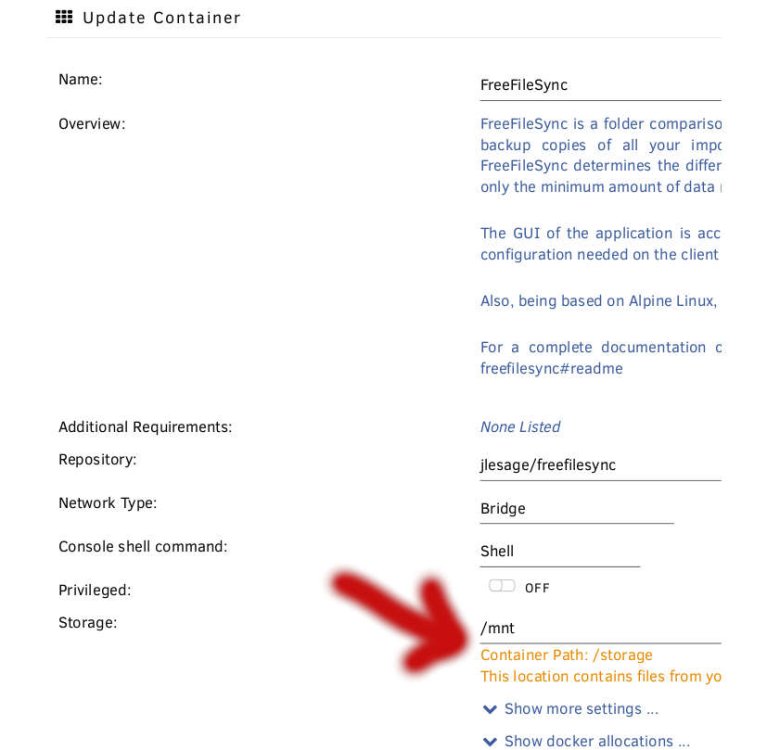
in the field container path, just use /mnt you will have access to the whole unraid array (and more... so be carefull)