





96dervalics
Members
-
Joined
-
Last visited
-
Thank you I understand now!
-
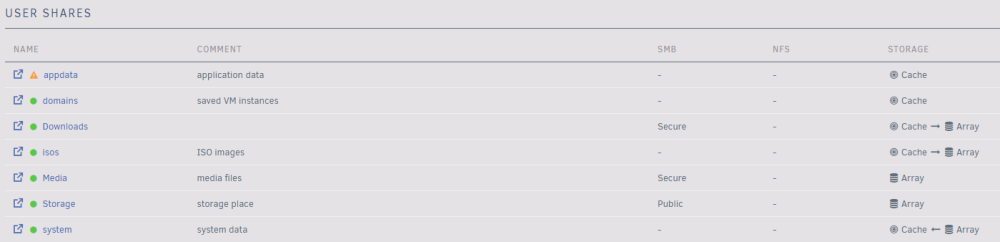
Hello! When I tried unRAID I used only 1 disk, now I added 2 extra one (1 for parity and 1 for more space) and also an SSD to the cache pool. So I need to configure my Shares to use the cache pool. I found this comment: Here is my current configuration: - appdata: cache only - domains: cache only - downloads: cache primary, then move to the array - isos: cache primary, then move to the array - media: array only - storage: array only - system: cache primary, move to cache from array The problem is no matter what I do in the pool devices the cache only used 5.73mb which is pretty low, so probably nothing really on cache. How can I fix this? Also this configuration is okay?
-
Hello! I have a home server with a 16tb HDD, mainly using plex on it, also storing some family photos/videos. The HDD is almost full, so I decided to buy 2 more for +16tb storage and 1 for data protection. Now I want to use unRaid, but I have to format my 16tb HDD to use it on unRaid, becuase it uses a different file system? Whats the best way to move all of my content?
