





muko
Members
-
Joined
-
Last visited
-
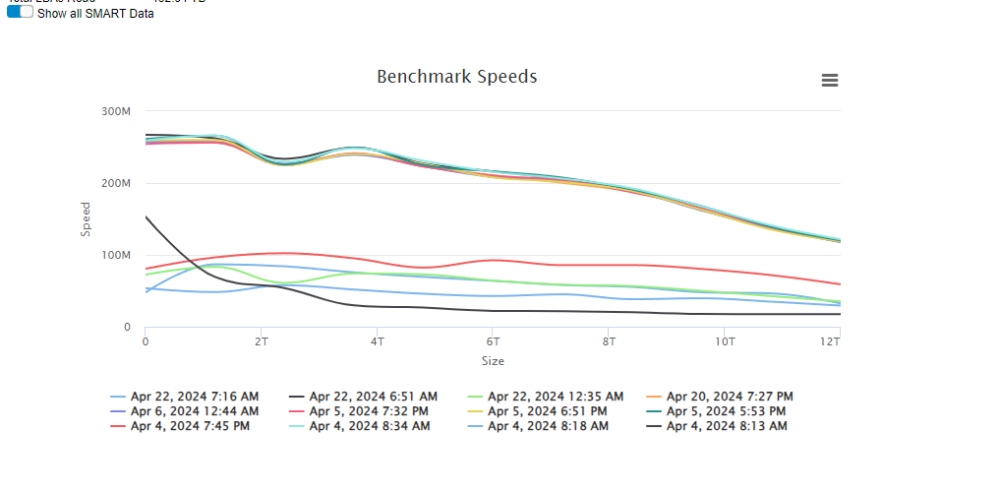
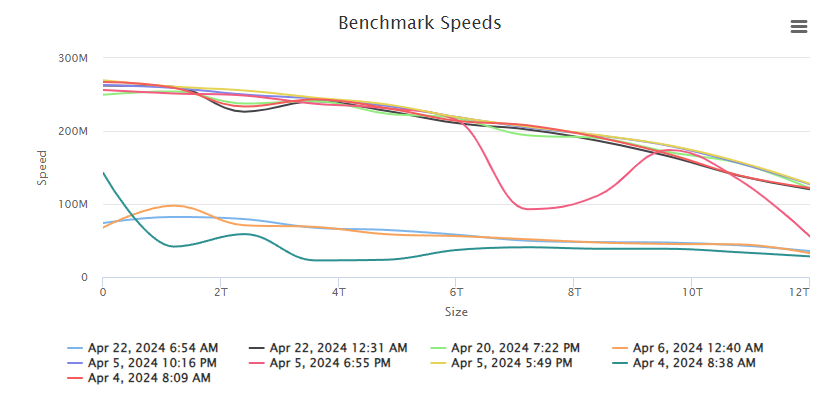
Hi again, sorry for the double post. I did some further testing today. What I did: 1) I moved all my drives to yet an other PC. Exept of the two HDD the NVME cache and the USB drive every pice of hardware was different. Result was that the issue didnt. change. Still one drive was very slow. 2) I then createt usb drive with a fresh unraid test version install. I used a NVME drive that I had laying around as my array and put everything back in my "old" PC. Just installed the unassigned divece plugin and diskspeed. The result was both drives at full speed. 3) I replaced the fresh USB drive with my "production" one reinserted my cache drive and voila the error is back. Interesting to add here that again the error moved from one drive to the other comparing the situation before step 1 and after. For me it seems that it realy comes down to the unraid installation ?!? An other thing I noticed during doin all of that. Starting the array takes like ages. So I would also exclude a lot of processes that are started after the array is running. Edit: Ok I think I now identified the error. However, I still don't fully understand it. Maybe you can help me out.. I noticed that ZFS scrup was running. When I stoped that, we're back at full speed. I still don't understand why it's sometimes the one and sometimes the other drive? Can anyone explain that for me? Edit 2: I think I have the full picture now. I just made an other little experiment. I started scrub and did the speed test. I figured that my main drive was slow. Parity at full speed. I did that test several times. Next I shuted down the PC and switched the sata cable between the two drives. After reboot I started scrub again and I did an other speed test. Now my party was slow. Here comes the thing: Disk Speed Scans the SATA controllers once. It won't recocnize if you switch SATA cable. So after switching my main drive was shown as parity and vice versa. After hitting that rescan button the main drive speed test is the slower one again. My goodness, that cost me some of my life. I was about to buy some new drives ;(
-
In that case I'm very positive
-
Yeah, more or less. As one drive is the parity and other one is drive1. I m new to unraid so I don’t know wether there are scenarios when parity only is accessed by anything and not the data?
-
But how likely is it that the same problem is on two different bords. Fun fact: I didnt touch anything since I run the speedtest last time. System was powered all the time. Now I just run the test again and boths HDD are at full speed. Magic
-
Hmmm strange. I was thinking that it’s an hardware issue. However, after changing the whole system except the drives and the PSU, I still have the problem. I think with switching the SATA cable, I can move the problem from one to the other device. Could it be a driver issue?
-
And which disk? It happens on on both ones. Some times the one sometimes the other. However, it’s always only one of the two.
-
Hi guys, I have a very stange Problem. Somtimes one of my disks is very slow. Every time this happens its only one of the two drives. I've changed the SATA cables and the mainboard and RAM ( for an other reason ) and still it happens. Any clue? unraid-server-diagnostics-20240422-0729.zip
-
Thanks a lot for your reply. Looks as if I have/had RAM issues. Memtest had a lot of erros. I now switched to a RAM Stick of my desktop pc and it seems to run just fine. I will test it for a few more days to be sure that this was the issue. I'm wondering if I might have currupted data now as I moved all of my data to the unraid server using non working RAM. However, after copying the data I run beyond compare the check if the data on my old nas and the unraid system are the same with no errors... What do you think, is it likely that my data are currupted now/
-
Hi guys, hope you can help me. Since my unraid system was set up I'm havin a lot of issues with the system crashing. This happens every 1-2 days. Alao it's appears to be a little different from time to time. Sometimes the web UI is completly gone, sometimes I can still access it but not do anything. Thanks in advance. unraid-server-diagnostics-20240409-0829.zip syslog-previous (2)

