





RobF285
Members
-
Joined
-
Last visited
-
Did not see that tick box at all. Either blind, ignorant or it didn't appear. But regardless.... THANK YOU. Your input has been truly valuable.
-
When i tried to remove the parity disk without New Config the array says a disk is missing and is not allowed to start.
-
Unraid Start Parity Sync Manually. For anyone that runs into this issue and like me needed it explaining like a 5 year old. To Start a Parity Sync you must:- 1. Make a note of your disk assignments and order. Ideally I would suggest to note the serial number of each disk as it pertains to each slot 2. Stop the Array 2. Open Tools then New Config 3. Choose to preserve your pools if you like but not assignments 4. Go back to Main and add your drives back, but NOT the parity drive. Add them in the same order if you need to. I think this is best 5. Start the Array 6. Stop the Array 7. Add your Parity Drive back into the Parity Drive Space 8. Start the Array. A Manual Parity Sync, NOT CHECK, should now be running.
-
I have stopped the CHECK. How do i now start a SYNC?
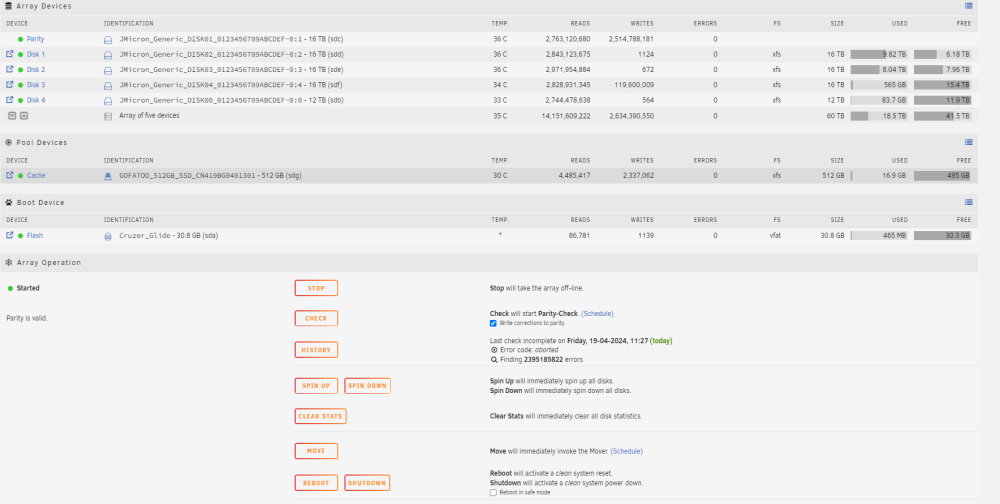
-
Is that an option that will appear on this screen when it is completed?
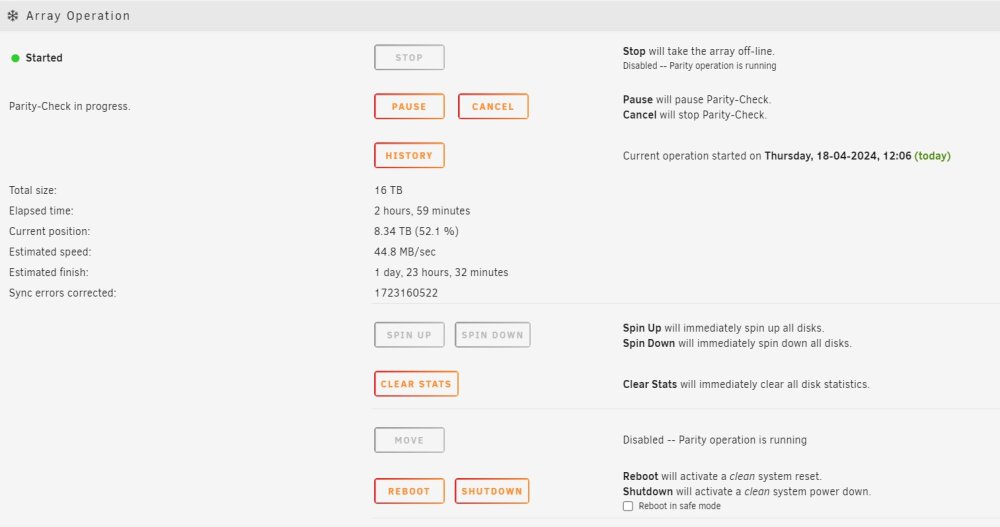
-
I do not understand what you mean by run a check. What check? Is there a tool somewhere that i should run?
-
As the 1st parity sync hadn't finished i am guessing that it is still seeing errors from where the old parity sync had got to on the same parity disk. My gut feeling is to just let this parity sync finish and that way all is "safe". It doesn't appear to be overwriting my data with faulty parity data. I think the 1st sync that i killed when i added an extra drive was around 52% complete. This one is at 49.5%. I am hoping that as i get to 60% or so, the parity disk will have no holdover data left from the first incomplete sync and the errors will stop. The trouble with all this is i just dont know. As i think about it... This current parity sync is the 3rd. I stopped the second due to tonnes of these sync errors. When the 3rd started it did not get sync errors until it passed the percentage of where i had stopped the second sync. I hope that makes sense. What check should i run to confirm all is ok?
-
Hi All, I am very new to unraid and just built myself an array. It did consist of 4x16tb drives. But i added a 5th 12tb drive... BEFORE the first parity check was completed. In the process of doing that, unraid pooped the bed and i lost data from one of my drives. I think because it put the existing parity drive as disk 3 in the array and what was disk 3 as the parity drive. I am now 2 days into what is ostensibly the first parity sync of the new new array and it is throwing up billions of corrected sync errors. I have not got a clue what is going on. I know my data isn't "safe" until the parity check is complete. Or is it somehow slowly killing my data as it goes? Any file i access seems to be totally fine. I just don't know what is going on or what i should do, if anything. Thank you for your help Rob nas-diagnostics-20240418-1124.zip
-
RobF285 joined the community
-
Hi All, I am very new to unraid and just built myself an array. It did consist of 4x16tb drives. But i added a 5th 12tb drive... BEFORE the first parity check was completed. In the process of doing that, unraid pooped the bed and i lost data from one of my drives. I think because it put the existing parity drive as disk 3 in the array and what was disk 3 as the parity drive. I am now 2 days into what is ostensibly the first parity sync of the new new array and it is throwing up billions of corrected sync errors. I have not got a clue what is going on. I know my data isn't "safe" until the parity check is complete. Or is it somehow slowly killing my data as it goes? Any file i access seems to be totally fine. I just don't know what is going on or what i should do, if anything. Thank you for your help PS. I know i am going to need to upload a diagnostic file but i can't see anywhere to do that? How do i/we/you normally go about it? Rob


