salar
Members
-
Joined
-
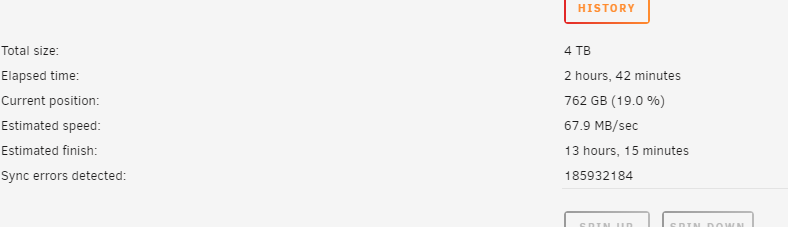
you're right, id did that 🤦♂️. so for those who may have the same problem. As @Kilrah said, I checked the "parity is valid" checkbox, so the parity sync did not start automatically. I took the following steps to get the parity sync working again: Cancel parity check Tools --> New Config add array's disc start array stop array add parity start parity sync
-
thanks for your reply. thats means, that the parity check is wrong and i should stop it, and figure out how to start the sync ? what i did was that i added the disks to the array and then added the parity disk and then started the array.
-
@JorgeB thanks for your prompt reply :). I don't remember that i saw a parity sync option or button. Where or how can i do a parity snyc ? thats means, that i should stop the parity check, right ?
-
Hello Unraid Community, I recently installed Unraid 6.12.10 on my mini PC and have set up my storage with two 1TB HDDs formatted with XFS (which have Data on), and a brand new 4TB HDD. I prepared the 4TB drive using the preclear feature from the Unassigned Devices plugin. I've designated this 4TB HDD as a parity drive and initiated a manual parity check without enabling the 'write corrections' option. As the parity check progresses, I'm noticing an increasing number of sync errors being reported. Is this normal for a first-time parity check? I would appreciate any insights or suggestions on how to address this issue. Thank you!