



Skip to content
View in the app

A better way to browse. Learn more.

Unraid

A full-screen app on your home screen with push notifications, badges and more.

To install this app on iOS and iPadOS
  1. Tap the Share icon in Safari
  2. Scroll the menu and tap Add to Home Screen.
  3. Tap Add in the top-right corner.
To install this app on Android
  1. Tap the 3-dot menu (⋮) in the top-right corner of the browser.
  2. Tap Add to Home screen or Install app.
  3. Confirm by tapping Install.

xtrezpasor

Members
  • Joined

  • Last visited

  1. Ah thats interesting. I unfortunately don't have a 4th slot or I'd add another nvme
  2. I've attached my diagnostics @trurl TIA 215abbington4u-diagnostics-20240803-1806.zip
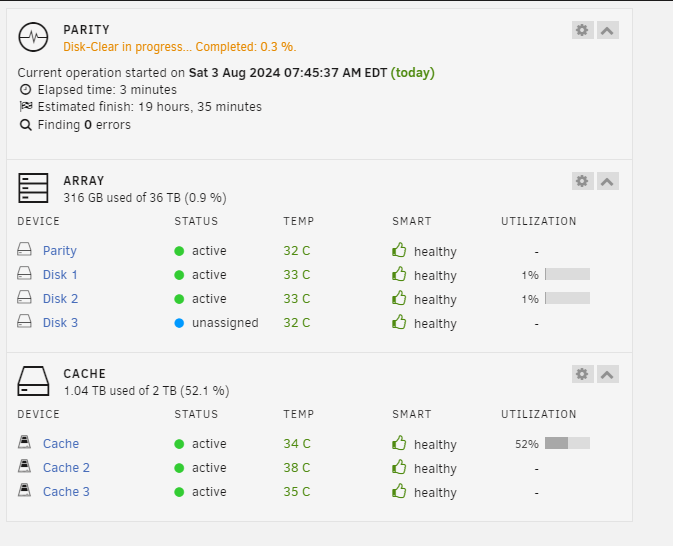
  3. Can someone tell me why my Cache Util says its using 1.04tb of space on one screen and shows me it only is using 83 gb, but only has 1tb free? I am not sure where to even look to determine what is causing this. I recently added the 2tb nvme to the pool because i got a good price on it - prior to that I do not believe i was having this issue but I am relatively new to unraid Should i have put the 2tb in the first position? any help would be appreciated Thank you in advance

Account

Navigation

Search

Search

Configure browser push notifications

Chrome (Android)
  1. Tap the lock icon next to the address bar.
  2. Tap Permissions → Notifications.
  3. Adjust your preference.
Chrome (Desktop)
  1. Click the padlock icon in the address bar.
  2. Select Site settings.
  3. Find Notifications and adjust your preference.