Lee739579651
Members
-
Joined
-
Last visited
-
Thx! I changed it to exclusive mode, it's become better, however when it's copying many small files the speed is still around 10mb/s which is much more slower than the 100mb/s. And I found that when I tried to copy many small files from this folder to a local folder the speed was only 20mb/s. Is there any further way to improve the transmission speed. By the way, I don't think it's the hardware that limits the transfer speed, because the cpu usage is very low when I transfer and the theoretical performance of this SSD should be much higher than that.
-
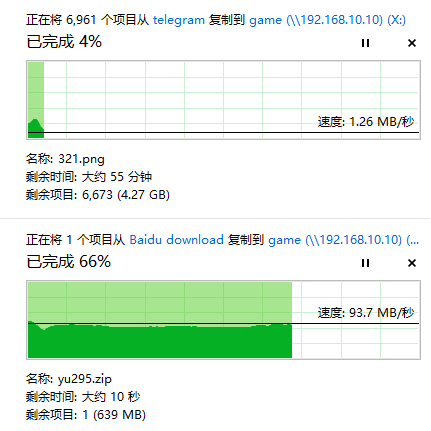
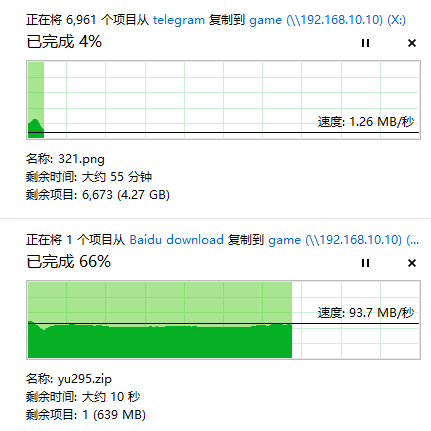
The game folder was shared with my computer through smb, and the computer was connected to the nas through a Gigabit network cable. The game folder is located on a ssd in the pool, its a Samsung pm983a. When I tried to copy a video game to the game folder the transfer speed was very slow, sometimes down to 1mb/s, while I did not have this problem when I transferred the zip file. When I tried to copy the zip package to the game folder and then extract it from the folder, I encountered the same problem, and the extract speed was extremely slow. Anyone know how to solve this problem? All help is appreciated!


-
通过smb把这个game文件夹共享给了我的电脑,电脑与nas之间通过千兆网线连接。game文件夹位于我的池设备中的一块固态硬盘上,硬盘型号是三星pm983a。当我尝试把游戏复制到game文件夹中的时候传输速度奇慢,有时甚至会降到几百k,而当我传输zip文件时就没有该问题。当我尝试把zip压缩包复制到文件夹中然后在文件夹中解压缩时遇到了同样的问题,解压缩速度也奇慢无比。有没有大佬知道这是什么问题? (速度慢的是直接复制游戏到game文件夹,速度快的是直接复制压缩包) (unraid系统下的硬盘状态以及文件系统)