




Skip to content
View in the app

A better way to browse. Learn more.

Unraid

A full-screen app on your home screen with push notifications, badges and more.

To install this app on iOS and iPadOS
  1. Tap the Share icon in Safari
  2. Scroll the menu and tap Add to Home Screen.
  3. Tap Add in the top-right corner.
To install this app on Android
  1. Tap the 3-dot menu (⋮) in the top-right corner of the browser.
  2. Tap Add to Home screen or Install app.
  3. Confirm by tapping Install.

Laserdisk

Members
  • Joined

  • Last visited

  1. Danke hat geklappt, beim nächstenmal weiss ich jetzt: rtfm
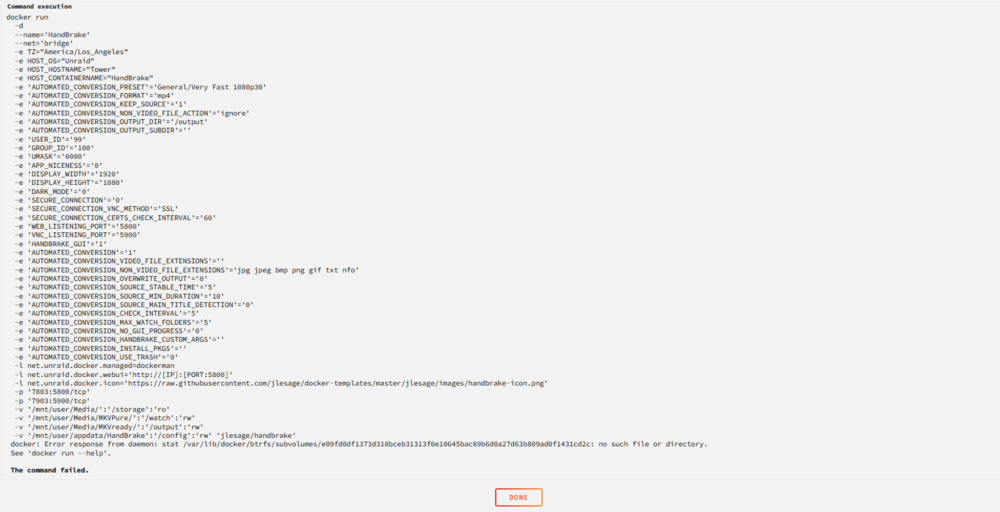
  2. als ich letztens nach hause gekommen bin waren alle meine docker gelöscht alles hat sich einfach wieder instalieren lassen, ausser ein paar docker die alle denn selben fehler bei instalations versuchen zeigen. docker: Error response from daemon: stat /var/lib/docker/btrfs/subvolumes/e09fd0df1373d318bceb31313f0e10645bac89b6d0a27d63b809ad0f1431cd2c: no such file or directory. ich habe versucht docker/installed neu zu installieren über die docker einstelungen, das hat aber nicht geholfen oder geklappt sicher bin ich mir da nicht. der Server wurde ebenfalls schon ein paar mal rebootet. ich bin für jede hilfe dankbar. tower-diagnostics-20240512-0007.zip
Account

Navigation

Search

Search

Configure browser push notifications

Chrome (Android)
  1. Tap the lock icon next to the address bar.
  2. Tap Permissions → Notifications.
  3. Adjust your preference.
Chrome (Desktop)
  1. Click the padlock icon in the address bar.
  2. Select Site settings.
  3. Find Notifications and adjust your preference.