




Skip to content
View in the app

A better way to browse. Learn more.

Unraid

A full-screen app on your home screen with push notifications, badges and more.

To install this app on iOS and iPadOS
  1. Tap the Share icon in Safari
  2. Scroll the menu and tap Add to Home Screen.
  3. Tap Add in the top-right corner.
To install this app on Android
  1. Tap the 3-dot menu (⋮) in the top-right corner of the browser.
  2. Tap Add to Home screen or Install app.
  3. Confirm by tapping Install.

iamDevmin

Members
  • Joined

  • Last visited

  1. Thank you so much! Now I feel like a right idiot. But, it's fixed!
  2. iamDevmin changed their profile photo
  3. Thanks, sorry for missing the pinned post with the info about what to post, here's the diagnostics. robin-diagnostics-20240515-0553.zip
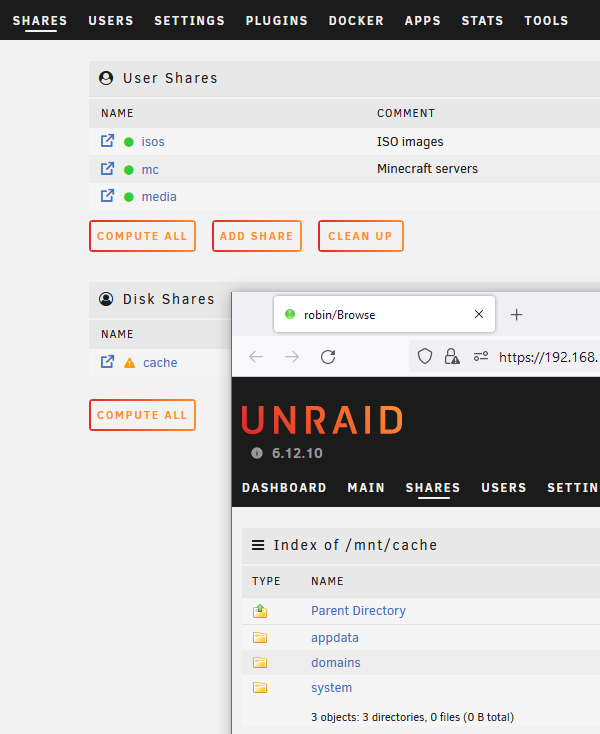
  4. Hello, I just added a single NVMe as a Cache to array. I should also note that I also added a pair of 18TB drives, one as data and one as a replacement parity, and let that rebuild. Then I set "appdata", "system" and the currently unused "domains" folders to be cache only, and ran mover. Mover shifted the files, but then the shares disappeared, see screenshot. I've tried a reboot, and also checked Fix Common Problems plugin but it doesn't even see these as shares. Please help! Thanks.
Account

Navigation

Search

Search

Configure browser push notifications

Chrome (Android)
  1. Tap the lock icon next to the address bar.
  2. Tap Permissions → Notifications.
  3. Adjust your preference.
Chrome (Desktop)
  1. Click the padlock icon in the address bar.
  2. Select Site settings.
  3. Find Notifications and adjust your preference.
