Skip to content
View in the app

A better way to browse. Learn more.

Unraid

A full-screen app on your home screen with push notifications, badges and more.

To install this app on iOS and iPadOS
  1. Tap the Share icon in Safari
  2. Scroll the menu and tap Add to Home Screen.
  3. Tap Add in the top-right corner.
To install this app on Android
  1. Tap the 3-dot menu (⋮) in the top-right corner of the browser.
  2. Tap Add to Home screen or Install app.
  3. Confirm by tapping Install.

psychic

Members
  • Joined

  • Last visited

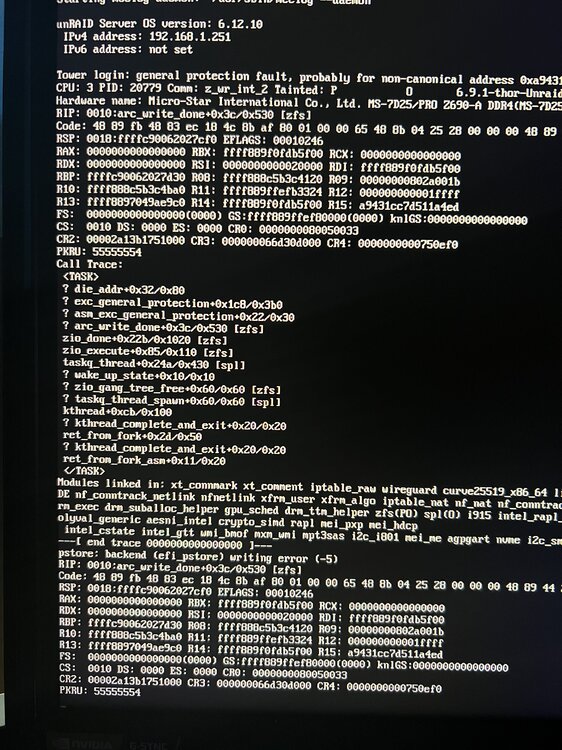
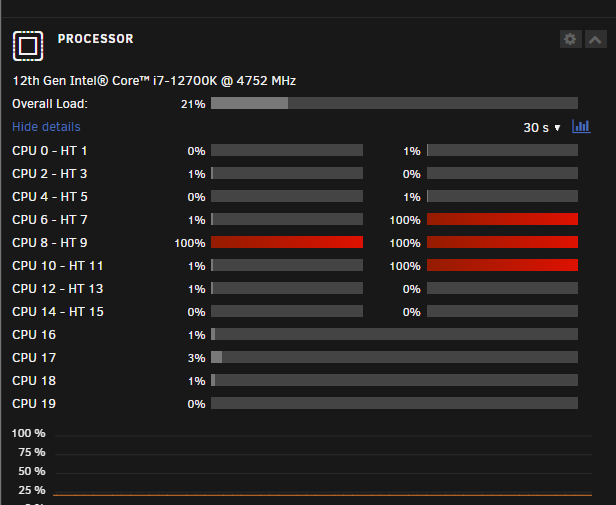
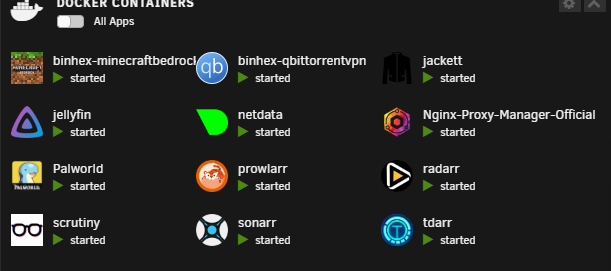
  1. I recently completed my build and setup unraid, but i have been running into this issue consistently since finishing the GUI would lock up, anything running on the network stops working such as smb file shares, 2 of my cores are locked at 100 percent ( as i am writing this it is now 4 cores locked up) docker services are down, im not sure where to even begin with troubleshooting, i switched flash drives, ive went back to the stock zfs larc setting because i thought it was a ram issue
Account

Navigation

Search

Search

Configure browser push notifications

Chrome (Android)
  1. Tap the lock icon next to the address bar.
  2. Tap Permissions → Notifications.
  3. Adjust your preference.
Chrome (Desktop)
  1. Click the padlock icon in the address bar.
  2. Select Site settings.
  3. Find Notifications and adjust your preference.