Fuzy
Members
-
Joined
-
Last visited
-
tower-diagnostics-20240606-2124.zip
-
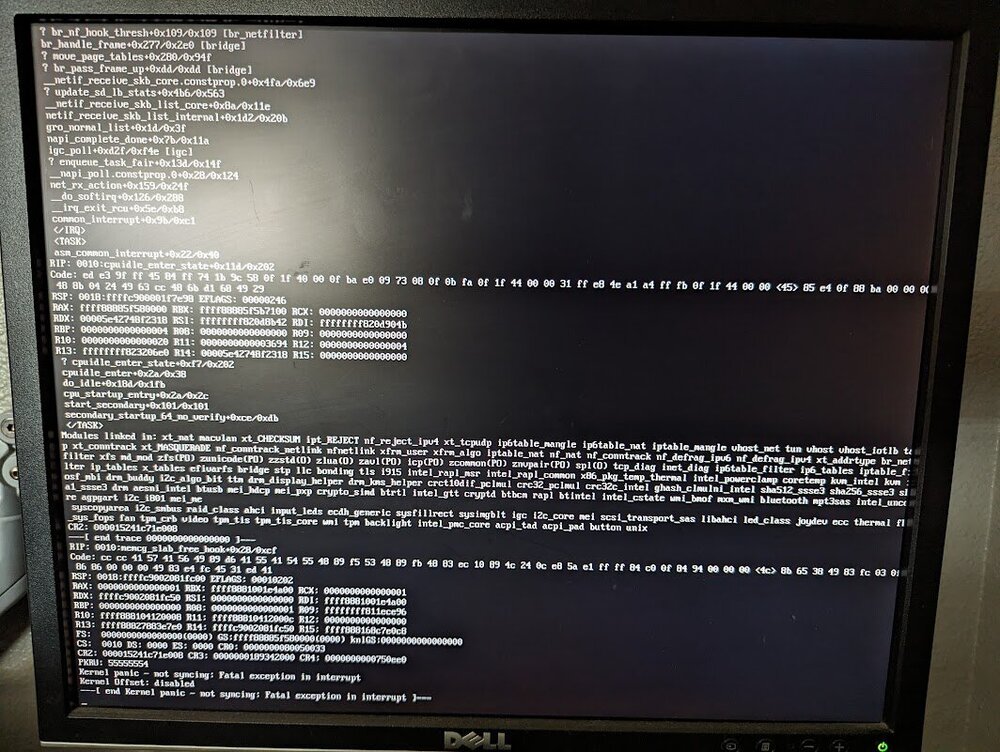
background: System was running create for a several years on older hardware (i5/older mobo). The mobo went bad. Bought a new mobo/CPU/RAM. System booted right up, was working fine for a few weeks and then suddenly starting crashing. Thought it was memory, performed Mem test, all RAM sticks and slots passed without issue but it's still experiencing regular crashes to the point that it won't even respond to anything, keyboard or pings, nothing. Have to manually reset, upon reboot it will begin to perform a parity test, pass and be up for several days before crashing again. Attached is an image of the screen when it crashed yesterday. I restarted it and today this is the log output. Not sure what it means, if anyone can shed light on what next steps might be I would appreciate it. Also attached is the log output from today. unraid-log.txt