ldunklee
Members
-
Joined
-
Last visited
-
Hey JorgeB - thanks again for being super helpful. I'm jumping on the version 7 betaa and currently moving my data around to fully reformat my Unraid setup. I working with 4 x NVME and 2 x SSD, but previously had an array of 4, which I'm now learning should probably have been a pool. Can I get your recommendations? 2 x 2tb NVME - a pool called cache mostly for appdata and transfers, mirrored for redundancy. ZFS here? or would something else be faster 4 x 4tb (2 NVME and 2 SSD) - For general purpose storage, I was thinking ZFS here, with 1 parity (or whatever that's called in a zfs pool. I'm still learning here, so if you've got a better setup to recommend I'm eager to hear it!
-
You're right - it worked just fine. Thank you! The error is still listed, however, when I run the "zpool -import" command. Not sure if I need to be concerned about that?
-
Adding output of command: zpool import root@dunkn1nas:~# zpool import pool: disk1 id: 14425130831282954939 state: ONLINE action: The pool can be imported using its name or numeric identifier. config: disk1 ONLINE nvme3n1p1 ONLINE pool: disk2 id: 8066004336620429800 state: ONLINE action: The pool can be imported using its name or numeric identifier. config: disk2 ONLINE sdb1 ONLINE pool: disk3 id: 16878528302525108289 state: ONLINE action: The pool can be imported using its name or numeric identifier. config: disk3 ONLINE sdc1 ONLINE pool: disk0 id: 5619643743092101906 state: UNAVAIL status: One or more devices contains corrupted data. action: The pool cannot be imported due to damaged devices or data. see: https://openzfs.github.io/openzfs-docs/msg/ZFS-8000-5E config: disk0 UNAVAIL insufficient replicas nvme2n1p1 UNAVAIL invalid label pool: cache id: 16495675138800522101 state: ONLINE action: The pool can be imported using its name or numeric identifier. config: cache ONLINE mirror-0 ONLINE nvme0n1p1 ONLINE nvme1n1p1 ONLINE ro
-
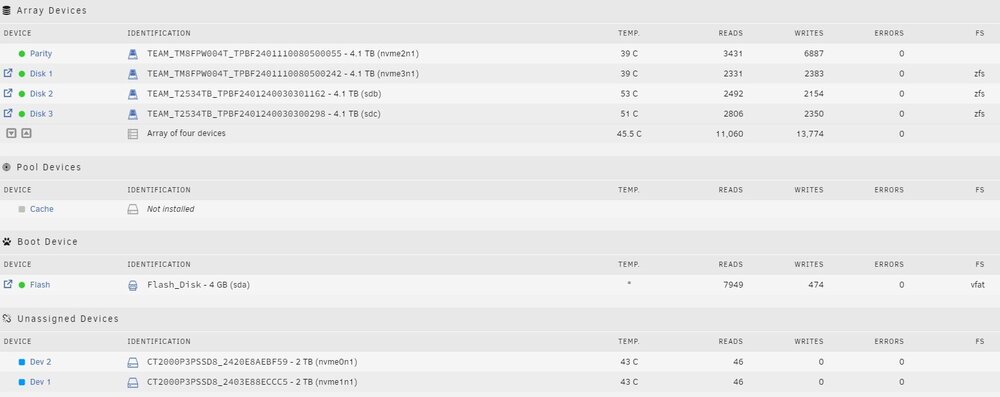
We had an extended power outage overnight and I'm rebooting my Unraid system today. Now I can start the array, and it finds the array without problem (1 parity + 3x 4tb SSD). But it doesn't seem to mount my previous cache pool (2 x 2tb NVME, zfs, raid1) The cache pool drives are visible but now in unassigned devices section. As a result, system cannot find my docker vimage and appdata folders. Is there a best practice to remounting these drives to preserve my previous configuration? I'll attach diagnostics file and images below. Thanks! dunkn1nas-diagnostics-20240630-1110.zip