RayKhouri
Members
-
Joined
-
Last visited
-
Thank you for ensuring. Would be "least full" put f.e. a movie on each drive (thus speeding it up a bit) or would every full run of mover be on 1 disk? trying to optimize a bit as redudency in basis only needs to cover my dockers and tower config as thats the only annoying bit to lose.
-
as requested. tower-diagnostics-20240627-1246.zip
-
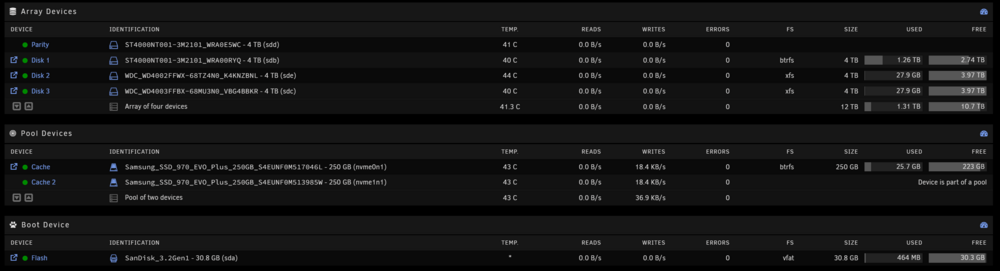
Hello, I use my set-up for automated download to stream. and currently im downloading harder than mover can move my files from the ssd cache. I have mover set to start moving at 40% of cache but still my downloader goes into pause mode (to which i have to manually activate again etc.). So i was thinking about upgrading the cache drives to 1tb. but i do not want to lose my set-up and re-do everything. now im assuming my cache is set-up with parity, so my question is, can i swap 1 than wait for rebuild and than swap another one? (so stop the docker (no vms present), stop the array, swap out 1 ssd, start array, do they parity check etc. shutdown array swap 2nd ssd). Also, it seems everything from my cache goes straight to Disk1 and doesnt get split across the disks, is this best? i think it would be more optimized if it was split? how would i go about doing that? This is a Terramaster f4-424 Pro so i have no additional spaces/slots availble.