




Skip to content
View in the app

A better way to browse. Learn more.

Unraid

A full-screen app on your home screen with push notifications, badges and more.

To install this app on iOS and iPadOS
  1. Tap the Share icon in Safari
  2. Scroll the menu and tap Add to Home Screen.
  3. Tap Add in the top-right corner.
To install this app on Android
  1. Tap the 3-dot menu (⋮) in the top-right corner of the browser.
  2. Tap Add to Home screen or Install app.
  3. Confirm by tapping Install.

chardzard

Members
  • Joined

  • Last visited

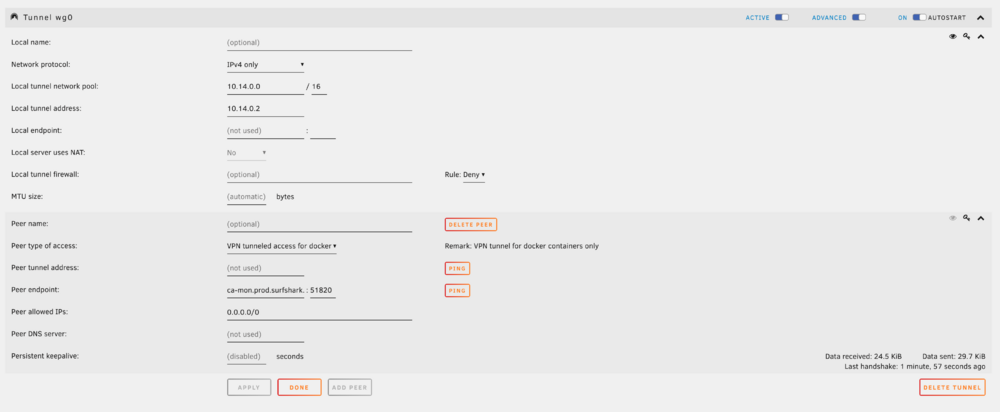
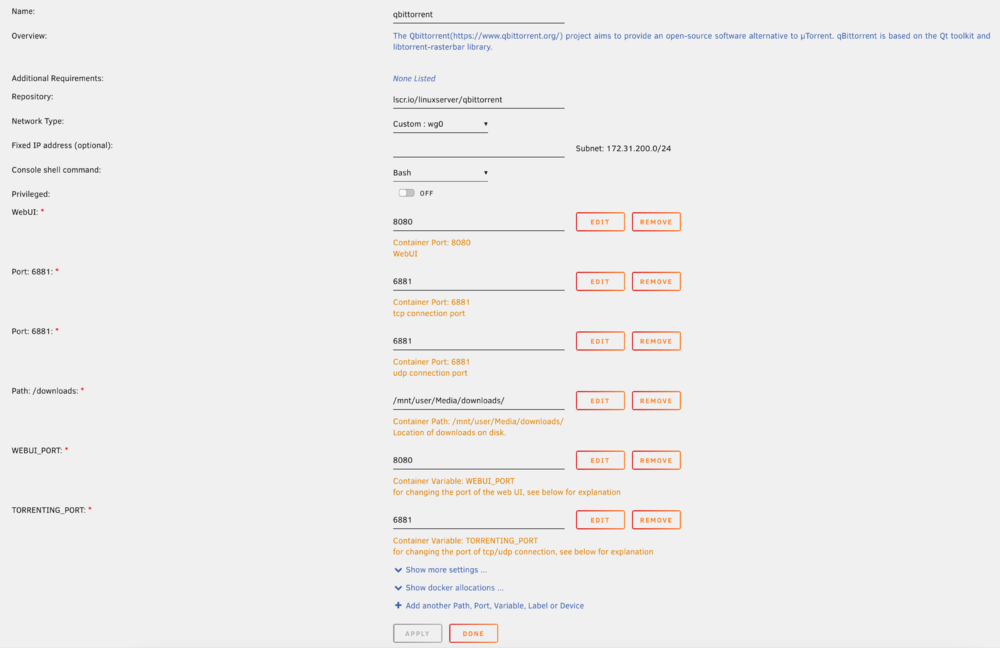
  1. I had to recreate my torrent docker app, and when I did, suddenly the VPN tunnel that I'd had setup stopped working. I've tried restarting the container, I've tried recreating the tunnel (multiple times), and nothing has changed about the how it's all setup since it was working (to the best of my knowledge.) I've attached the settings I currently have for both the VPN and the container. The container starts up just fine, and doesn't show any errors in the logs. When I switch the network back to bridge it works just fine. But when I have it set to the wg0 network, I can't connect to the web UI and the other containers can't talk to it. I feel like I'm taking crazy pills.
Account

Navigation

Search

Search

Configure browser push notifications

Chrome (Android)
  1. Tap the lock icon next to the address bar.
  2. Tap Permissions → Notifications.
  3. Adjust your preference.
Chrome (Desktop)
  1. Click the padlock icon in the address bar.
  2. Select Site settings.
  3. Find Notifications and adjust your preference.