





Starfish4711
Members
-
Joined
-
Last visited
-
Yes, but it's still there and potentially accessible. Sure, if someone would gain access to this file somehow, this person most likely could do much more bad stuff on the system besides just to copy this file. But it's still a piece of security related information that should not stay after usage. Therefor my opinion/suggestion that it should be deleted automatically. As you suggested, I will use that GUI button or write a small script. That "delete" button on the main page sounded dangerous to me, therefor I did not use it before. Thanks for your support!
-
I have re-created the pool, again using btrfs with encryption. According to syslog this time it should be encrypted indeed: Dec 2 21:00:34 nas-langner24 emhttpd: shcmd (506): udevadm settle Dec 2 21:00:34 nas-langner24 kernel: md1p1: running, size: 5860522532 blocks Dec 2 21:00:34 nas-langner24 emhttpd: shcmd (510): /usr/sbin/cryptsetup luksOpen /dev/sdb1 sdb1 --allow-discards --key-file=/root/keyfile Dec 2 21:00:34 nas-langner24 kernel: device-mapper: ioctl: 4.48.0-ioctl (2023-03-01) initialised: [email protected] Dec 2 21:00:36 nas-langner24 kernel: BTRFS: device fsid 2560928a-5aad-4693-b1f5-6dc76d97f289 devid 1 transid 11 /dev/dm-0 (251:0) scanned by udevd (11432) Dec 2 21:00:36 nas-langner24 emhttpd: cache: Encrypted volume present Dec 2 21:00:36 nas-langner24 emhttpd: shcmd (512): /usr/sbin/cryptsetup luksOpen /dev/sdc1 sdc1 --allow-discards --key-file=/root/keyfile Dec 2 21:00:38 nas-langner24 kernel: BTRFS: device fsid 2560928a-5aad-4693-b1f5-6dc76d97f289 devid 2 transid 11 /dev/dm-1 (251:1) scanned by udevd (11433) Dec 2 21:00:38 nas-langner24 emhttpd: cache2: Encrypted volume present Dec 2 21:00:38 nas-langner24 emhttpd: import 30 pool device: (sdb) Samsung_SSD_870_EVO_500GB_S7EWNL0X331366M Dec 2 21:00:38 nas-langner24 emhttpd: import 31 pool device: (sdc) Samsung_SSD_870_EVO_500GB_S7EWNL0X331385N Dec 2 21:00:38 nas-langner24 emhttpd: update_pool_cfg: 30 cache 0 ... ... Dec 2 21:00:39 nas-langner24 emhttpd: mounting /mnt/cache Dec 2 21:00:39 nas-langner24 emhttpd: shcmd (520): mkdir -m 0666 -p /mnt/cache Dec 2 21:00:39 nas-langner24 emhttpd: cache: btrfs verify devices Dec 2 21:00:39 nas-langner24 emhttpd: /sbin/btrfs filesystem show 2560928a-5aad-4693-b1f5-6dc76d97f289 2>&1 Dec 2 21:00:39 nas-langner24 emhttpd: Label: none uuid: 2560928a-5aad-4693-b1f5-6dc76d97f289 Dec 2 21:00:39 nas-langner24 emhttpd: Total devices 2 FS bytes used 144.00KiB Dec 2 21:00:39 nas-langner24 emhttpd: devid 1 size 465.75GiB used 2.01GiB path /dev/mapper/sdb1 Dec 2 21:00:39 nas-langner24 emhttpd: devid 2 size 465.75GiB used 2.01GiB path /dev/mapper/sdc1 Dec 2 21:00:39 nas-langner24 emhttpd: mounting: cache devices: 2 slots: 2 missing: 0 Dec 2 21:00:39 nas-langner24 emhttpd: shcmd (521): mount -t btrfs -o noatime,nodiscard,space_cache=v2 -U 2560928a-5aad-4693-b1f5-6dc76d97f289 /mnt/cache Dec 2 21:00:39 nas-langner24 kernel: BTRFS info (device dm-0): first mount of filesystem 2560928a-5aad-4693-b1f5-6dc76d97f289 Dec 2 21:00:39 nas-langner24 kernel: BTRFS info (device dm-0): using crc32c (crc32c-intel) checksum algorithm Dec 2 21:00:39 nas-langner24 kernel: BTRFS info (device dm-0): enabling ssd optimizations Dec 2 21:00:39 nas-langner24 kernel: BTRFS info (device dm-0): enabling free space tree Dec 2 21:00:39 nas-langner24 emhttpd: shcmd (522): mount -o remount,discard=async /mnt/cache Dec 2 21:00:39 nas-langner24 emhttpd: update_pool_cfg: 30 cache 0 But, what I really don't like: the keyfile used for unlocking the cache pool still exists on the local drive: root@nas-langner24:~# ls -la /root/keyfile -rw-r--r-- 1 root root 799760 Dec 2 21:16 /root/keyfile In my opinion the keyfile should be removed immediately after unlocking drives! Can I delete the keyfile after the array has been started or is it needed for some reason?
-
Understood, what a tremendous GUI bug!!! I guess that means that once again I have to move all data from the cache pool to the array, drop the cache pool and recreate it, hoping that this time it will be encrypted. Which lines can I look for within the syslog file to prove encryption is really in place?
-
Posted a reply more than 3 hours ago, but it is shown in pink and says "Hidden - This content must be approved before it can be edited.". Have no idea why...
-
Yes, that's like it looks now (and should not be). But as shown above the cache pool was specified as diskFsType="luks:btrfs", which means it had been specified to be encrypted. Or can Unraid 6.x specify that without the pool being encrypted in real? When I setup the system, first time I created the cache pool without encryption. Later I decided to encrypt it, but it was not been possible to do this on the existing pool. Therefor I had to move all data to the array, delete the pool and create a new one, this time with encryption enabled. This is what is shown in the picture in my previous post. Since that I had to provide the key file on starting the array. However, I have searched for an old log file, before upgrade to 7.x and found one within a flash backup (at "\logs\syslog-previous" dated 2024/10/28). It contains: Oct 28 15:22:16 nas-langner24 webGUI: Successful login user root from 192.168.178.70 Oct 28 15:23:01 nas-langner24 kernel: mdcmd (31): set md_num_stripes 1280 Oct 28 15:23:01 nas-langner24 kernel: mdcmd (32): set md_queue_limit 80 Oct 28 15:23:01 nas-langner24 kernel: mdcmd (33): set md_sync_limit 5 Oct 28 15:23:01 nas-langner24 kernel: mdcmd (34): set md_write_method Oct 28 15:23:01 nas-langner24 kernel: mdcmd (35): start STOPPED Oct 28 15:23:01 nas-langner24 kernel: unraid: allocating 15750K for 1280 stripes (3 disks) -> that's me logging in to start the array, providing the key file ... Oct 28 15:23:01 nas-langner24 kernel: md1p1: running, size: 5860522532 blocks Oct 28 15:23:01 nas-langner24 emhttpd: shcmd (155): udevadm settle Oct 28 15:23:01 nas-langner24 emhttpd: Opening encrypted volumes... Oct 28 15:23:01 nas-langner24 emhttpd: shcmd (158): touch /boot/config/forcesync Oct 28 15:23:01 nas-langner24 emhttpd: Mounting disks... Oct 28 15:23:01 nas-langner24 emhttpd: mounting /mnt/disk1 ... Oct 28 15:23:01 nas-langner24 emhttpd: mounting /mnt/cache Oct 28 15:23:01 nas-langner24 emhttpd: shcmd (162): mkdir -p /mnt/cache Oct 28 15:23:01 nas-langner24 emhttpd: /sbin/btrfs filesystem show d76f29d1-666f-4e9d-9347-2701cb6969c2 2>&1 Oct 28 15:23:01 nas-langner24 emhttpd: Label: none uuid: d76f29d1-666f-4e9d-9347-2701cb6969c2 Oct 28 15:23:01 nas-langner24 emhttpd: #011Total devices 2 FS bytes used 77.00GiB Oct 28 15:23:01 nas-langner24 emhttpd: #011devid 1 size 465.76GiB used 83.01GiB path /dev/sdb1 Oct 28 15:23:01 nas-langner24 emhttpd: #011devid 2 size 465.76GiB used 83.01GiB path /dev/sdc1 Oct 28 15:23:01 nas-langner24 emhttpd: /mnt/cache uuid: d76f29d1-666f-4e9d-9347-2701cb6969c2 Oct 28 15:23:01 nas-langner24 emhttpd: shcmd (163): mount -t btrfs -o noatime,space_cache=v2 -U d76f29d1-666f-4e9d-9347-2701cb6969c2 /mnt/cache Oct 28 15:23:01 nas-langner24 kernel: BTRFS info (device sdb1): first mount of filesystem d76f29d1-666f-4e9d-9347-2701cb6969c2 Oct 28 15:23:01 nas-langner24 kernel: BTRFS info (device sdb1): using crc32c (crc32c-intel) checksum algorithm Oct 28 15:23:01 nas-langner24 kernel: BTRFS info (device sdb1): using free space tree Oct 28 15:23:01 nas-langner24 kernel: BTRFS info (device sdb1): enabling ssd optimizations Oct 28 15:23:01 nas-langner24 emhttpd: shcmd (164): mount -o remount,discard=async /mnt/cache Oct 28 15:23:01 nas-langner24 kernel: BTRFS info (device sdb1: state M): turning on async discard These lines do not show any indication of encryption (besides "Opening encrypted volumes..."), but I don't know which lines are expected when encryption is enabled...
-
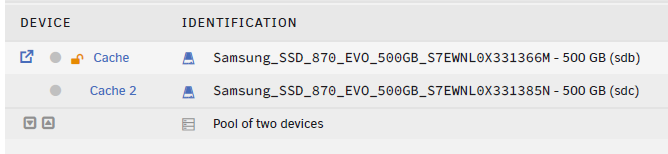
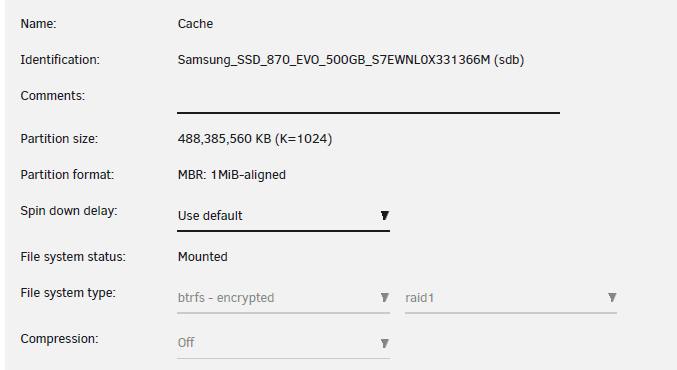
Yes, when I had setup Unraid (using v6.12.10) the pool has been encrypted: There are no "keyfile" files on /boot and there is no script to unlock the cache pool. Intention is to have a secure system and starting the array/pool is possible only for someone providing the correct key file manually. I have no recent screen shots showing encryption state, but I have digged through various backups of the cache.cfg file, stored within some flash backups and diag files: In the beginning cache.cfg contained these lines: diskUUID="d76f29d1-666f-4e9d-9347-2701cb6969c2" diskFsType="luks:btrfs" diskFsProfile="raid1" diskFsWidth="0" diskFsGroups="0" These lines stay until the upgrade to version 7.1.4. Flash backup before the upgrade still shows diskFsType="luks:btrfs", but flash backup after upgrade shows: diskFsType="btrfs" diskUUID="d76f29d1-666f-4e9d-9347-2701cb6969c2" diskAutotrim="on" diskCompression="off" diskWarning="" The order of the first 2 lines has switched and it shows diskFsType="btrfs" instead of diskFsType="luks:btrfs". However according to my notes I had to provide my key file after system booted into 7.1.4., which means the cache pool still should have been encrypted. I might not have booted the system before the upgrade to 7.2.2, but after this latest upgrade it has been the first time that for starting the array I did not had to provide the key file, even there has not been any option to provide a key file (as before). Access to the shares located on the cache pool worked all the time (and still does). Shall it mean that 7.1.4 did decrypt my cache pool in place without notification?? I have to get back to a an encrypted cache pool with no auto-mount. nas-langner24-diagnostics-20251201-1137.zip
-
Hi, today I have upgraded my Unraid system from 7.1.4 to 7.2.2. On first reboot I have been surprised that mounting the array did not ask for my key file and cache pool / array got mounted right away (only the cache is encrypted). To check whether this has been just a one-time simplification in course of the upgrade, I rebooted the system and again: no asking for passphrase or key file! I have checked for existing "keyfile" files on /boot, but there are none. I am also wondering about the status display of the cache drive. On 7.1.4 : file system type has been shown as "btrfs - encrypted" (with raid 1) -> now it's just "btrfs" (with raid 1) on the "main" page the first cache pool device was shown with an "lock/unlock" symbol -> now there is none This looks like the cache drive would not be encrypted at all. But on the other hand I can still see file content of this drive, which should indicate that encryption is still in place (otherwise I would expect to see only garbage). How can I: a) check whether the pool is still encrypted? b) disable the auto-mount of this pool in means that I have to provide the key file manually on mount? Thanks in advance! Regards Frank
-
Here is the diag archive... nas-langner24-diagnostics-20240630-1146.zip
-
Hello, I am evaluating Unraid (6.12.10) and use a system with 2 hard disks and 2 SSDs (Samsung EVO 870). For the HDDs Unraid showed their temperature right away, but not for the SSDs. Using smartctl I have checked that a temperature can be read, it's ID 190 "Airflow_Temperature_Cel". Therefor I have added "190" to the "Custom attributes" property of the SSDs and afterwards the main section as well as the dashboard showed the current temperature of the SSDs also. That means Unraid understood which kind of value this ID represents (a temperature). But the dashboard also shows me "smart errors" for the SSDs now, because Unraid thinks that the SSD temperatures are too high. That's wrong, because temperature is 23° C, thresholds are 45/55°C. I assume it's because ID 190 has to be handled differently than ID 194 ("Temperature_Celsius", reported by my HDDs). Is that bug or should I not add ID 190 to the SSD's smart attributes? But if so, how to I get a temperature reading for the SSDs? Thanks in advance!
