sse550
Members
-
Joined
-
Last visited
-
That did the trick. Everything is as expected now. eth0 is the first onboard NIC. Thank you very much.
-
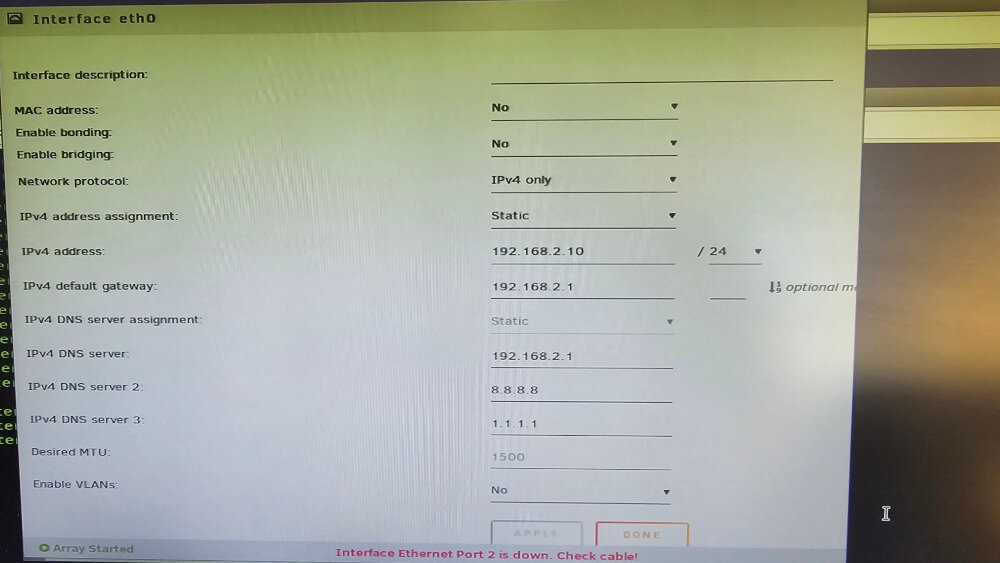
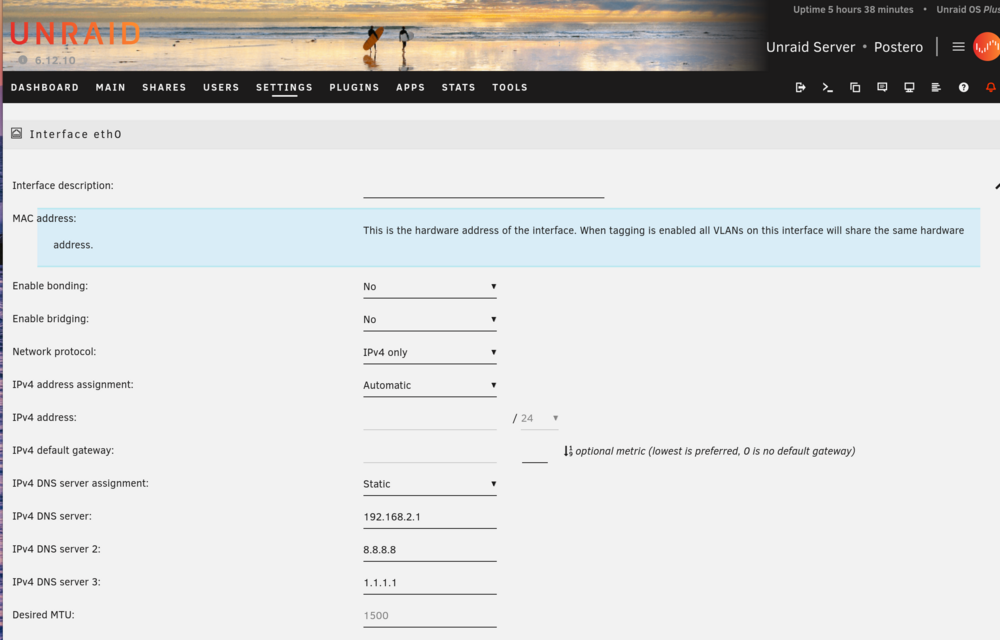
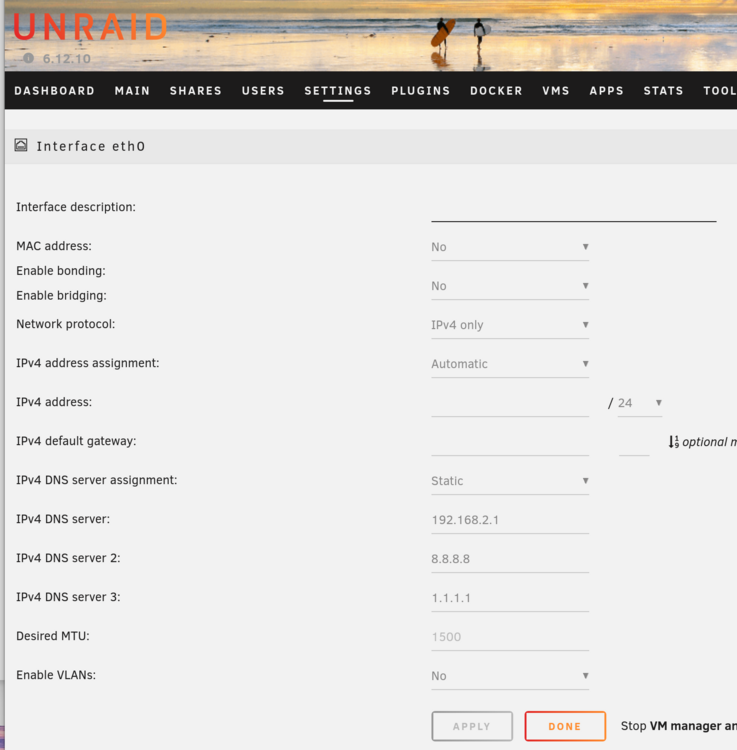
This is not possible as there is no dropdown list for eth0. When clicked mac address of eth0, the following text comes up:
-
I would love to do this change. Could you please elaborate this? There is no MAC id in eth0. network-rules.cfg: #PCI device 0x14e4:0x165f (tg3) SUBSYSTEM=="net", ACTION=="add", DRIVERS=="?*", ATTR{address}==94:18:82:16:f4:90", ATTR{dev_id}=="0x0", ATTR{type}=="1", KERNEL=="eth", NAME="eth2" #PCI device 0x14e4:0x165f (tg3) SUBSYSTEM=="net", ACTION=="add", DRIVERS=="?*", ATTR{address}==94:18:82:16:f4:91", ATTR{dev_id}=="0x0", ATTR{type}=="1", KERNEL=="eth", NAME="eth3" network.cfg (current): # Generated settings: IFNAME[0]="eth0" DHCP_KEEPRESOLV="yes" DNS_SERVER1="192.168.2.1" DNS_SERVER2="8.8.8.8" DNS_SERVER3="1.1.1.1" DHCP6_KEEPRESOLV="no" PROTOCOL[0]="ipv4" USE_DHCP[0]="yes" USE_DHCP6[0]="yes" IFNAME[1]="eth1" PROTOCOL[1]="ipv4" IFNAME[2]="eth2" DESCRIPTION[2]="LAN" PROTOCOL[2]="ipv4" USE_DHCP[2]="no" IPADDR[2]="192.168.2.10" NETMASK[2]="255.255.255.0" GATEWAY[2]="192.168.2.1" IFNAME[3]="eth3" DESCRIPTION[3]="Unused" PROTOCOL[3]="ipv4" SYSNICS="4" I should somehow assign MAC id of eth2 to eth0. But, I don't know how? Thank you for your support.
-
But there is no MAC id in eth0 properties. There is no such a NIC. Doesn't exist in network-rules.cfg. Besides, "Fix Common Problems" complains about it. If I assign statik IP to eth0, no reply at all. It is a ghost NIC.

-
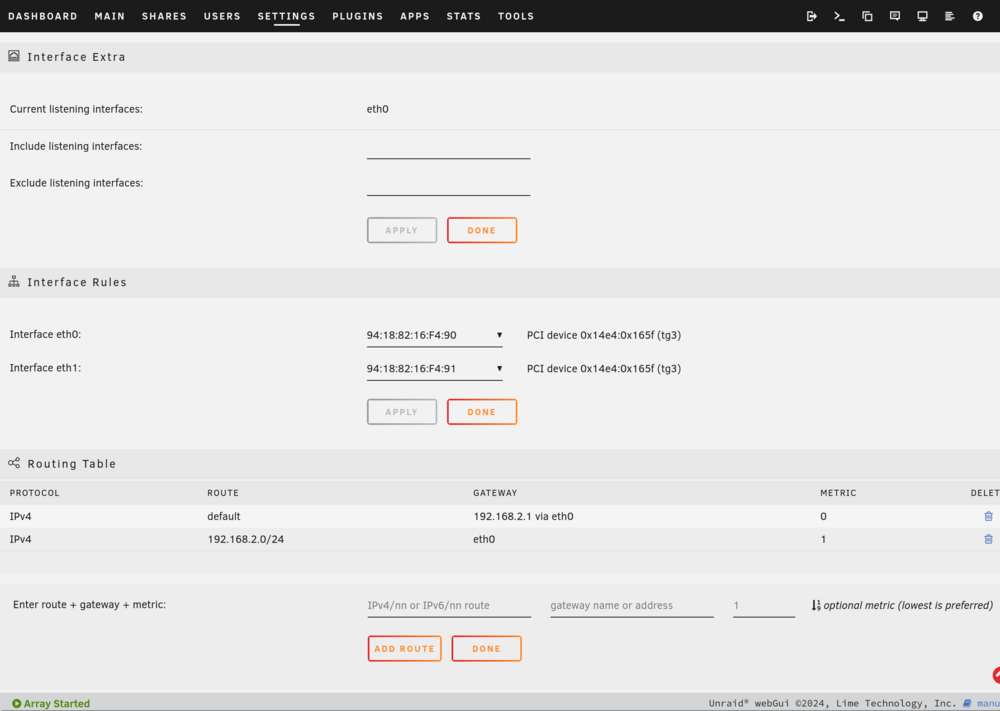
OK. I changed the network configs as per your instruction. eth0 --> No IP set, No Gateway. Just DNS IPs. (there is no such a ethernet port) eth2 --> IP set as 192.168.2.10. Gateway set as 192.168.2.1. This is connected to LAN. eth3 --> No IP set. No Gateway set. This config worked. Thank you. But just out of curiosity and learning experience: If I use eth3, shouldn't I set a Gateway here? I changed config to this: eth0 --> No IP set. As there is no such a ethernet, I cannot assign a static IP here. Therefore Gateway cannot be set as well. DNS IPs are set. eth2 --> IP set as 192.168.2.10. No Gateway set. This is connected to LAN. eth3 --> No IP set. No Gateway set. This config worked too. How could this work without Gateway? How should I define Gateway if I use eth3 as well? This is last network.cfg which is currently working fine without any Gateway definition: # Generated settings: IFNAME[0]="eth0" PROTOCOL[0]="ipv4" USE_DHCP[0]="yes" DHCP_KEEPRESOLV="yes" DNS_SERVER1="192.168.2.1" DNS_SERVER2="8.8.8.8" DNS_SERVER3="1.1.1.1" USE_DHCP6[0]="yes" DHCP6_KEEPRESOLV="no" IFNAME[1]="eth1" PROTOCOL[1]="ipv4" IFNAME[2]="eth2" DESCRIPTION[2]="LAN" PROTOCOL[2]="ipv4" USE_DHCP[2]="no" IPADDR[2]="192.168.2.10" NETMASK[2]="255.255.255.0" IFNAME[3]="eth3" DESCRIPTION[3]="Unused" PROTOCOL[3]="ipv4" SYSNICS="4" Here is the routing table. Protocol Route Gateway Metric IPv4 172.18.0.0/16 br-5de832fcff27 0 IPv4 172.19.0.0/16 br-79f2f09c175d 0 IPv4 172.31.200.0/24 br-7ac6debf9764 0 IPv4 192.168.2.0/24 eth2 1 IPv4 192.168.122.0/24 virbr0 0
-
But, eth3 is down. Is it still a problem?
-
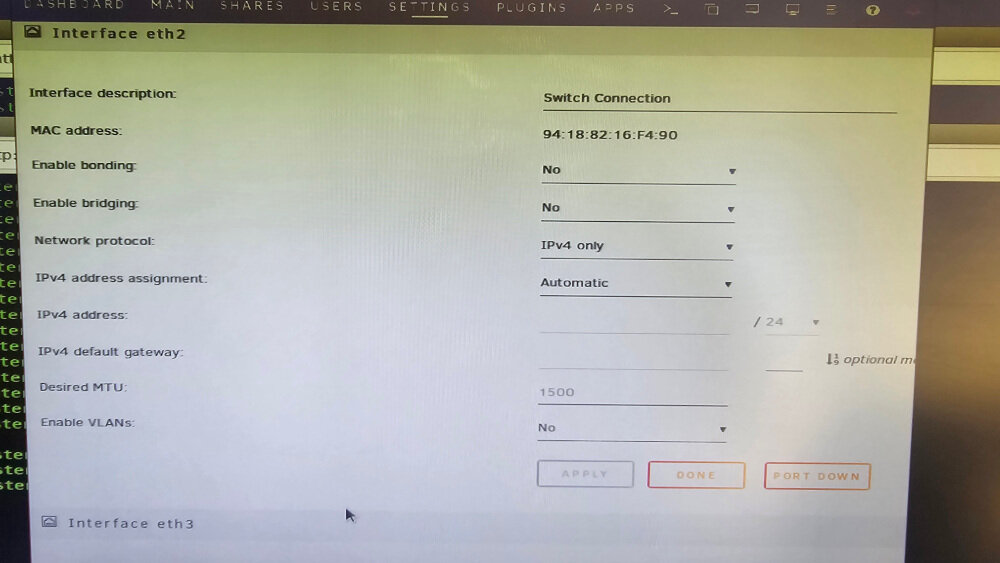
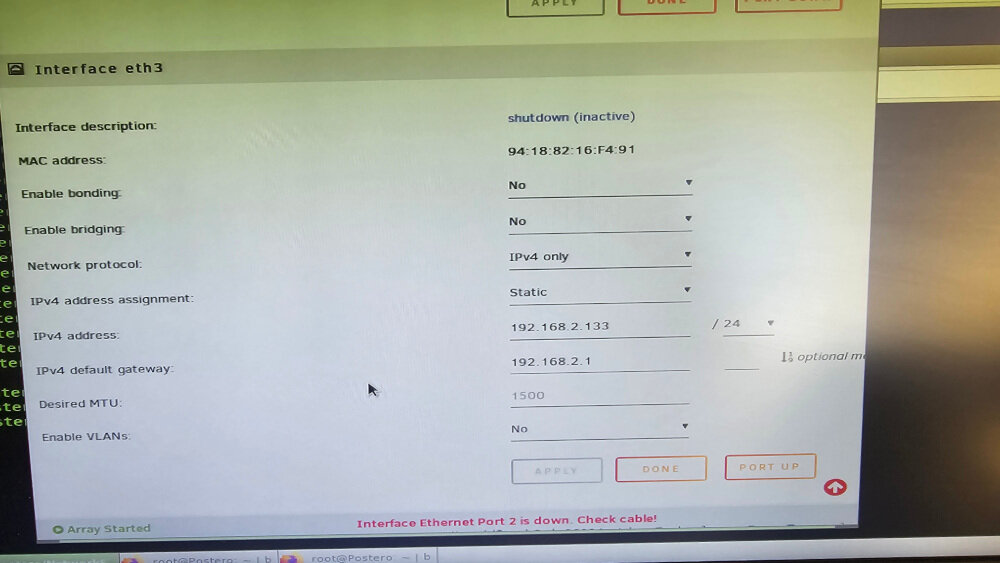
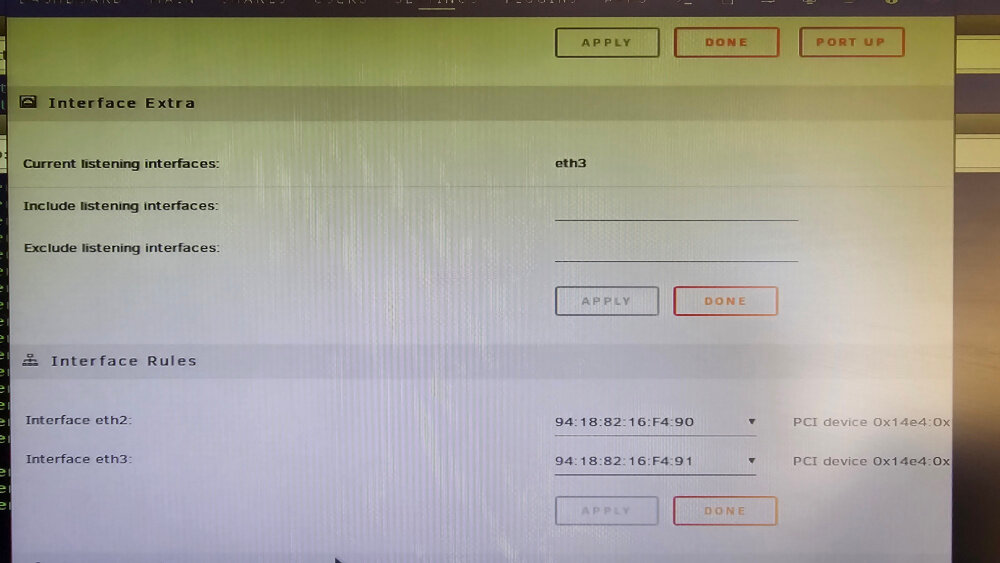
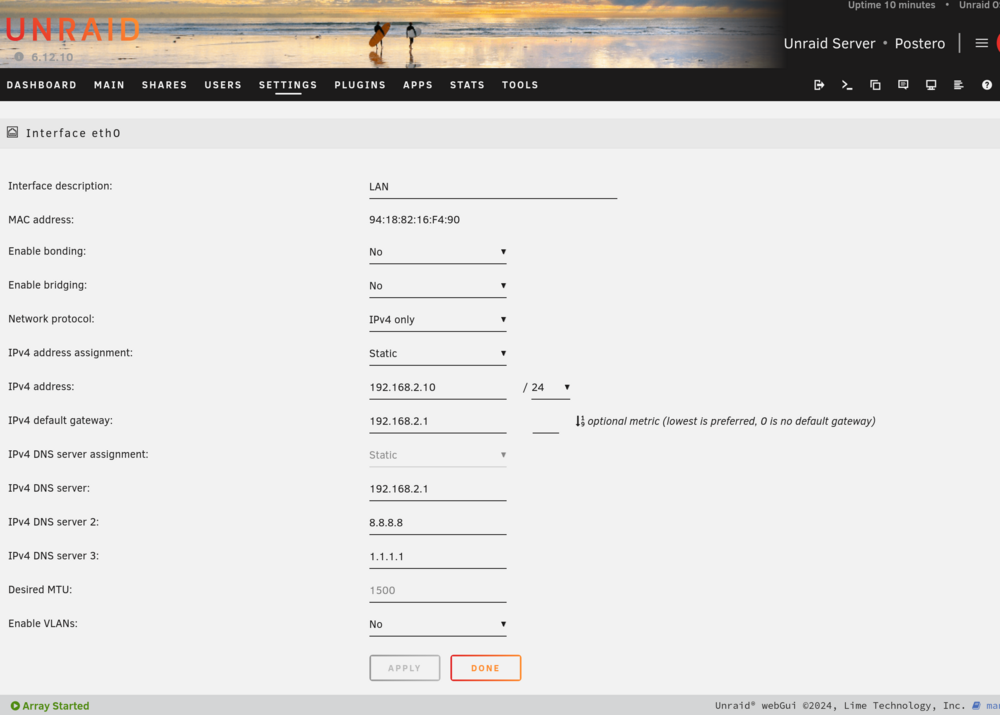
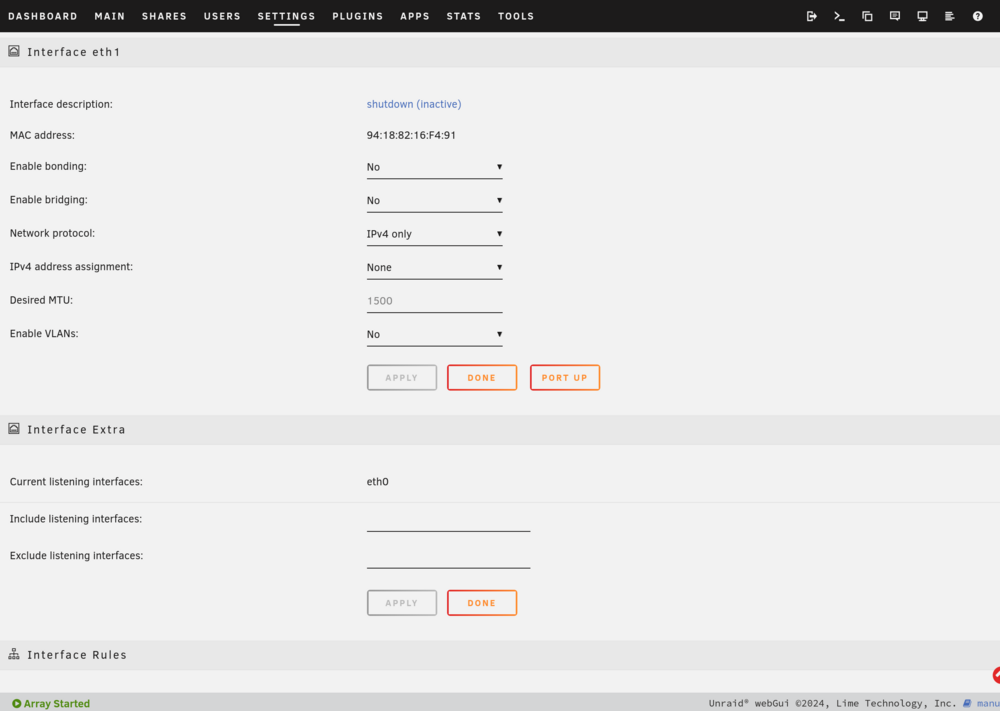
I have been using Unraid for years without any problem. Currently 6.12.10 installed. My server is HPE ML110 Gen10. There are 2 onboard Broadcom (BCM5720) ethernet ports (Plus one more ethernet lookalike port but dedicated to iLO ). Broadcom ports are: 13:00:0 Ethernet Controller: Broadcom Inc. and subsidiaries Nextreme BCM5720 Gigabit Ethernet PCIe 13:00:1 Ethernet Controller: Broadcom Inc. and subsidiaries Nextreme BCM5720 Gigabit Ethernet PCIe Also I have PCIe NIC card with 2 ethernet ports: 61.:00:0 Ethernet Controller: Intel Corporation I350 Gigabit Network Connection (rev 01) 61.:00:1 Ethernet Controller: Intel Corporation I350 Gigabit Network Connection (rev 01) So far, I used just one of the Intel ethernet ports to connect to LAN with a static IP 192.168.2.10. Never used builtin Broadcom eths. However, I decided to relocate my physical router/firewall to VM in Unraid. So, I passthrough Intel NIC card to the VM. This works fine. But, the problem is now I cannot get DNS working. Remaining Broadcom ports are in a mess. Here is network.cfg #Generated settings IFNAME[0]="eth0" DHCP_KEEPRESOLVE="yes" DNS_SERVER1=192.168.2.1 DNS_SERVER2=8.8.8.8 DNS_SERVER3=1.1.1.1 DHCP6_KEEPRESOLVE="no" PROTOCOL[0]="ipv4" USE_DHCP[0]="no" IP_ADDR[0]="192.168.2.10" NETMASK[0]=255.255.255.0 GATEWAY[0]="192.168.2.1" USE_DHCP6[0]="yes" IFNAME[1]="eth1" PROTOCOL[1]="ipv4" IFNAME[2]="eth2" DESCRIPTION[2]="Switch Connection" PROTOCOL[2]="ipv4" USE_ DHCP[2]="yes" IFNAME[3]="eth3" DESCRIPTION[3]="Empty" PROTOCOL[3]="ipv4" USE DHCP[3]="no" IPADDR[3]="192.168.2.133" NETMASK[3]="255.255.255.0" GATEWAY[3]="192.168.2.1" SYSNICS="4" network-rules.cfg: #PCI device 0x14e4:0x165f (tg3) SUBSYSTEM=="net", ACTION=="add", DRIVERS=="?*", ATTR{address}==94:18:82:16:f4:90", ATTR{dev_id}=="0x0", ATTR{type}=="1", KERNEL=="eth", NAME="eth2" #PCI device 0x14e4:0x165f (tg3) SUBSYSTEM=="net", ACTION=="add", DRIVERS=="?*", ATTR{address}==94:18:82:16:f4:91", ATTR{dev_id}=="0x0", ATTR{type}=="1", KERNEL=="eth", NAME="eth3" And here are the pictures from GUI: So many questions: 1. Why no MAC ID for eth0? What is eth0 if it doesn't exist in network-rules.cfg? 2. Why does driver show "?*" in network-rules.cfg? Doesn't Unraid 6.10.12 kernel include Broadcom drivers? 3. Why does "Current listening interface" is eth3 as its port is down? 4. Where is eth1? There are eth0, eth1 and eth2 in network.cfg. In GUI, eth0, eth2 and eth3. Why? 5. Is eth0 some kind of alias for Undraid to enter DNS etc variables? When I setup eth0 with static IP 192.168.2.10 (like above), I cannot reach Unraid. When I setuo eth2 with static IP 192.168.2.10, I can access Unraid. However, no DNS resolution at all. I appreciate any help. Thank you.