Skip to content
View in the app

A better way to browse. Learn more.

Unraid

A full-screen app on your home screen with push notifications, badges and more.

To install this app on iOS and iPadOS
  1. Tap the Share icon in Safari
  2. Scroll the menu and tap Add to Home Screen.
  3. Tap Add in the top-right corner.
To install this app on Android
  1. Tap the 3-dot menu (⋮) in the top-right corner of the browser.
  2. Tap Add to Home screen or Install app.
  3. Confirm by tapping Install.

n0cteserver

Members
  • Joined

  • Last visited

Everything posted by n0cteserver

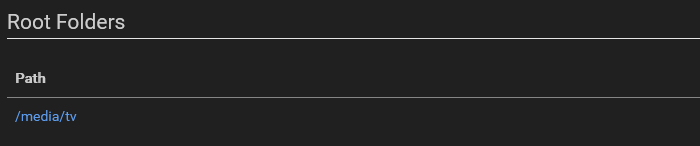
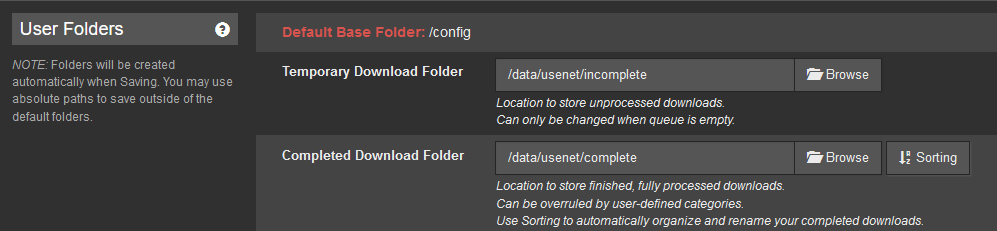
  1. Hey everyone, I'm new to unraid and loving it but I've been reading different guides until my brains started melting. I've several -arr apps, sab setup in docker and all -arr apps give me the following error. "You are using docker; download client SABnzbd places downloads in /data/usenet/complete but this directory does not appear to exist inside the container. Review your remote path mappings and container volume settings." SAB setup: -Arrs setup: I've tried my best to set it up according to Trash's guides but I'm straight up lost at this point.

Account

Navigation

Search

Search

Configure browser push notifications

Chrome (Android)
  1. Tap the lock icon next to the address bar.
  2. Tap Permissions → Notifications.
  3. Adjust your preference.
Chrome (Desktop)
  1. Click the padlock icon in the address bar.
  2. Select Site settings.
  3. Find Notifications and adjust your preference.