ShaolinAI
Members
-
Joined
-
Last visited
-
And its plugged in directly via ethernet so this means what?
-
Set to DHCP here are the diags shaolin-diagnostics-20240722-1751.zip
-
So booted with the 7.0.0 beta and I am able to boot but now I am having LAN issues. It boots without IP, was able to boot with a static IP but unable to reach anything. I assume I should start a new thread as my initial issue seems to be resolved but I am also looking into solutions. Was reading this thread:
-
Yes
-
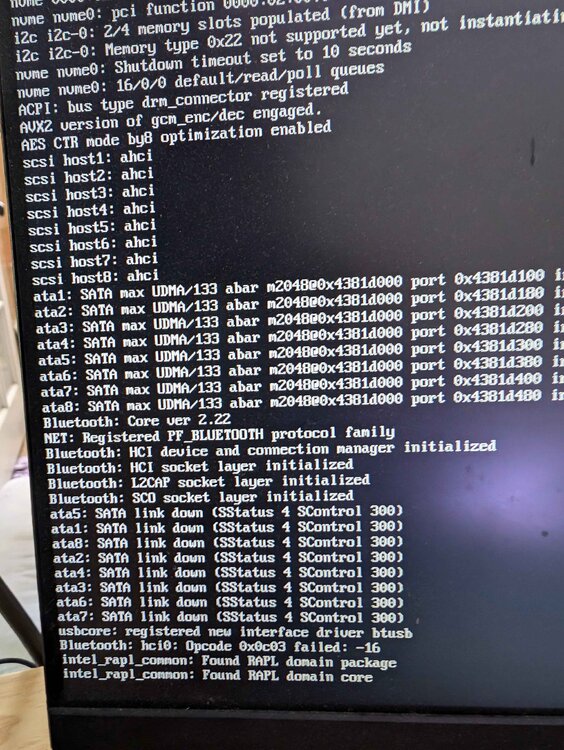
I am new to Unraid but have a long time Unraid user helping me out. I built a brand new PC (Parts list: https://pcpartpicker.com/list/DmYMsh ) purchased an unraid license and the samsung drive recommended by unraid. Initially followed each step of the quick start guide and used the Unraid boot drive set up tool. Tried to set up the BIOS according to the guide and spaceinvaderone demo video. Booted normally and I am able to see the unraid boot select screen but a few seconds into the boot it just freezes. See attached screenshot. Have since messed with the BIOS, tried manually creating a boot drive, tried some nonsense from Claude/chatGPT, and followed the steps here since this guy had a similar gigabyte mobo to me: https://www.reddit.com/r/unRAID/comments/1atjjm3/newer_intel_motherboardcpu_will_not_boot_unraid/ none of these things changed anything (Booted in regular/gui/safe mode and still get stuck on the same line.) I see the memory error above and the bluetooth error, not sure what to make of any of those. Willing to try anything. Is there something obvious I am missing? Any help would be appreciated. Tried to include as much info as possible