Martin Dallinger
Members
-
Joined
-
Last visited
Everything posted by Martin Dallinger
-
Thank you for your quick reply - mounting in ro-mode works, I now have the issue that I do not have a new cache-disk lying around for now and I could not find anything on how I could get my system back up and running - could you maybe give me a few hints/commands on how one would push the recovered cache disk-data to the array?, I am worried about overwriting something I should not...
-
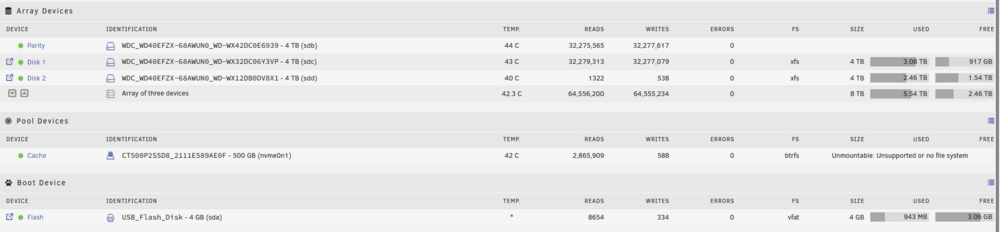
Hello everyone, I would be really greatful if anyone has some advice for me here - I already checked quite many forum posts and the docs but could not fix things - the issue: - My only cache disk shows "Unmountable: Unsupported or no file system" (no additional warnings on the Main Page) - I do have 3 additional Disks (see screenshot), which are non-problematic: - It runs btrfs (on /dev/nvme0n1p1) - The following commands did not help: root@RyzenServer:~# btrfs rescue zero-log /dev/nvme0n1p1 Clearing log on /dev/nvme0n1p1, previous log_root 45887504384, level 0 ERROR: failed to write super block for devid 1: flush error: No data available ERROR: failed to write dev supers: No data available WARNING: fsync on device 1 failed: No data available and root@RyzenServer:~# btrfs rescue super-recover /dev/nvme0n1p1 All supers are valid, no need to recover Furthermore, I am now starting to try to restore everything: sudo btrfs restore -iv /dev/nvme0n1p1 /mnt/disk1/Backup-Data/cache_disk Funnily enough, the btrfs check does not output any problems: root@RyzenServer:~# btrfs check /dev/nvme0n1p1 Opening filesystem to check... Checking filesystem on /dev/nvme0n1p1 UUID: 756f823b-c701-4391-9d73-27122e342f7c [1/7] checking root items [2/7] checking extents [3/7] checking free space tree [4/7] checking fs roots [5/7] checking only csums items (without verifying data) [6/7] checking root refs [7/7] checking quota groups skipped (not enabled on this FS) found 391609741312 bytes used, no error found total csum bytes: 160518816 total tree bytes: 885686272 total fs tree bytes: 302432256 total extent tree bytes: 337625088 btree space waste bytes: 205524097 file data blocks allocated: 3900642582528 referenced 348404584448 If the cache-disk is hardware-faulty, is there a simple way to restore? Please help, I really have to get my docker containers and VMs back, you would definitely make my day... ryzenserver-diagnostics-20240726-0108.zip