





minnesotaonion
Members
-
Joined
-
Last visited
-
success. My server is booted and so far haven't seen any errors in the syslog. thank you everyone for helping get to the bottom of this.
-
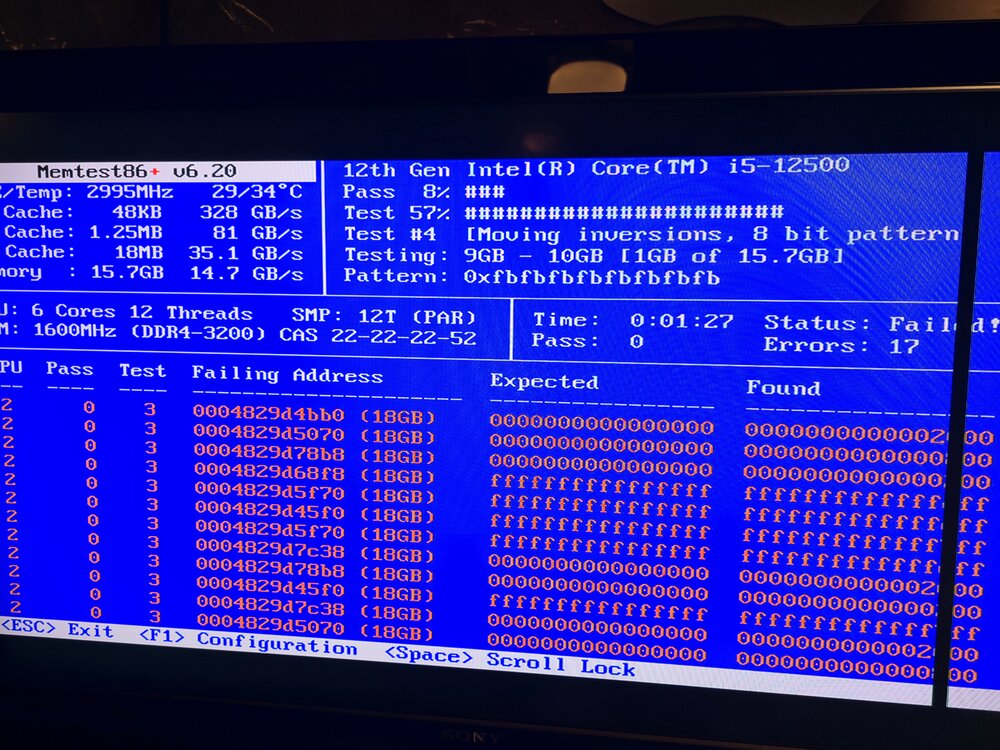
Well, one of my memory sticks is bad. 17 errors in the first minute of the memtest. Ran a few different configurations and am pretty confidently able to say that it's the stick not the slot. Now when booting with the good stick I'm getting an error when trying to boot that says umount: /: not mounted bzroot checksum error - press ENTER key to reboot... I'm fairly certain I have encountered this before and found that the solution is to basically replace the bz* files on my USB?
-
I've only ever had to run memtest once on a personal machine many years ago. I've read online that 3 passes should be enough for pretty conclusive findings, but I've also seen people recommending no less than 5 or 6 passes or to just let it run for an entire day. What is the best suggestion?
-
I'm continuing to see odd behavior in my syslog as regular tasks are running on my server, are the docker "entering disabled state" and "entering forwarding state" messages anything to be concerned about as well? syslog
-
will do. I have been fearing RAM may be the issue and have been trying to put off having to run Memtest but i'll give it a shot.
-
Ah okay. I had my local syslog folder set but for some reason it is not there. I did manage to get this from my remote syslog from the reboot though. syslog
-
yes this is from my syslog server that is running on my personal machine.
-
Here are those diagnostics. I was able to reboot -f which successfully rebooted the server and allowed me to get into the webUI. cayde-6-diagnostics-20260325-1107.zip
-
I attached my syslog from the remote syslog server I set up on my personal computer. I set up a remote syslog last night, while i was still able to access my webGUI. This morning after waking up and checking to see if i still have access to the webGUI, I can reach the page to enter my credentials, but when I click log in the page just loads indefinitely. My solution so far has just been to hard restart my server, as when I run a reboot command via ssh I'm never able to get my server to come back online, or sometimes it seems like my system just ignores the command and never reboots as I'm able to access the webGUIs of my docker containers long after running the command. syslog
