Skip to content
View in the app

A better way to browse. Learn more.

Unraid

A full-screen app on your home screen with push notifications, badges and more.

To install this app on iOS and iPadOS
  1. Tap the Share icon in Safari
  2. Scroll the menu and tap Add to Home Screen.
  3. Tap Add in the top-right corner.
To install this app on Android
  1. Tap the 3-dot menu (⋮) in the top-right corner of the browser.
  2. Tap Add to Home screen or Install app.
  3. Confirm by tapping Install.

syntax_err0r

Members
  • Joined

  • Last visited

Everything posted by syntax_err0r

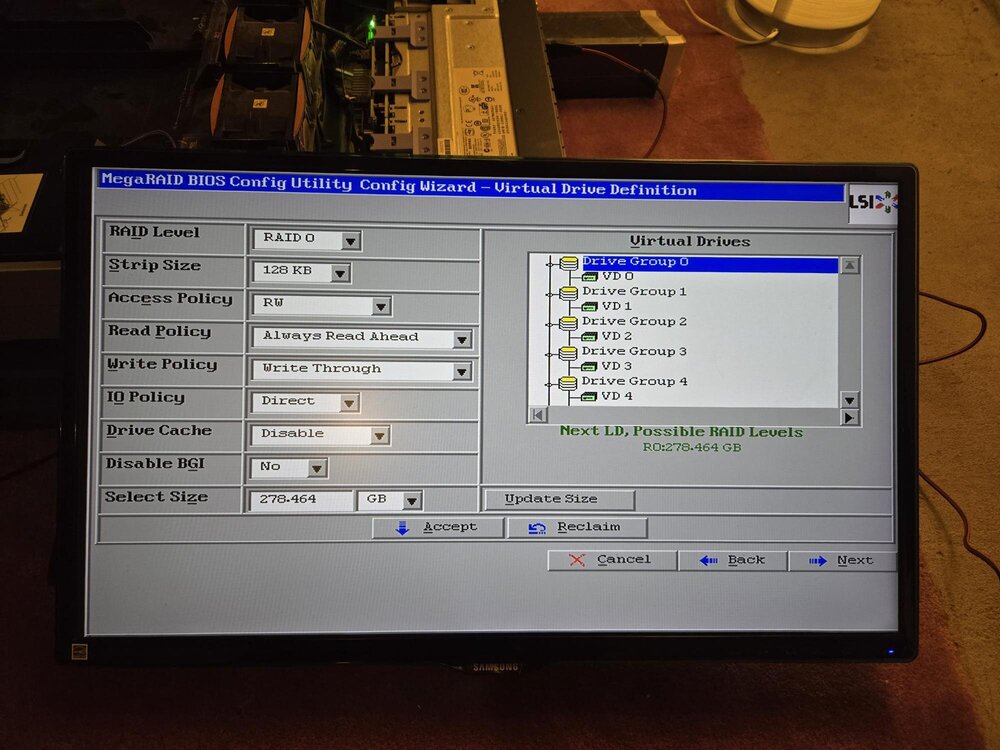
  1. Hi, New Unraid user here. I have a IBM System x3650 M4 server with a ServeRAID M5110e raid card. I configured (via webBIOS) Single-Drive RAID 0 Arrays where each drive was added to a single drive group, then each drive group was added to a single virtual drive. Afterwards I was able to see the drives in Unraid. However, when I try to create an array I can only add 1 drive. When I try to add Parity 2 for example, the UI refreshes and goes back to 'unassigned'. Any advice is appreciated! helios-diagnostics-20240731-2203.zip

Account

Navigation

Search

Search

Configure browser push notifications

Chrome (Android)
  1. Tap the lock icon next to the address bar.
  2. Tap Permissions → Notifications.
  3. Adjust your preference.
Chrome (Desktop)
  1. Click the padlock icon in the address bar.
  2. Select Site settings.
  3. Find Notifications and adjust your preference.