dasmonx
Members
-
Joined
-
Last visited
Everything posted by dasmonx
-
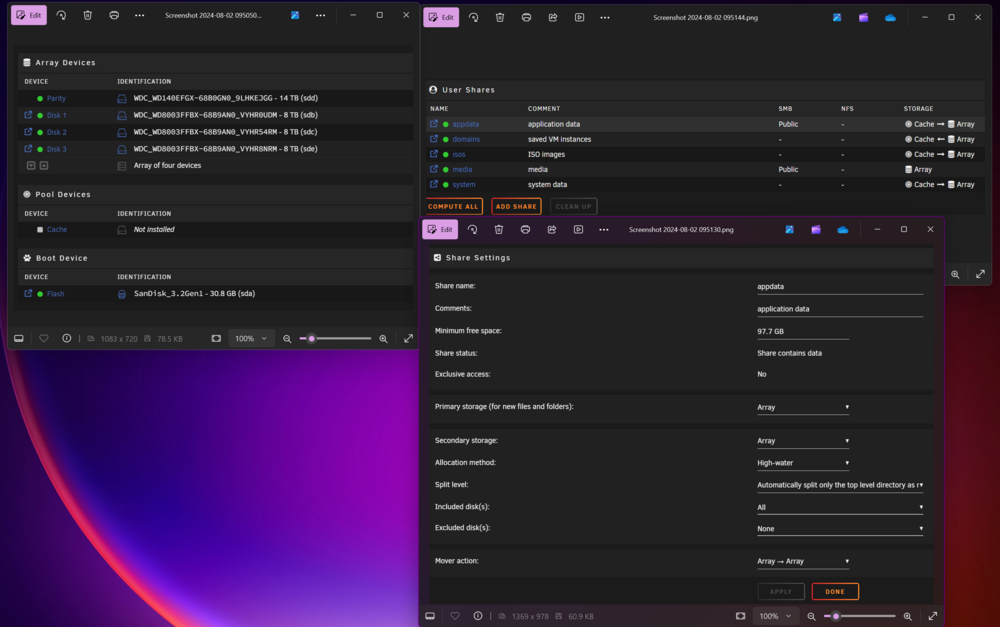
Thank you for the advice. I started the array with cash drives, marked as Array > Cache, invoked mover. This moved the appdata but not the docker (docker was stopped) Then i re-added the docker containers as appdata was available. All settings came back automatically. After that I marked the shares as cache only. All seems good
-
Hello, Just started with unraid and need help with a beginner question. I created my first array, installed dockers on it. Now that I'm ready with all of that decided to add cache drives. After just adding the pool and starting the array the Docker apps are missing. Screenshot attached with the basic setup. Once I removed the pool, everything works again. I tried youtube tutorials but the interface on shares is different I don't have the prefer etc options. I tried using search function on the forum here but I was unable to find help with my specific issue. I'm sure this has already been asked before and maybe a link or the correct search term would help me greatly. Thanks in advance.