AlexaH
Members
-
Joined
-
Last visited
-
Hello, I continued to investigate a little bit on the side. I successfully fixed the issue. But I am not sure how to prevent it. It appears some file related to the shares where not placed correctly. I moved them manually to the correct drive with Dynamix File Manager. Now the Dashboard displays the correct available free space. But I am not sure why Mover left some file behind after his work. Thus I am not sure how to prevent the issue.
-
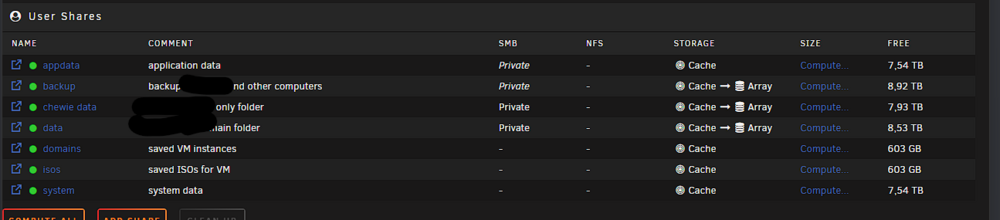
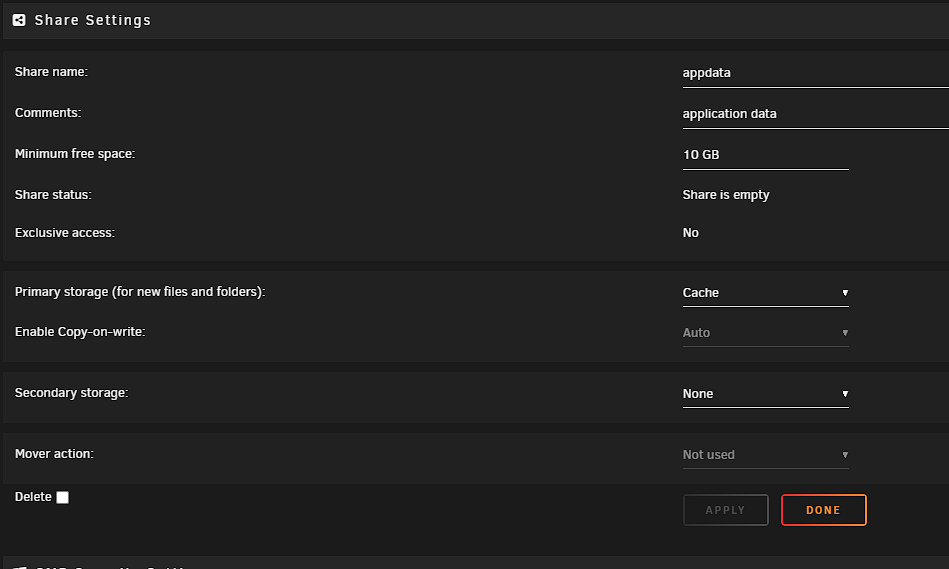
Hello, I have setup my appdata share to be exclusively stored on my cache. I have two 1 TB cache SSD in raid1. Meaning I have only 1TB of space available. Yet, Unraid displays 7.54 TB of available space for my appdata share. Moreover, it displays 603 GB available for my domains and isos shares which are configured in the same way. (603 GB seems to be the expected free space available on my cache right now.) Can you please explain why Unraid is displaying these numbers? 7.54TB of free space should be wrong. Do you see mistakes or not optimal configurations in my setup? here are some screenshots: Please note than I am quite new to unraid.