StephenGris
Members
-
Joined
-
Last visited
-
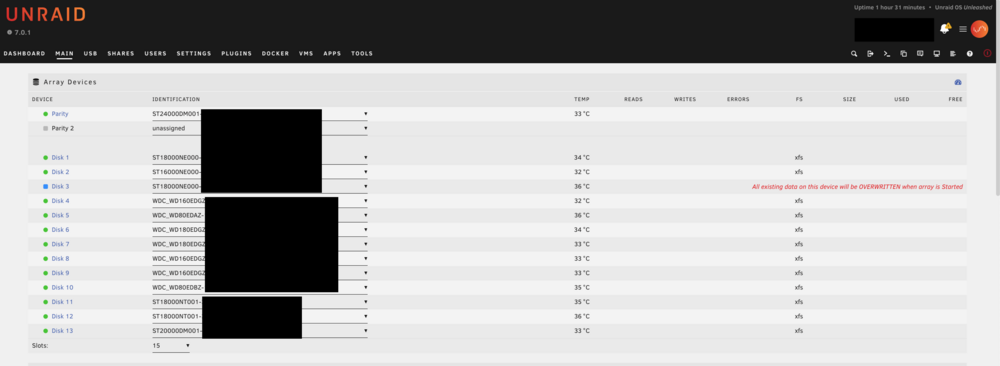
Diagnostics attached. diagnostics-20250915-1906.zip It's worth noting that, when I have another smaller unassigned drive (which is empty) connected to my system, if I select it to replace Drive 3, I do not get this warning message.
-
Hi all, I've run into an unfortunate issue - I have a drive (Drive 11) that is in the process of failing. Because I'm smart, I was trying to look at the physical drive while the system was on, and in the process, I accidentally disconnected power to another drive (Drive 3). I was able to run a SMART test on Drive 3, and it appears to be fine, but the drive reported as Missing/Disabled/Emulated. I looked into it, and found this reddit thread, and this legacy information from the Unraid guide, with instructions on how to resolve. I've followed those instructions - stopping the array, unassigning the disk, restarting the array to recognize the disk is missing, stopping the array again, and setting the same drive to the same slot. I thought that would allow the system to recognize the drive, and reinstate it, and everything would be fine, but the warning I now have in the dashboard says that starting the array will wipe the disk completely for a rebuild. Given that Drive 11 is in the process of failing, I don't know if it can handle a full rebuild - as it is, it was transferring files to other disks incredibly slowly, and my intent was to actually rebuild it's contents onto a new drive later today. Does anyone know if starting the array will in fact wipe the disk vs recognizing it as the same one that got disconnected? If so, is there anything else I can do to get this to register properly and avoid rebuilding?