




Skip to content
View in the app

A better way to browse. Learn more.

Unraid

A full-screen app on your home screen with push notifications, badges and more.

To install this app on iOS and iPadOS
  1. Tap the Share icon in Safari
  2. Scroll the menu and tap Add to Home Screen.
  3. Tap Add in the top-right corner.
To install this app on Android
  1. Tap the 3-dot menu (⋮) in the top-right corner of the browser.
  2. Tap Add to Home screen or Install app.
  3. Confirm by tapping Install.

drain

Members
  • Joined

  • Last visited

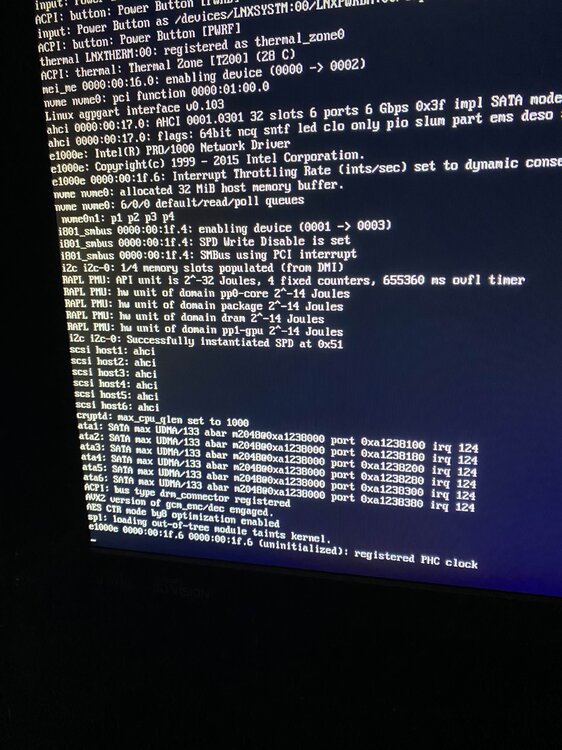
  1. i5 8400 16gb ddr4 ram booting off a cruzer glide 32gb usb 2.0 first time installation, this keeps happening to me and has happened on a fully installed system before though e100e 0000:00:1f.6 0000:00:1f.6 (uninitialized): registered PHC clock
  2. I started my install on a static IP address and the IP I used to connect was completely wrong, but other than that it was booting perfectly fine I just couldn't connect due to the IP I chose. I then changed the IP to one that would actually work and now the boot gets hung up on the position I posted below e100e 0000:00:1f.6 0000:00:1f.6 (uninitialized): registered PHC clock running an i5 8400, 8gb ddr4 ram (buying more after I test and get this all setup I know its not enough)
Account

Navigation

Search

Search

Configure browser push notifications

Chrome (Android)
  1. Tap the lock icon next to the address bar.
  2. Tap Permissions → Notifications.
  3. Adjust your preference.
Chrome (Desktop)
  1. Click the padlock icon in the address bar.
  2. Select Site settings.
  3. Find Notifications and adjust your preference.