





toddishere666
Members
-
Joined
-
Last visited
-
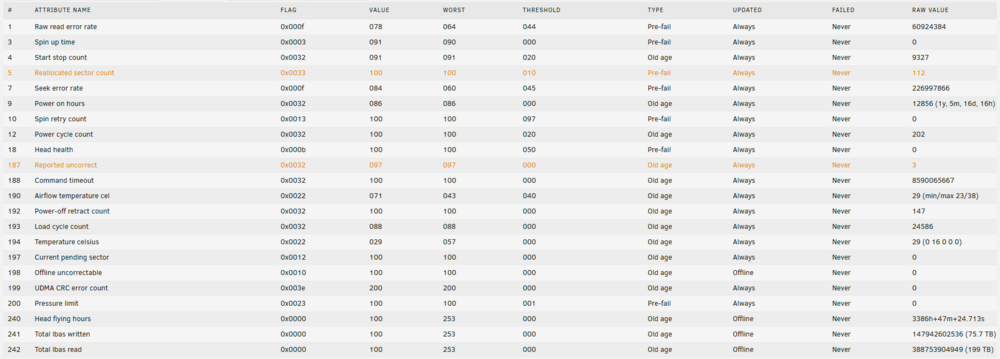
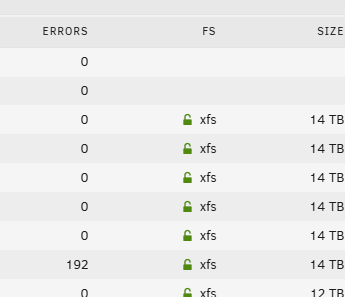
I did a dumb thing and forgot to power off my Unraid box prior to doing some work on my home's AC breaker panel. This led to unexpected disruption in power to the machine. When it came back up, it required a parity check (2-disk parity). The parity check passed, but one of the 8 non-parity disks quickly showed errors at the early portion of the check within the first hour (then no additional errors during the remaining 20+ hrs it took to finish parity check). Should I be concerned? It seems like it has to be due to the power disruption, as it was all clean before, so it's a shame that these sectors are now permanently reallocated (without specialized tools, at least). Do hard drives have a limit on how many sectors they will reallocate before total failure? Wasn't clear from online search. I am assuming these reallocations were due to power outage and not a sign of other troubles with the HDD. I do have a cold spare available, seems like it may be too soon to replace now. I also have a UPS that I got working with a different Proxmox machine to put it to sleep in event of power loss via NUT server, but have not learned how to use that machine/server to control the Unraid box and tell it to also shut down in case of power loss. Thank you in advance for any comments from you, the community members ST14000NM001G Results of long SMART test performed after the parity check: ATA Error Count: 3 CR = Command Register [HEX] FR = Features Register [HEX] SC = Sector Count Register [HEX] SN = Sector Number Register [HEX] CL = Cylinder Low Register [HEX] CH = Cylinder High Register [HEX] DH = Device/Head Register [HEX] DC = Device Command Register [HEX] ER = Error register [HEX] ST = Status register [HEX] Powered_Up_Time is measured from power on, and printed as DDd+hh:mm:SS.sss where DD=days, hh=hours, mm=minutes, SS=sec, and sss=millisec. It "wraps" after 49.710 days. Error 3 occurred at disk power-on lifetime: 12804 hours (533 days + 12 hours) When the command that caused the error occurred, the device was active or idle. After command completion occurred, registers were: ER ST SC SN CL CH DH -- -- -- -- -- -- -- 40 53 00 ff ff ff 0f Error: UNC at LBA = 0x0fffffff = 268435455 Commands leading to the command that caused the error were: CR FR SC SN CL CH DH DC Powered_Up_Time Command/Feature_Name -- -- -- -- -- -- -- -- ---------------- -------------------- 60 00 00 ff ff ff 4f 00 12:03:55.666 READ FPDMA QUEUED 60 00 00 ff ff ff 4f 00 12:03:55.666 READ FPDMA QUEUED 60 00 00 ff ff ff 4f 00 12:03:55.666 READ FPDMA QUEUED 60 00 00 ff ff ff 4f 00 12:03:55.666 READ FPDMA QUEUED 60 00 00 ff ff ff 4f 00 12:03:55.666 READ FPDMA QUEUED Error 2 occurred at disk power-on lifetime: 12792 hours (533 days + 0 hours) When the command that caused the error occurred, the device was active or idle. After command completion occurred, registers were: ER ST SC SN CL CH DH -- -- -- -- -- -- -- 40 53 00 ff ff ff 0f Error: UNC at LBA = 0x0fffffff = 268435455 Commands leading to the command that caused the error were: CR FR SC SN CL CH DH DC Powered_Up_Time Command/Feature_Name -- -- -- -- -- -- -- -- ---------------- -------------------- 60 00 00 ff ff ff 4f 00 00:03:04.460 READ FPDMA QUEUED 61 00 00 ff ff ff 4f 00 00:03:04.460 WRITE FPDMA QUEUED 47 00 01 30 03 00 a0 00 00:03:04.439 READ LOG DMA EXT 47 00 01 30 00 00 a0 00 00:03:04.439 READ LOG DMA EXT 47 00 01 00 00 00 a0 00 00:03:04.438 READ LOG DMA EXT Error 1 occurred at disk power-on lifetime: 12792 hours (533 days + 0 hours) When the command that caused the error occurred, the device was active or idle. After command completion occurred, registers were: ER ST SC SN CL CH DH -- -- -- -- -- -- -- 40 53 00 ff ff ff 0f Error: UNC at LBA = 0x0fffffff = 268435455 Commands leading to the command that caused the error were: CR FR SC SN CL CH DH DC Powered_Up_Time Command/Feature_Name -- -- -- -- -- -- -- -- ---------------- -------------------- 60 00 00 ff ff ff 4f 00 00:03:01.389 READ FPDMA QUEUED 60 00 00 ff ff ff 4f 00 00:03:01.381 READ FPDMA QUEUED 60 00 00 ff ff ff 4f 00 00:03:01.380 READ FPDMA QUEUED 60 00 00 ff ff ff 4f 00 00:03:01.379 READ FPDMA QUEUED 60 00 08 ff ff ff 4f 00 00:03:01.374 READ FPDMA QUEUED
-
Perfect, thank you for informing me of the backup plugins. I know I asked some newbie questions in this thread, I am a novice user at this time and appreciate everyone's help! It's awesome how many features there are in Unraid and how all these various scenarios and options have been thought of and exist for me to discover. Community support here and via apps helps a lot!
-
Thank you for the additional suggestions, everyone. Yes, I found the balance option earlier and used that to convert to raid1. Also played around with mover to relocate the data onto Array. BTW aside from speed (using HDD in array vs NVME for Cache), are there any other downsides to storing appdata, domains, system (docker, VM, other?) on the Array rather than Cache? Since array is behind dual parity, that should provide safety in case of failure, allowing for Cache to be raid0 with almost no dangers? I am getting some new NVME from BF sales and will be upgrading this cache soon anyway. @JorgeB about your comment, you said since both are same capacity, may as well use raid0 (striping, no redundancy) with same risk. I don't think that's true if appdata, domains, system shares are stored there (on one of two drives in striped config), right? Or are you suggesting to make copies of those shares on the 2nd drive in the raid0 cache pool?
-
Nice, thank you! Both replies are correct here, thanks guys!

-
That's a good hypothesis, let me see if I can clear that out and re-create, maybe there were options (been a while since I created this system) to do either mirroring or striping config (I want striping, not mirroring). THank you for the suggestion.
-
Could someone please explain why the 2nd NVME drive here shows blank for Used/Free space? Both appear to be in used based on read/write activity. Thank you.

-
Happy Unraid newbie here. But having some issues with NIC sometimes not working. It is working now, but I would appreciate it, if someone would be kind enough to educate me on how this is possible. 7.0.0-beta.2 My B550 motherboard has a Realtek 2.5 Gb port. I added a cheapo OEM PCIe card based on Intel x540 with two 10G ports that I would like to leverage for 10G to my network switch's 10G SFP+ port, it's all hooked up and working at the moment (but is not always the case). Just a single connection, no need or plan to use the other 2 vacant ports. So I have mapped as follows: eth0 - Intel 10G port A eth1 - onboard Realtek 2.5G eth2 - Intel 10G port B (2nd port of same board as eth0) Mapped as such just to simplify it so that the default (first 10G port) is number 0, that's all. In Settings, Network, I have specified static IP addresses on the local network (in part to troubleshoot), so I made them unique such that eth0 (10G port A) is 192.168.0.198, eth1 is 192.168.0.199, and eth2 is unspecified/None. I am trying to get stable operation on the eth0 10G port, but since it has not been always stable, I also have eth1 defined in case I need to fall back and change config or troubleshoot. So right now, after a couple of modifications/tries/reboots, it is working, and Dashboard Interface section shows eth0 as 10000 Mbps and the other two as interface down. This is what I wanted. But what doesn't make sense is that when I ping the host name of the machine (from another client, Windows PC), it returns 192.168.0.199 even though that should be the disconnected eth1 port. I expected to see .198 IP after modifying the config as such. What am I missing? eth0: IPv4 address: 192.168.0.198 IPv4 default gateway: 192.168.0.1 IPv4 DNS server: 192.168.0.1 eth1: IPv4 address: 192.168.0.199 IPv4 default gateway: 192.168.0.1 (no option of DNS server for some reason, maybe because it is not the default or because it is unplugged?) Bonding/bridging are "No" across the board. ethtool confirms the correct devices (eth0 supports 10000baseT, eth1 only 2500baseT)

