





fabio.lanza
Members
-
Joined
-
Last visited
-
I did try with the GPU ID found in the NVIDIA driver settings. Is it strange that I get an error in the runtime parameter?
-
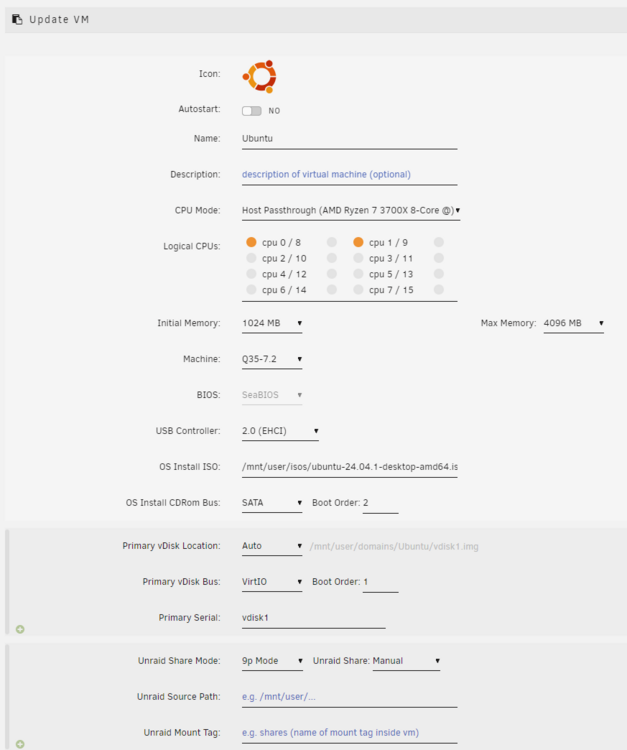
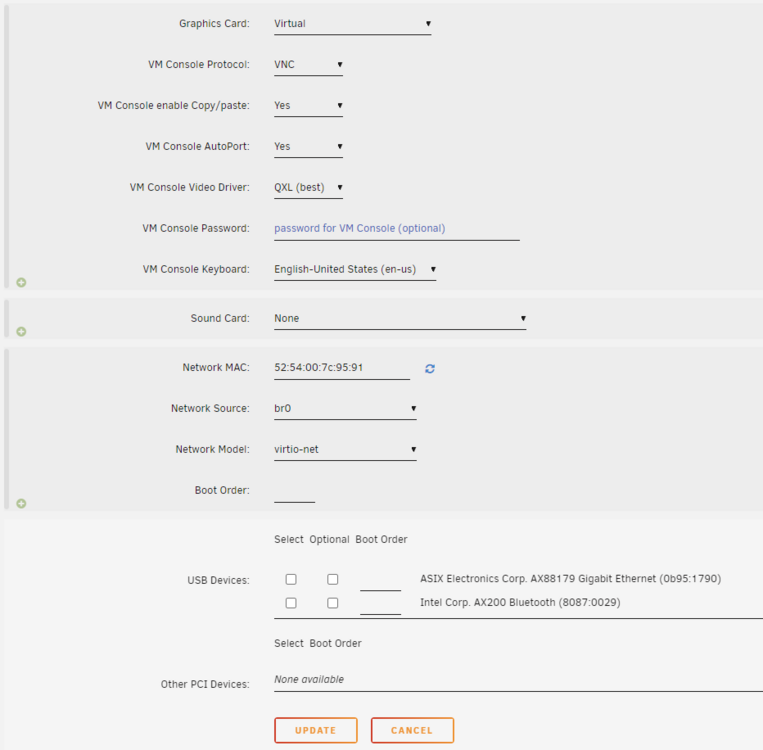
Hi everyone, I am new to UNRAID and I am trying to install an Ubuntu VM. I have defined the parameters as per the screenshots below. The VM starts and Ubuntu selection menu (try, install, etc) shows up. I select install, the install screen appears for a few seconds but then becomes black with a mouse pointer that looks like an X. Can you please advise on what the issue may be? Thank you, Fabio
-
fabio.lanza joined the community
-
Hi everyone, I installed UNRAID (coming from TrueNAS after some struggles), and I want to deploy Plex with NVIDIA GPU hardware acceleration. I followed some tutorials online, but I was not able to make it work. Can you please advise? I have 32GB ECC RAM and NVIDIA QUADRO P400. I have installed the NVIDIA Driver and the GPU Statistics plugins, and they seem to work. I can see the GPU stats in the dashboard. Then, I also installed the official Plex application as offered in the Apps section. I have configured the Plex template to the following: Extra Parameters: --runtime=nvidia Additional Container Variable NVIDIA_VISIBLE_DEVICES: all /transcode -> /dev/shm When I apply the template, I get the error "unknown or invalid runtime name: nvidia.": docker run -d --name='Plex-Media-Server' --net='host' --pids-limit 2048 -e TZ="America/Los_Angeles" -e HOST_OS="Unraid" -e HOST_HOSTNAME="NAS" -e HOST_CONTAINERNAME="Plex-Media-Server" -e 'PLEX_CLAIM'='claim-XXXXXXXXXXX' -e 'PLEX_UID'='99' -e 'PLEX_GID'='100' -e 'VERSION'='latest' -e 'NVIDIA_VISIBLE_DEVICES'='all' -l net.unraid.docker.managed=dockerman -l net.unraid.docker.webui='http://[IP]:[PORT:32400]/web' -l net.unraid.docker.icon='https://raw.githubusercontent.com/plexinc/pms-docker/master/img/plex-server.png' -v '/dev/shm':'/transcode':'rw' -v '/mnt/user/STORAGE/':'/data':'ro' -v '/mnt/user/appdata/Plex-Media-Server':'/config':'rw' --runtime=nvidia 'plexinc/pms-docker' docker: Error response from daemon: unknown or invalid runtime name: nvidia. See 'docker run --help'. The command failed. I appreciate any support and help. Thanks, Fabio


