rschweit
Members
-
Joined
-
Last visited
Everything posted by rschweit
-
I found out what the issue was--I turned off the "Enhanced macOS interoperability" setting in the SMB settings, and it seems to be copying over all files without issues. -Ryan
-
Yes, but my question is (and as I mentioned at the end of my initial post, I probably should have been more specific), how do I go about the fine details of changing those settings in regard to " smbd max xattr size" to correct this issue-- I need some details, such as what size in bytes do I need to set that to, so I can fix the problem without borking up my Unraid server's configuration or making things worse. And if those smbd settings are automatically saved for that command/parameter after it's changed, or if they need to be edited in some .rc or other configuration file to make then "stick" upon reboot, so as to be loaded as default. -Ryan
-
Has anyone here able to find out what is causing this issue with my Unraid setup?
-
Sure thing, here it is. BTW, I'm using Unraid version 6.12.13 (the latest). mediasmart-diagnostics-20240926-2157.zip
-
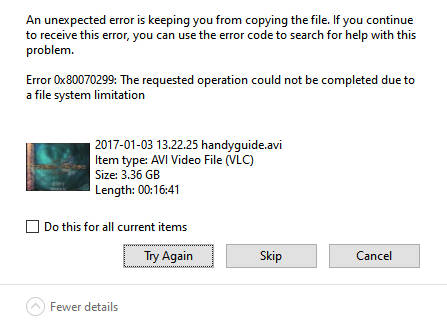
Hello, I'm having some trouble trying to copy large files over to my UnRaid NAS (using an old 2007-vintage HP MediaSmart EX475 with four 2 TB drives). I have a few video files that range in size from 3.36 to 15 GB, and every time I try to copy them to a shared folder on my Unraid NAS, I keep getting this error under Win10 immediately after the file is finished copying: I would get this same Windows error with a few other larger files that I'd try to copy as well. So, I decided to take a look at the System Log, and I noticed these errors: Sep 26 15:33:14 MediaSmart smbd[21723]: [2024/09/26 15:33:14.470429, 0] ../../source3/modules/vfs_streams_xattr.c:944(streams_xattr_pwrite) Sep 26 15:33:14 MediaSmart smbd[21723]: streams_xattr_pwrite: Write to xattr [user.DosStream.TOC.WMV:$DATA] on file [Drive D backup/My Documents/RyanSchweitzer/Misc/Handycam guide/2017-01-03 13.22.25 handyguide.avi] exceeds maximum supported extended attribute size. Depending on filesystem type and operating system (OS) specifics, this value may be increased using the value of the parameter: smbd max xattr size = <bytes>. Consult OS and filesystem manpages prior to increasing this limit. Sep 26 15:33:14 MediaSmart smbd[21723]: [2024/09/26 15:33:14.473029, 0] ../../source3/modules/vfs_streams_xattr.c:944(streams_xattr_pwrite) Sep 26 15:33:14 MediaSmart smbd[21723]: streams_xattr_pwrite: Write to xattr [user.DosStream.TOC.WMV:$DATA] on file [Drive D backup/My Documents/RyanSchweitzer/Misc/Handycam guide/2017-01-03 13.22.25 handyguide.avi] exceeds maximum supported extended attribute size. Depending on filesystem type and operating system (OS) specifics, this value may be increased using the value of the parameter: smbd max xattr size = <bytes>. Consult OS and filesystem manpages prior to increasing this limit. How would I go about adjusting said parameter for smbd (and what parameters should I use) so I can be able to copy over my large files? I'm currently using xfs as the file system for the array. Thanks, Ryan