





spiralout154
Members
-
Joined
-
Last visited
Everything posted by spiralout154
-
Well I guess it was that simple. Rebooting seemed to fix everything.
-
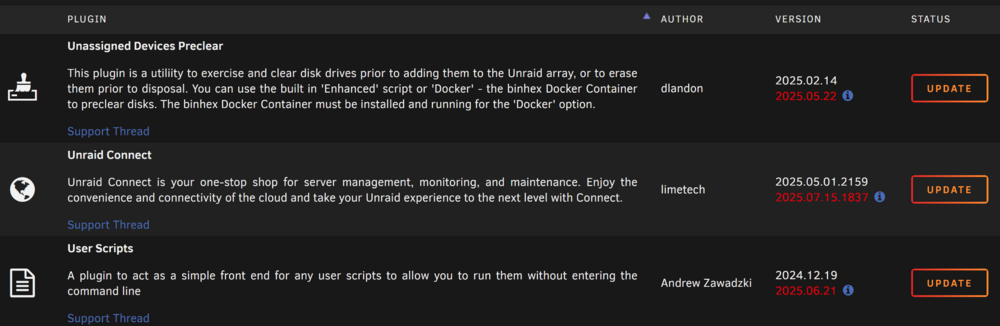
Yes it is just those ones. All others are up to date and I just tried installing a new one with no issue. Another weird issue I noticed, not sure if related, but the notification icon at the top doesn't work anymore. I know it worked a few days ago. Perhaps I need to reboot?
-
Adding diagnostics file alexandria-diagnostics-20250715-2242.zip
-
I have 3 plugins that say they have an update but are not able to install the update. Unassigned Devices Preclear plugin: updating: unassigned.devices.preclear.plg Executing hook script: pre_plugin_checks plugin: run failed: 'upgradepkg --install-new --reinstall' returned 127 Executing hook script: post_plugin_checks Unraid Connect plugin: updating: dynamix.unraid.net.plg Executing hook script: pre_plugin_checks Checking disk space on /usr... ok. (15226MB free) Running on supported version 6.12.10 Backing up original files... Backup complete. Patching header logo if necessary... Installing package... Cleaning up existing node_modules directory... Package installation failed plugin: run failed: '/bin/bash' returned 1 Executing hook script: post_plugin_checksUser Scripts plugin: updating: user.scripts.plg Executing hook script: pre_plugin_checks plugin: run failed: 'upgradepkg --install-new' returned 127 Executing hook script: post_plugin_checks
-
Thanks for the assistance! Disk was able to rebuild and everything looks good. Going to restart the parity check now.
-
New diags after starting array alexandria-diagnostics-20250411-2105.zip
-
Here are the diagnostics after rechecking connections and rebooting. Do things look okay to start the array? Would doing a short smart test on each drive be any benefit to test the connections are all working properly? alexandria-diagnostics-20250411-2044.zip
-
I have swapped out the power supply as I believe that might have been causing similar issues in the past. I will be rechecking all cable connections tonight after work and restarting the system. Is there a recommendation for checking that all drives are communicating properly before starting the array? I'd imagine the best approach would be some type of read test on each drive to check that the cables are all good. I've only ever done Preclear on new disks but I don't want to erase any existing data on these obviously.
-
Well I guess that's better news than a failing drive. I'm a bit surprised since I haven't touched anything in awhile and this happened while I wasn't even home. Will this have any effect on the parity check or do I just let that continue to run and then do a rebuild once it's done?
-
My system is running it's regularly scheduled parity check (started on Sunday) and today one of my drives in the array (not a parity drive) was disabled due to a write error. The parity check is still running fine but I've never had this happen in the middle of a check and was wondering what the next steps are. Do I just let the check continue for the next few days? There was 1 sync error detected within the first few minutes of the parity check and I believe that is the first time that has happened as well. Will this sync error be affected by the disabled drive? Attached are the diagnostics. alexandria-diagnostics-20250408-1636.zip
-
Rebuild has been going for about a day without errors so I am guessing the new cable fixed it. Guess I need to be wary of amazon cables.
-
I won't be able to swap cables until later today. If I swap them with another disk and the cables are bad, won't that cause the other disk to enter an error state and then I will be down two discs that need to rebuilt? I imagine you're suggesting to swap them so that we know it's a cable that already works rather than a new untested cable. I do have double parity but it makes me nervous not having any backups left if I have to rebuild two drives. I'm currently using a SAS breakout cable and I tried one of the extra SATA connections that wasn't being used and had the same issue. I will try a brand new SATA cable when I am home. I may be able to steal a power cable from my fans for testing too. If all that fails I will try swapping with an existing drive. I didn't think it would be a faulty cable since I am always very careful when I open my case, but the extended SMART passed without error so not sure what else it could be.
-
I am having issues after restarting my server. Everything was working fine yesterday, but after starting up today I am having issues with one of the discs. I had the system off this morning to try and adjust something inside my PC case that was rattling. I did not unhook any cables or anything. After turning it back on and starting the array one of my discs went into an error state. I did short self test with no errors. I tried to stop the array, remove disc, restart, stop, add disc, restart, rebuild but got a write error when trying to rebuild the array. I then turned off the system to check all the cables even though I hadn't touched anything. All cable connections seem fine. Tried the process again with same results. Short self test again had no issues. Not sure what to try from here except the extended smart test. I have uploaded the log files. Please let me know what to try from here. alexandria-smart-20250202-1126.zip alexandria-smart-20250202-1105.zip alexandria-syslog-20250202-1704.zip alexandria-syslog-20250202-1727.zip
-
Just posting to confirm the solution for this issue. I believe the sata power cable I was using had too many daisy-chains and was not providing enough power to the drives that were getting errors. After doing some cable changes I was able to rebuild with no issues and then add my new drives.
-
Attaching new logs alexandria-diagnostics-20241116-2109.zip alexandria-syslog-20241117-0254.zip
-
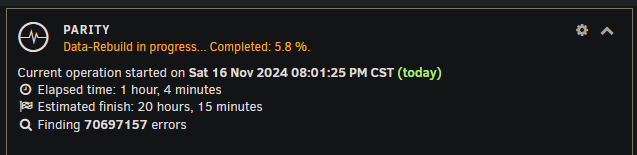
I canceled the extended self- test and have begun the data rebuild (in maintenance mode) and am getting errors. Is this an issue?

-
Looking for some advice on my issue. Bit of an unraid noob so be patient with my ignorance. I haven't messed with my system in months since first setting it up and haven't had any issues. I have been getting low on space so recently got some new drives to install. Powered down the system, installed new drives, swapped some cables around inside for better cable management, then powered back on. Once the array was running I started doing preclear for the new drives I put in. Soon after I got an error about an I/O issue on one of my old drives and unraid disabled the drive. Not being familiar with what this meant, I figured it might be a cable issue so I powered down and made sure all my cables were plugged in correctly. Turning the system back on and the disc was still disabled (being emulated). After skimming the forums a bit, it sounds like this is often a cable issue. Since my system has been working fine before this and my drives aren't that old, it would make sense if it was something unrelated to the drive. I am using a PCI board with SAS to SATA breakout cables. Before today I was using 4 drives with just one breakout cable so today I installed a 2nd breakout cable onto the board using the same brand of cable I used before. Each SAS connection is being used by multiple drives, but only one of them is having the issue. If this is a cable issue, why would only one drive be affected? Is it maybe a power issue? Here's the hardware I purchased: https://www.amazon.com/dp/B0085FT2JC?ref=ppx_yo2ov_dt_b_fed_asin_title https://www.amazon.com/dp/B012BPLYJC?ref=ppx_yo2ov_dt_b_fed_asin_title A short SMART test showed no issue with my drive and I am currently performing an extended test, I will post the results when it is done. I am attaching the diagnostic files and syslog files, although they may be missing some info since I restarted my system before reading the forums (oops). Is there anything else I should do while the extended test is running? If it shows no errors it sounds like the next step would be to rebuild the drive: https://docs.unraid.net/unraid-os/manual/storage-management/#rebuilding-a-drive-onto-itself Any help appreciated! alexandria-diagnostics-20241116-1551.zip alexandria-syslog-20241116-2151.zip


